Web Forms for Marketersモジュールのアンインストール
このページの翻訳はAIによって自動的に行われました。可能な限り正確な翻訳を心掛けていますが、原文と異なる表現や解釈が含まれる場合があります。正確で公式な情報については、必ず英語の原文をご参照ください。
マーケター向けWebフォーム モジュールは、Sitecoreからすべての関連ファイルとアイテムを削除することでアンインストールできます。必要に応じて、モジュール を再インストール することもできます。
マーケター向けWebフォーム モジュールをアンインストールするには:
-
Masterデータベースで、次の項目を削除します。
-
/sitecore/layout/Renderings/Modules/Web Forms for Marketers
-
/sitecore/Media Library/Web Forms for Marketers
-
/sitecore/System/Modules/Web Forms for Marketers
-
/sitecore/System/Marketing Center/Goals/Leave a message
-
/sitecore/System/Marketing Center/Goals/Tell a Friend
-
/sitecore/System/Settings/Rules/Web Forms for Marketers Conditions
-
/sitecore/System/Settings/Analytics/Reports/Subreports/Web Forms for Marketers Reports
-
/sitecore/System/Settings/Analytics/Reports/Subreports/Web Forms for Marketers Detailed Reports
-
/sitecore/Templates/Branches/Web Forms for Marketers
-
/sitecore/Templates/Web Forms for Marketers
-
マーケター向けWebフォーム モジュールに関連するすべてのレポート アイテムは、
 アイコンの付いた /sitecore/System/Settings/Analytics/Reports SQL Queriesフォルダーにあります。
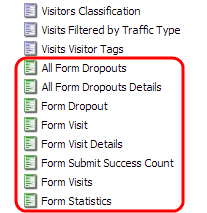
-
マーケター向けWebフォーム モジュールに関連するすべての目標項目 ( /sitecore/System/Marketing Center/Goalsフォルダーにあります)
-
-
Coreデータベースで、次の項目を削除します。
-
/sitecore/content/Applications/Content Editor/Ribbons/Chunks/Forms
-
/sitecore/content/Applications/Content Editor/Ribbons/Contextual Ribbons/Forms
-
/sitecore/content/Applications/Content Editor/Ribbons/Strips/Presentation/Forms
-
/sitecore/content/Applications/Modules/Web Forms for Marketers
-
/sitecore/content/Applications/WebEdit/Custom Experience Buttons/Edit Form
-
/sitecore/content/Documents and settings/All users/Start menu/Programs/Web Forms for Marketers
-
-
ファイル・システムで、次のファイルを削除します。
-
\App_Config\Include\Captcha.config
-
\App_Config\Include\Sitecore.forms.config
-
\bin\ MSCaptcha.dll
-
\bin\ Sitecore.Forms.Core.dll
-
\bin\ Sitecore.Forms.Custom.dll
-
\bin\ Sitecore.Forms.Mvc.dll
-
\bin\ Sitecore.WFFM.dll
-
\bin\ Sitecore.WFFM.Abstractions.dll
-
\bin\ Sitecore.WFFM.Actions.dll
-
\bin\ Sitecore.WFFM.Analytics.dll
-
\bin\ Sitecore.WFFM.Services.dll
-
\bin\ Sitecore.WFFM.Update.dll
-
\bin\ System.Data.SQLite.dll
-
\bin_x64\ System.Data.SQLite.dll
-
\Dataフォルダ内のWFFMデータベース
-
\layouts\system\VisitorIdentificationExtension.aspx
-
\sitecore\shell\Applications\Modules\Web Forms for Marketers
-
\sitecore\shell\Themes\Standard\Default\WFM
-
\sitecore\shell\Themes\Standard\Default\FormBuilder.css
-
\sitecore\shell\Themes\Standard\Default\FormDataViewer.css
-
\sitecore\shell\Themes\Standard\Default\MultiTreeView.css
-
\sitecore\shell\Themes\Standard\Default\Placeholder.css
-
\sitecore\shell\Themes\Standard\Firefox\WFM
-
\sitecore\shell\Themes\Standard\Firefox\FormBuilder.css
-
\sitecore modules\Shell\Web Forms for Marketers
-
\sitecore modules\Web\Web Forms for Marketers
-
-
Webサイトを公開して、変更を適用します。