1. 6. Open the website

Update and display talk teasers

One last thing to make the event page complete. The teasers on the page need to show talk teasers and link to associated talks.
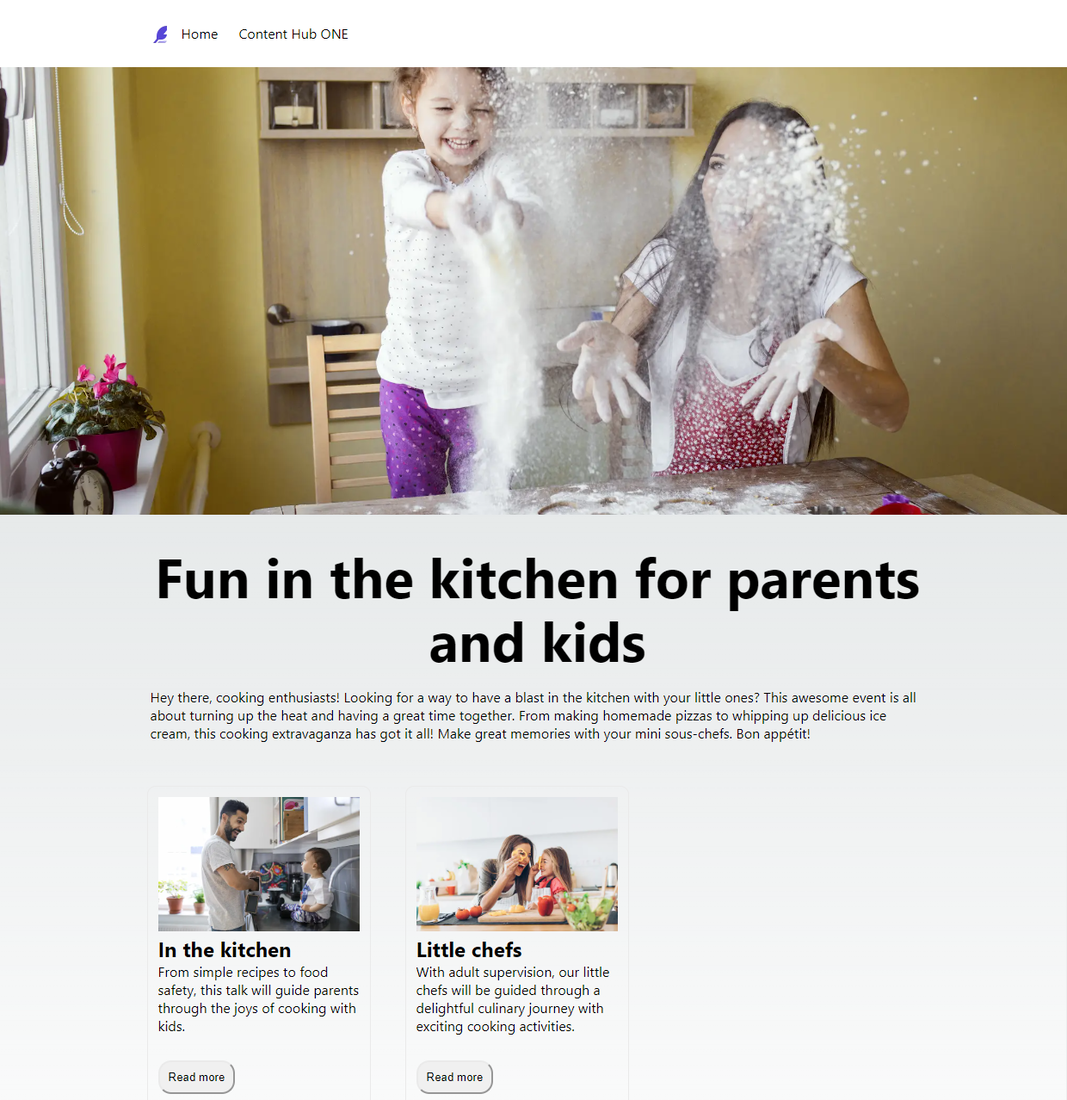
final event page

Create the talk-lib file

Create the talk-lib.ts file so you have a dedicated function to query talk data.

To create the talk-lib file:

  1. In Visual Studio Code, open the starter kit repository and go to the /lib/Events folder.

  2. Create a copy of the event-lib.ts file and name it talk-lib.ts.

  3. Open this file and modify it as shown in the following table and code sample.

    Search forChange fromChange to
    Functions that use Event in the title.EventTalk
    import Event statementimport Event, {EventResults} from "../../types/Events/event-type";(import Talk, { TalkResults } from "../../types/Events/talk-type";)
    import Event statementN/Aimport ALL_AGENDA_QUERY, {AGENDA_QUERY} from "../../graphQl/Events/agenda-query";).
    getAllTalk functionPromise Event[] Promise Talk[] .
    getAllTalk functionALL_EVENT_QUERYALL_AGENDA_QUERY to pass into the function
    getTalkById functionPromise Event Promise Talk
    getTalkById functionconst queryEventconst queryTalk
    getTalkById functionawait fetchAPI(queryEvent)await fetchAPI(queryTalk)
    getAllEventsWithIds functionPromise Event Promise Talk .
    getAllEventsWithIds functiondata:allEventdata:allTalk
    getAllTalksWithIds functionEVENT_QUERYAGENDA_QUERY
    extractPosts functiondata:Eventdata:Talk
    extractPosts functiondata:EventResultsdata:TalkResults
    extractPost functiondata:Eventdata:Talk
  4. Remove unused imports for events.

  5. Save the file. The final code looks like this.

    talk-lib.ts
    import {fetchAPI} from "../Common/api"
    import Talk, {TalkResults} from "../../types/Events/talk-type";
    import ALL_AGENDA_QUERY, {AGENDA_QUERY} from "../../graphQl/Events/agenda-query";
    
     export async function getAllTalk(preview: boolean): Promise  Talk[]  {
     const data = await fetchAPI(`${ALL_AGENDA_QUERY}`);
    
     return extractPosts(data.data);
    }
     export async function getTalkById(id: string): Promise  Talk  {
       console.log('getTalkById' + id);
       const queryTalk = `{
     data: talk(id: "${id}")
     {
     ${AGENDA_QUERY}
     }
     }`;
       const data = await fetchAPI(queryTalk);
       return data.data.data;
     }
    
     export async function getAllTalksWithIds(): Promise  Talk[]  {
       const query = `{
     data: allTalk
     {
     __typename
      total
      results {
     ${AGENDA_QUERY }
     }
     }
       }`;
       const data = await fetchAPI(query);
       return extractPosts(data.data);
     }
    
     function extractPosts({
       data
     }: {
       data: TalkResults
     }) {
       return data.results.map((post: Talk) = {
         return post;
       });
     }
    
     function extractPost({data}: {data: Talk}) {
       return data;
     }

Create the talkTeaser component file

To create the talkTeaser component file:

  1. In Visual Studio Code, open the starter kit repository, make a copy of the /components/Recipe folder and name it Events.

  2. Open the Events folder and rename the recipeTeaser-component.tsx file talkTeaser-component.tsx.

  3. Open the talkTeaser-component.tsx file and change all mentions of recipe to equivalent mentions of talk.

  4. Save the file. The final code looks like this.

    talkTeaser-component.tsx
    import stylesHp from '../../styles/Homepage/Homepage.module.css'
    import Talk, {TalkResults} from "../../types/Events/talk-type";
    import Link from 'next/link'
    import Image from 'next/image'
    
    type Props = {
      allTalks: TalkResults;
    }
    const TalkTeaserComponent = ({allTalks}:Props) = {
      const talks = allTalks.results;
    
      return(
         div
          {talks.map((talk: Talk) = (
             div key={talk.id} className={stylesHp.boxOuter}
               div className={stylesHp.box}
                 Image
                  alt=''
                  src={talk.image.results[0].fileUrl}
                  width='500'
                  height= '500'
                  className={stylesHp.boxImage}
                /
                 h2  {talk.talkTitle} /h2
                 p className={stylesHp.boxText}
                  {talk.talkDescription}
                 /p
                 p
                   button className={stylesHp.button}
                   Link href={/talk/${encodeURIComponent(talk.id)}} Read more /Link
                   /button
                 /p
               /div
             /div
          ))}
         /div
      )
    }
    
    export default TalkTeaserComponent

Create the talk details page

Create the talk details pages so the talk IDs are passed through the URL and query for data.

To create the talk details page:

  1. In Visual Studio Code, open the starter kit repository and go to the /pages folder.

  2. Create a copy of the recipes folder and name it talk.

  3. Open the /pages/talk/[slug].tsx file.

  4. Modify it as follows to create the talk detail pages, changing all instances of recipe to equivalent instances of talk.

    Search forChange fromChange to
    import Recipeimport Recipe, {RecipeResults} from "../../types/Recipe/recipe-type";import Talk, {TalkResults} from "../../types/Events/talk-type";
    import {getRecipeByIdimport {getRecipeById,getAllRecipeWithIds} from "../../lib/Recipe/recipe-lib";import {getTalkById,getAllTalksWithIds} from "../../lib/Events/talk-lib";
    getStaticProps functionconst recipeconst talk
    getStaticProps functionget recidpeByIdgetTalkById
    getStaticProps functionprops: {recipe,homepage}props: {talk,homepage}
    getStaticPaths functionconst allRecipePostconst allTalksPost
    getStaticPaths functiongetAllRecipesWithIdsgetAllTalksWithIds
    getStaticPaths functionallRecipePosts.map(({ id }) = /recipes/${id})allTalkPosts.map(({ id }) = /talk/${id})
    props definitionrecipe: Recipetalk: Talk
    Post propertyrecipetalk
    title tagsrecipe?.Titletalk?.talkTitle
    HeroBanner recipeImage (recipe?.image?.results[0].fileUrl)talkImage (talk?.image?.results[0].fileUrl)
    h1 tag h1 {recipe?.Title} /h1 h1 {talk?.talkTitle} /h1
    strong Duration: /strong {recipe?.Duration}{talk?.time}
    strong Ingredients: /strong p strong Ingredients: /strong {recipe?.Ingredients}/p Remove or comment out.
  5. Remove Output Duration and Ingredients as these are not needed.

  6. Remove the RichText Component as this is not needed because talkDescription is not rich text.

  7. Add Talk Data. The final code looks like this.

    [slug].tsx
    import Talk, {TalkResults} from "../../types/Events/talk-type";
    import {getTalkById,getAllTalksWithIds} from "../../lib/Events/talk-lib";
    import stylesHp from '../../styles/Homepage/Homepage.module.css';
    import Head from 'next/head'
    import {getHomepageById} from "../../lib/Homepage/homepage-lib";
    import { HOMEPAGE_ID } from "../../lib/Common/constants";
    import Homepage from "../../types/Homepage/homepage-type";
    import HeaderComponent from "../../components/Homepage/header-component";
    import FooterComponent from "../../components/Homepage/footer-component";
    import HeroBanner from "../../components/Homepage/hero-banner";
    import RichText from "../../components/Common/richText-component";
    
    const Renderer = require("prosemirror-to-html-js").Renderer;
    
    type Params = {
      params: {
        slug: string;
      };
     };
    
    export async function getStaticProps({ params }: Params) {
     const talk = await getTalkById(params.slug);
     const homepage = await getHomepageById(HOMEPAGE_ID);
    
    return {
      props: {talk,homepage},
      // Next.js will attempt to re-generate the page:
      // - When a request comes in
      // - At most once every 10 seconds
      revalidate: 10, //in seconds
     };
    }
    
    export async function getStaticPaths() {
     const allTalkPosts = await getAllTalksWithIds();
    
     return {
      paths: allTalkPosts.map(({ id }) = `/talk/${id}`) ?? [],
      fallback: true,
     };
    }
    type Props = {
     talk: Talk;
     homepage: Homepage;
    };
    
    const Post = ({talk,homepage}: Props) = {
      return (
        div className={stylesHp.container}
           Head
             title {talk?.talkTitle} /title
             meta name="description" content="Generated by create next app" /
             link rel="icon" href="/favicon.ico" /
           /Head
     main className={stylesHp.main}
       HeaderComponent
        allHeaders={homepage.header}
      /
       HeroBanner
        heroImageUrl={talk.image.results[0].fileUrl}
        altText=''
       /
    
       div className={stylesHp.boxedContainer}
          h1 {talk?.talkTitle} /h1
          p strong Duration: /strong {talk?.time} min. br/ /p {/*
          p strong Ingredients: /strong {talk?.Ingredients} /p */}
    
         {/* RichText richText={talk?.preparationDescriptionRt} / */}
       /div
    
       FooterComponent
         allFooters={homepage.footer}
       /
      /main
      /div
     )
    };
    export default Post;

Update the event.tsx file

To update the event.tsx file:

  1. In Visual Studio Code, open the starter kit repository and go to the /pages folder.

  2. Open the event.tsx file.

  3. Add the line import TalkTeaserComponent from '../components/Talk/talkTeaser-component'; after the import FooterComponent statement.

  4. Add the following lines before the FooterComponent.

    
    TalkTeaserComponent
          allTalks={event.agenda}
         /
    
  5. Save the file.

  6. If the website is not still running locally, run npm run dev.

  7. Navigate to http://localhost:3000/event to open the event page and see your changes.

The final code should look like this.

event.tsx
import Head from 'next/head'
import HeaderComponent from '../components/Homepage/header-component'
import stylesHp from '../styles/Homepage/Homepage.module.css';
import {getAllHomepage, getHomepageById} from "../lib/Homepage/homepage-lib";
import Homepage from "../types/Homepage/homepage-type";
import FooterComponent from '../components/Homepage/footer-component';
import TalkTeaserComponent from '../components/Talk/talkTeaser-component';
import Image from 'next/image';
import HeroBanner from '../components/Homepage/hero-banner';
import { HOMEPAGE_ID } from '../lib/Common/constants';
import { getEventById } from '../lib/Events/events-lib';
import Event from '../types/Events/events-type';
import RichText from '../components/Common/richText-component';

export async function getStaticProps({ preview = false}){
 const allHomepage = await getAllHomepage(preview);
 const homepage = await getHomepageById(HOMEPAGE_ID);
 const event = await getEventById(' YOUR_EVENT_ID ');
 return{
   props: {allHomepage, homepage, preview},
   // Next.js will attempt to re-generate the page:
   // - When a request comes in
   // - At most once every 10 seconds
   revalidate: 10, //in seconds
  }
}
type Props = {
 allHomepage: Homepage[];
 homepage: Homepage;
 event: Event;
}
const Homepage = ({allHomepage, homepage}: Props) = {
 //const homepage = allHomepage[0];

  return (
   div className={stylesHp.container}
     Head
      title Event /title
      meta name="description" content="Generated by create next app" /
      link rel="icon" href="/favicon.ico" /
     /Head

     main className={stylesHp.main}
      HeaderComponent
      allHeaders={homepage.header}
      /
      HeroBanner
       heroImageUrl={event.eventImage?.results[0]?.fileUrl}
       altText=''
      /

   div className={stylesHp.boxedContainer}
     h1 className={stylesHp.title}
      {event.eventName}
     /h1
     RichText
      richText={event.eventDescription}
     /
     TalkTeaserComponent allTalks={event.agenda}/
    /div

   FooterComponent
    allFooters={homepage.footer}
   /

   /main

  /div
 )
}

export default Homepage;

Your first foray into Content Hub ONE development is complete! You're now ready to continue your developer journey to build and deliver great applications.

If you have suggestions for improving this article, let us know!