External Data Feed
The External Data Feed is a Sitecore Content Hub capability that publishes Content Hub entity lifecycle events (create, update, delete) to an external Kafka topic. Instead of manual exports or batch jobs, an external data feed streams structured JSON messages that downstream systems can consume and process data in real time.
With an external data feed, you can stream Content Hub entity events to external data platforms, so that all your reporting data can be consolidated in a single platform.
Use cases include:
- Real-time analytics - feed entity changes into BI dashboards for real-time insights.
- Content lifecycle monitoring - aggregate events across systems such as PIM, DAM, and ecommerce platforms for a complete picture of how content flows across systems without manual data stitching.
- Data lake integration - make selected Content Hub data available for analytical and predictive models.
Although External Data Feed lets you easily extract event data, it does not replace auditing and reporting logs. Audit and reporting logs remain the source of truth.
Content Hub information architects and those in technical roles can find more detailed information about using external data feeds to report asset events to Power BI in the Accelerate Cookbook for Content Hub, a collection of recipes that provides information to help you successfully set up, configure, and implement Content Hub.
Architectural overview
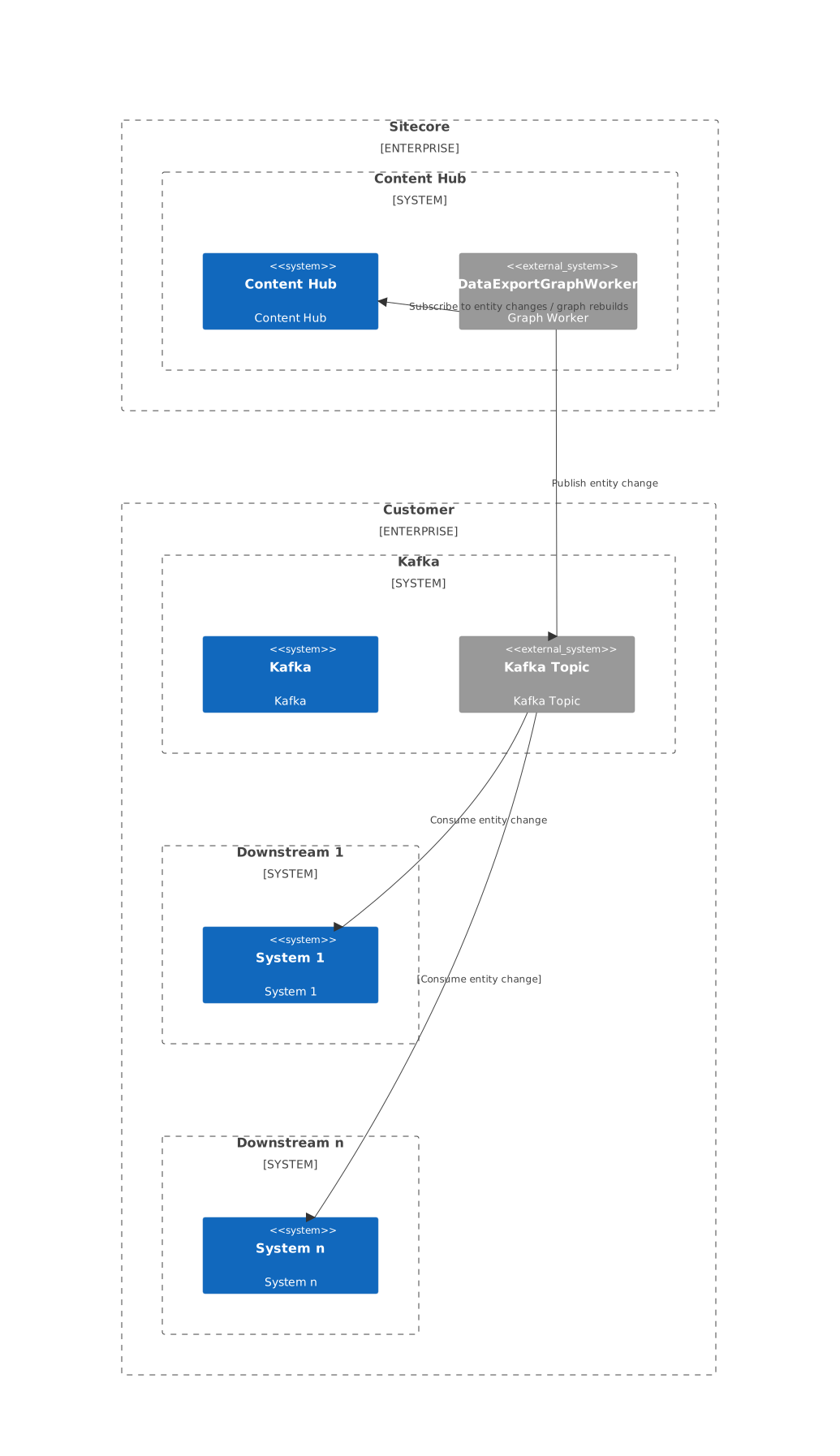
Conceptually, the External Data Feed turns Content Hub into a Kafka producer. When a Kafka endpoint is configured, Content Hub publishes entity change events to the configured topic so downstream systems can consume events for analytics, AI, and operational workflows.
Configuration
To get started with a working example, see Set up External Data Feed with Azure Event Hubs and Power BI
To configure the External Data Feed, use the ExternalDataFeed setting category. It contains two settings: Export and Transport.
Export
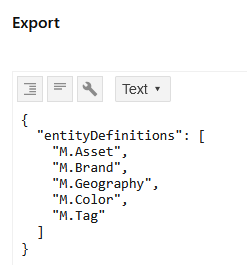
Use Export to define which entity definitions are monitored and exported. If a definition is not selected, its entities do not generate events. Add an entity definition by including its name in the entityDefinitions array.
Supported operations:
- Re-export all - trigger a bulk export to resend all selected entity definitions to Kafka. All entities of the definitions listed in this setting are exported again with the
entity.initializedevent type. - Re-export per definition - select specific entity definitions and re-export them.
Transport
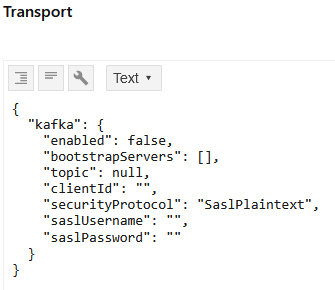
Use Transport to configure and enable Kafka transport. It includes the following properties:
| Property | Description |
|---|---|
kafka.enabled | Determines whether export to Kafka is enabled. |
kafka.bootstrapServers | Array of Kafka bootstrap servers. Only ports 9092 and 9093 are supported. |
kafka.topic | Target Kafka topic name. |
kafka.clientId | Client ID used by the Kafka producer. Default: contenthub-external-data |
kafka.securityProtocol | The security protocol Kafka uses when establishing the client-broker connection. SaslSsl or SaslPlainNote
The SASL mechanism is always |
kafka.saslUsername | The SASL username. |
kafka.saslPassword | The SASL password. |
Event payloads
External Data Feed publishes structured JSON messages for entity lifecycle events. The following is the basic envelope of a message:
Event types:
entity.initialized- baseline is established during re-export.entity.saved- an entity is created or updated.entity.deleted- an entity is removed.
Example: Entity saved
This event is triggered for any entity save operation, either when the entity is created new or an existing entity is updated. The payload contains high-level metadata and the changed properties in the affected cultures and relations. If an attribute is not changed or not set from the beginning in case of entity creation, then the attribute is not part of the message.
Example: Entity initialized
This event is used to provide the baseline during a re-export. This occurs whenever a full re-export or a partial re-export for a specific definition is initiated through the ExternalDataFeed Export setting. This allows the downstream system to determine whether an incoming entity should be considered a new baseline, or an iterative change to an existing entity.
Downstream systems can be configured to handle this event in the following ways:
- Establish a new baseline if none exists.
- Establish a new baseline and discard existing data.
- Discard the event if not required.
The payload is similar to the entity.saved payload, but for initialization, all properties and relations are included in the message:
Example: Entity deleted
This event is triggered when an entity is deleted. It contains only high-level metadata. It acts as a tombstone event to notify downstream systems that the entity has been removed.