View decision model variant revisions
Each time a user saves a decision model variant, Sitecore Personalize automatically creates a revision. You can view a list of revisions, including the changes made, the date and time of the revision, which user made the revision, and any comments the user entered. You can also revert to a previous revision.
To view a list of revisions for a decision model variant:
-
Click Revisions. The Revisions page displays a list of decision model variant revisions including the following information:
- Date and timestamp - the date and time that the user saved this revision.
- User - the name of the user that saved this revision.
- Comments - any comments added by the user when saving the revision.
-
By default, the page displays revisions made by all users. To filter the list by a specific user, select the name from the User drop-down list.
The list refreshes to only display revisions made by the selected user.
-
To view the revision details, click the down arrow on the right. In the detailed view, additions are highlighted in green, and deletions in red as shown in the following image.
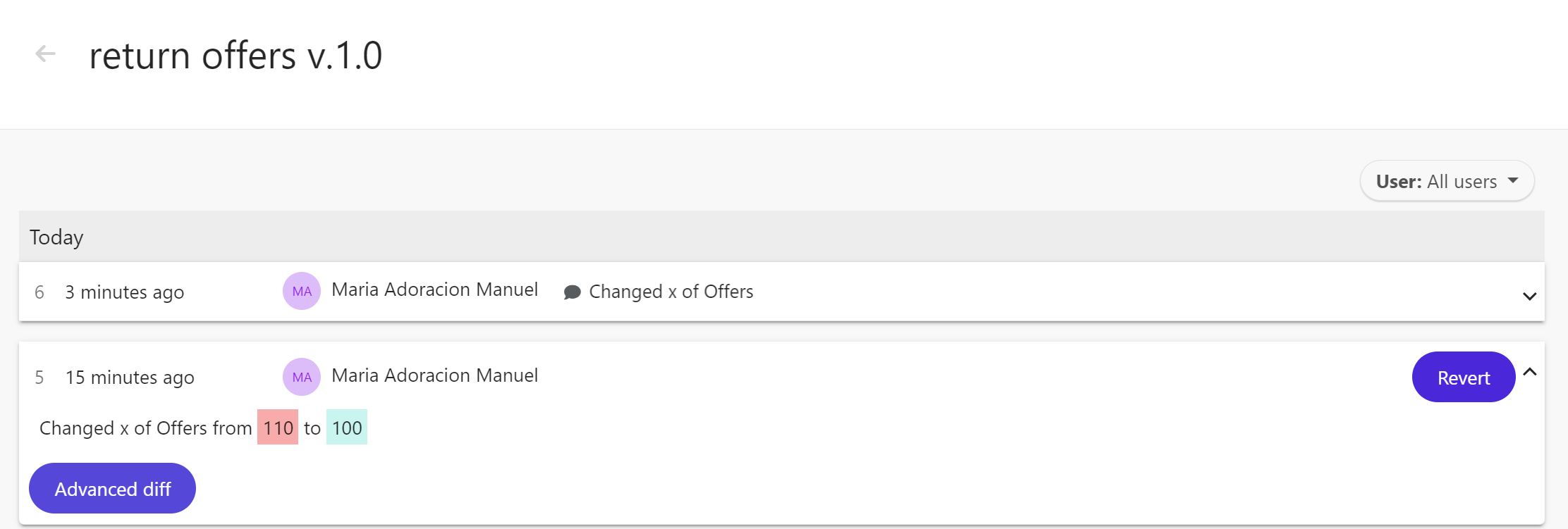
-
To view the XML code of the revision, including highlighted changes, click Advanced diff.
-
In the Compare XML dialog:
- To display only code lines in which changes were made, click Only Show Lines with Differences.
- Choose whether to display the differences Line by Line or Side by Side.
-
To revert to a previous revision, hover over the decision model revision and click Revert when it displays.