The Sitecore PowerShell extensions script library
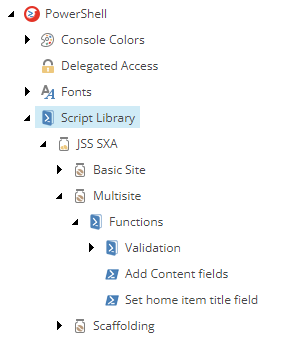
SitecoreAI includes a number of PowerShell scripts to automate the most common tasks. The open source Sitecore PowerShell Extensions (SPE) module provides a command line and a scripting environment and enables you to use PowerShell from within Sitecore. In this way, you can run commands and write scripts according to Windows PowerShell syntax. Some scripts are embedded into the Content Editor interface, where every module that uses SPE has its own script library in: sitecore/System/Modules/PowerShell/Script Library/JSS SXA.
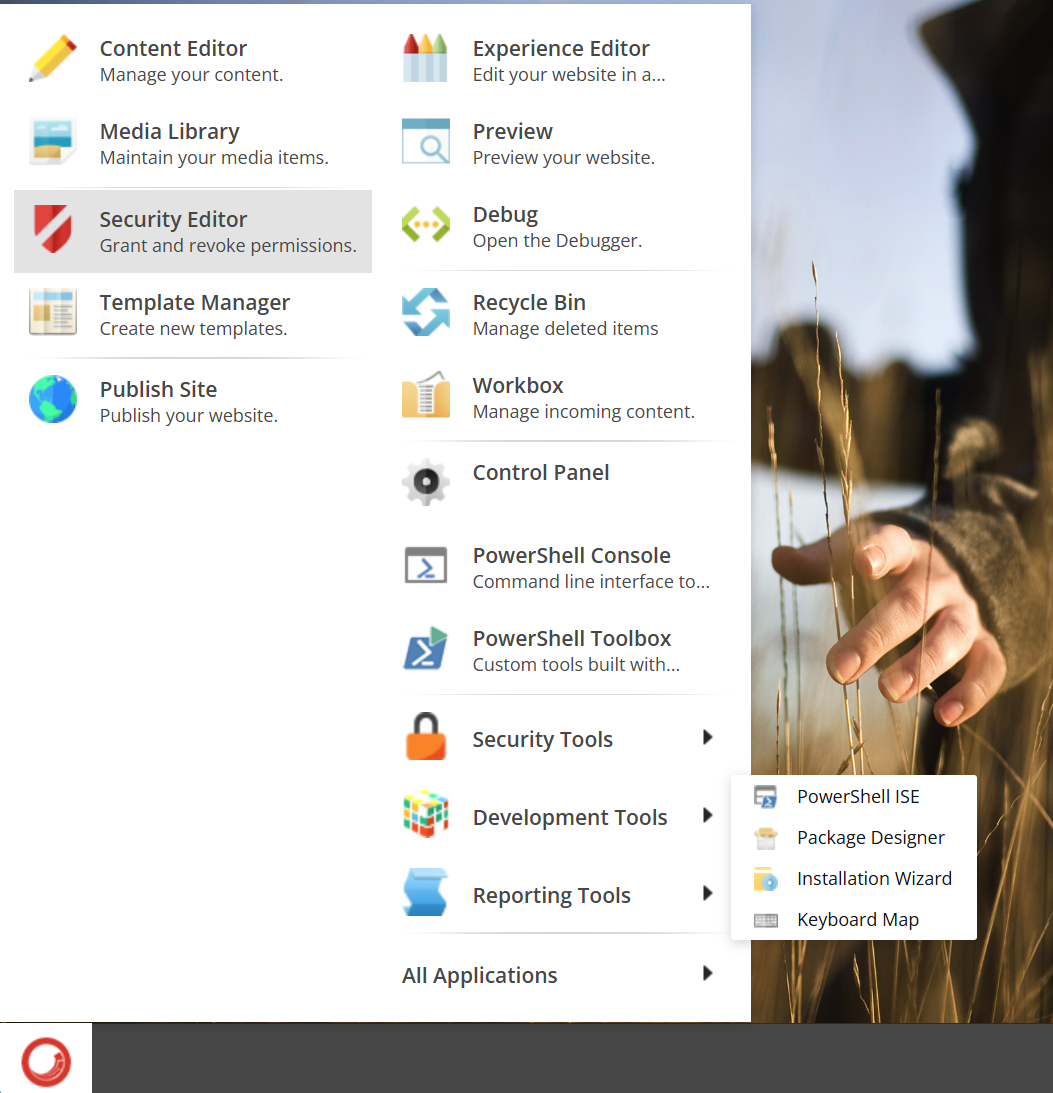
To write your own scripts, or view code of existing scripts, use the PowerShell Integrated Scripting Environment (ISE). To access this tool, in SitecoreAI's Desktop interface, click the Sitecore Start button > Development Tools > PowerShell ISE.
To use the ISE, you might need to set the correct value for the SITECORE_SPE_ELEVATION environment variable.
The following types of scripts are available:
-
Scaffolding – scripts that support the creation of a site or site collection by generating its foundational structure.
-
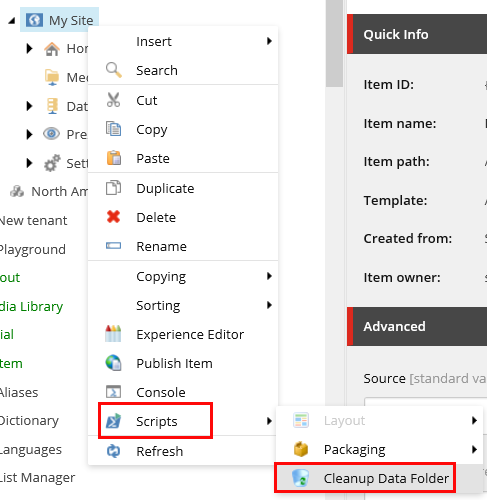
Context Menu – scripts that are available for editors using the Content Editor. For example, the cleanup data sources script:
-
Cmdlets – lightweight commands that are used in SPE and can be reused by other developers.
-
Insert Item – a script that extends the Insert section in the Content Editor.
The following table describes the script modules (where scripts are stored in module folders) in the Sitecore PowerShell extensions script library, their functions, descriptions, and type of script:
| Module | Function | Description | Type of script |
|---|---|---|---|
| Basic Site | Add home renderings | Builds the basic content structure of the site. | Scaffolding |
| Multisite | Add content fields | Adds new fields to Site Collection templates, as well as Content and Title fields to a Page template. | Scaffolding |
| Multisite | Set home item title field | Sets the home item title after the site is created. | Scaffolding |
| Scaffolding | Add-JSSTenant | Contains all the functions used to create a new headless site collection. | Cmdlet |
| Scaffolding | Get-AllJSSSite | Gets all headless sites. | Cmdlet |
| Scaffolding | Get-AllJSSTenant | Gets all headless site collections. | Cmdlet |
| Scaffolding | Get-JSSSiteDefinition | Gets headless site modules. | Cmdlet |
| Scaffolding | Get-JSSTenantDefinition | Gets headless site collection modules. | Cmdlet |
| Scaffolding | Install Headless Site module | Installs a headless site module. | Cmdlet |
| Scaffolding | Install Headless Site Collection module | Installs a headless site collection module. | Cmdlet |
| Scaffolding | Headless Site | Adds a script to the insert options in the context menu that lets users create a new headless site. | Insert item |
| Scaffolding | Headless Site Collection | Adds a script to the insert options in the context menu that lets users create a new headless site collection. | Insert item |
| Scaffolding | New-JSSTenant | Contains functions used to create a new headless site collection. | Cmdlet |
| Scaffolding | New-JSSSite | Contains functions used to create a new headless site. | Cmdlet |
Custom PowerShell scripts best practice and limitations
For scripts written by users, SitecoreAI does not define a fixed maximum number of items that can be processed in a single PowerShell operation. Depending on content size, number of languages and versions, custom pipelines, and available memory, there is a risk of a System.OutOfMemoryException error.
To prevent memory exhaustion and service instability, follow these guidelines:
- Always process large create, update, or publish operations in small batches. A practical starting point is 200–500 items per batch for heavy operations.
- Avoid scripts that load or loop through the entire content tree or store very large item lists in memory.
- Do not store large item collections in variables; process items as a stream and release references between batches.
- Schedule heavy PowerShell jobs outside business hours and avoid running them alongside other resource-intensive tasks.
- Always test at small scale first in a non-production environment and increase batch sizes gradually while monitoring memory usage.
- Split long-running jobs into multiple executions instead of running a single prolonged script.
Large unbounded PowerShell operations are not supported in SitecoreAI and may lead to service restarts or temporary outages.