Data lake export service
Feature availability is part of a phased rollout. Your organization may not see this functionality yet. It will become available when your environment is included in the rollout.
The data lake export service lets you access and share your audience and insights data with external platforms like Microsoft Fabric for analytics and reporting.
Sitecore stores your data in a Microsoft Fabric OneLake data lake. You can access this data using the data lake export to Fabric service, which uses zero copy functionality with zero egress cost. This service connects your Microsoft Fabric environment directly to the data stored in OneLake. The data is available up to the data retention limits that apply to data lakes.
Data lake export to Fabric
Data lake export to Fabric lets you access your SitecoreAI audience and insights data directly within Microsoft Fabric without manually copying data or building custom export pipelines.
Instead of relying on traditional Extract, Transform, Load (ETL) processes, manual data exports, or duplicated data warehousing workflows, you connect your Microsoft Fabric environment to Sitecore-managed data and consume it in place. Your data is stored and managed by Sitecore and is made available to your Fabric environment for analysis and reporting.
Overview
The benefits of using data lake export to Fabric include:
- Zero egress costs - access data directly through Microsoft Fabric without transferring it out of the Sitecore-managed data lake. Eliminates network egress charges that are typically incurred when moving large datasets between platforms.
- Faster time to value - access data through Microsoft Fabric without needing to build export pipelines or custom integrations. Data is available within hours of ingestion.
- Reduced operational overhead - eliminate the need for manual data exports, custom-built integration workarounds, or separate ETL workflows.
- Cost efficiency - no additional cost for exporting data from the Sitecore platform. Avoids infrastructure costs related to duplicating and moving data into separate storage systems.
- Modern analytics enablement - direct integration with Microsoft Fabric and Power BI. Enables advanced analytics, reporting, and data exploration using Fabric-native tools.
- Flexibility for advanced use cases - build custom dashboards and reports using Power BI. Feed downstream systems and third-party tools. Train machine learning models or AI agents using behavioral and profile data.
- Governed and centralized access - data remains in a single source of truth in the Sitecore-managed platform. Access is permission-aware and governed through Microsoft Entra ID. You access only the datasets explicitly shared with you through controlled OneLake shortcuts.
Data lake export to Fabric uses the following process to make your audience and insights data available in Microsoft Fabric:
- Data ingestion and storage - customer behavioral and profile data, such as profiles, sessions, and events, is collected by Sitecore and stored in a managed Fabric Lakehouse.
- Periodic data processing - a scheduled processing pipeline runs at regular intervals throughout the day. The pipeline reads newly available data and writes the processed data into a Sitecore-managed Fabric instance, with a Lakehouse per tenant for full data isolation. Each record type (profiles, sessions, events) has a dedicated table.
- In-place data sharing - Sitecore uses Microsoft Fabric external data sharing to share Lakehouse data with your Fabric tenant. You access the shared data through a OneLake shortcut that references the source data directly, without physically copying or duplicating it.
- Data consumption - you consume the shared data using Fabric-native experiences such as Power BI, notebooks, SQL analytics, and data exploration workflows. You can also integrate the data into your own machine learning, AI agent, or downstream application workflows.
The data available through this feature currently includes profiles, sessions, and events. For more information about the data entities, see Data entities reference.
Create an export link and accept the external data share
Before you can create an export link and accept the external data share:
-
You must be an Organization Admin or Organization Owner in your Sitecore Cloud Portal organization.
-
You must have access to a Microsoft Fabric workspace backed by active Fabric capacity.
-
You must have an active Microsoft Fabric account associated with Microsoft Entra ID identity. Your Microsoft Fabric account and Sitecore Cloud Portal account must use the same email address.
-
You must have sufficient permissions on the target Lakehouse or workspace to create and manage OneLake shortcuts.
-
External data sharing must be enabled in your Fabric tenant, and you must have the permissions to accept an external data share.
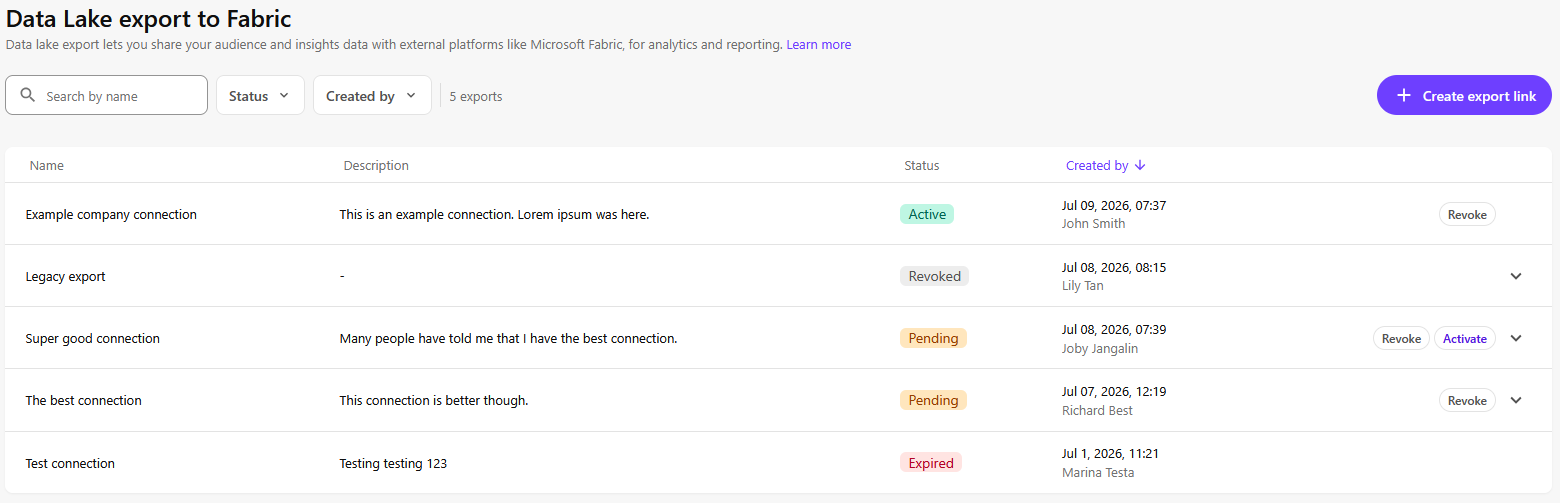
When you create an export link, an external data share link is generated. Activate the export link and accept the data share in Microsoft Fabric to access your data. Only one active export link is allowed per user.
To create an export link and accept the external data share:
- In SitecoreAI, click Performance > Settings > Data Lake export > Create export link.
- In the Create export link dialog, enter a Name and optional Description for your export link, then click Create.
The export link must be activated within 90 days. After that, it will expire.
- On the Data Lake export page, find the export link you created and click Activate.
- On the tab that opens, sign in using your Microsoft Fabric account credentials.
- Follow the steps to accept a share.
When the share is created in your OneLake location, the data within this share location can be consumed using any Fabric workload in your tenant.
When the export link is activated, its Status will be Active in the Data Lake export page.
Revoke an export link and its external data share
Revoking an external data share is a serious matter that should be considered carefully and in consultation with your Microsoft Fabric tenant. It completely and irreversibly severs all access from your Microsoft Fabric tenant to the shared data. This means that any and all data artifacts built in your Microsoft Fabric tenant on the basis of the shared data will cease to function. A revoked external data share can't be restored. A new external data share can be created, but all work done in your Microsoft Fabric tenant based on the revoked share will have to be rebuilt from scratch.
Export links can be revoked at any time. You must be an Organization Owner or Organization Admin to revoke an export link.
To revoke an export link and its external data share:
- In SitecoreAI, click Performance > Settings > Data Lake export.
- On the Data Lake export page, find the export link you want to revoke and click Revoke.
- In the Revoke export link dialog, enter the export link name, then click Revoke.
Limitations
- Platform support - this release supports Microsoft Fabric only. Support for other platforms is planned for future releases.
- Data freshness - data is not available in real time. Updates are processed and delivered at regular intervals throughout the day through the automated pipeline.
- Read-only access - shared data is read-only. You can query and analyze the data but cannot modify the source data through the Fabric shortcut.
- Export link expiry - when you create an export link, you must activate it and accept the share within 90 days or it will expire. When a link expires, its status will change to EXPIRED.
- Only one export link per user - you can't create more than one export link, unless your other export links have been revoked or have expired.
- Data scope - the data currently includes profiles, sessions, and events. Additional data types might be added in future releases.