SitecoreAI
SitecoreAI is a cloud-native, SaaS, hybrid headless digital experience platform (DXP). It helps businesses create and deliver relevant, personalized, multi-channel experiences on their websites and apps.
- Cloud-native - a secure, reliable, scalable, and enterprise-ready system built for the cloud.
- SaaS - Sitecore hosts, maintains, and updates SitecoreAI regularly, saving you costly installations and complex upgrades, while you enjoy the benefits of new product releases and up-to-date technologies.
- Hybrid headless - combines the flexibility of a headless CMS with authoring tools that empower content authors and designers. The headless aspect means that the content and presentation (front-end) are kept separate. WYSIWYG builders like the Page builder enable content authors by visualizing their changes in real time with no need for developer intervention for routine changes, balancing developer agility with marketer control.
With SitecoreAI, developers can rapidly build and manage tailored web experiences by modeling content with data templates, designing layouts and reusable components, and assigning content to components through data sources. You can use the Content SDK and modern front-end frameworks to create rich, interactive sites, integrate with SitecoreAI's visual editing interfaces and REST APIs, and deliver content globally via Experience Edge's scalable GraphQL endpoints. Extend your solution further with custom or public apps from the Sitecore Marketplace, and accelerate content creation using advanced AI capabilities for automated content generation and brand-aware optimization directly within your site-building workflow.
This topic describes key functionality in SitecoreAI. To find information about recent product releases, visit the SitecoreAI Changelog.
SaaS environment updates
SitecoreAI consists of various interfaces, including the Cloud Portal, the Deploy app, Page builder, Channels, Design Studio, Analytics, and more. Sitecore regularly updates these interfaces with new features, enhancements, and fixes. In addition, the content you create is stored and run on a unique Content Management (CM) instance in a base image.
Sitecore updates your SitecoreAI base images in the following scenarios:
- Routine automatic updates - approximately a week after Microsoft releases a new Windows image, we update the base image. This ensures that you have the latest version and features.
- Microsoft critical security fixes - whenever Microsoft releases a critical security fix for their Windows base image, to maintain the security of the platform and protect your environments.
- Sitecore security fixes - Sitecore regularly applies updates to maintain the security of the platform.
Apart from these scenarios, we regularly release new SitecoreAI images. However, we don't automatically update your environment for every release. You get these updates in the following ways:
-
Every time you deploy, the CM instance is updated to the latest version.
NoteYou can enable auto deployments in the Deploy app, in the environment settings by turning on Trigger deployment on commit to branch, so that whenever you commit to your code repository, you get the latest base image.
-
The
up.ps1script always fetches the latest base image, and you can use it in local development scenarios. If you develop locally, this ensures that you have access to the most recent version of the base image for testing and development purposes.
By following these update procedures, you can be sure that you have access to the latest features, security enhancements, and bug fixes.
SitecoreAI tools and apps
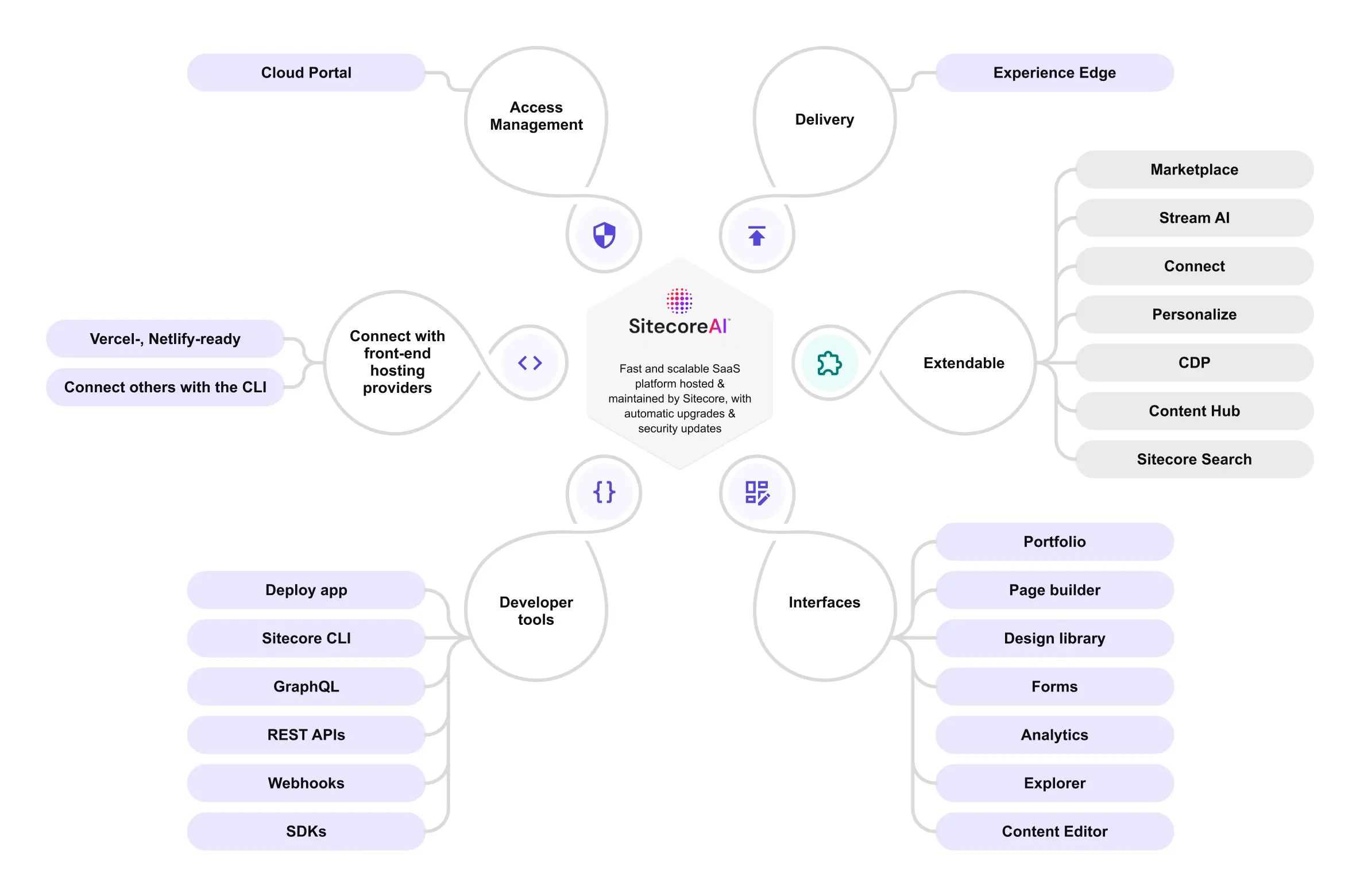
SitecoreAI includes many tools, features, and interfaces for managing and provisioning your websites, creating content, integrating with downstream applications, and publishing to your front end. The following overview diagram shows the many different parts of SitecoreAI:
Access
After deploying a project and environment, the environment is shown as a SitecoreAI app in the Sitecore Cloud Portal. From the Cloud Portal, you can open SitecoreAI and manage user access. After users are onboarded, they can access the various Sitecore apps directly from the Cloud Portal.
Interfaces
Here are the main user interfaces for working with SitecoreAI:
- Dashboard - the main entry point from which you edit sites, launch different tools, and manage site settings.
- Page builder - a WYSIWYG editor for building the layout and content of your site pages, used for creating page designs and templates, adding components, and personalizing the user experience. In Content mode, Page builder lets you work with content items independent of presentation.
- Design Studio - to visualize, test, and manage components and forms across their organization.
- Components - a visual grid-based builder with built-in styles and versioning capabilities that also supports using data sources and bringing your own React components (BYOC).
- Forms - a dedicated interface to create and design forms, which you add to your site pages using Pages. Forms capture user interactions and send them to a third-party system using webhooks.
- Content Editor - a powerful interface, familiar to on-prem Sitecore XP users, that allows you to model and create content, create page and partial designs, create workflows, and work with tags.
Developer tools
SitecoreAI includes a rich offering of developer tools for setting up and integrating your websites.
- Deploy app - a convenient user interface where you create, manage, and deploy projects and environments, configure source control and hosting providers, manage credentials, and check the system status.
- APIs - you can use the various APIs to query the SitecoreAI database, perform admin operations, and manage your content:
- Pages REST API - manage your site pages.
- Sites REST API - manage sites, site collections, and languages in the XM Apps system.
- Preview GraphQL API - query both unpublished and published content.
- Delivery GraphQL API - query content that's published to Experience Edge.
- Authoring and management GraphQL API - query and mutate (create, modify, delete) content and perform other authoring and content management operations.
- Publishing REST API - create, monitor, and manage publishing jobs across your environment.
- Deploy REST API - manage deployments.
- Content Transfer REST API - create and manage content transfer operations and transfer packages.
- Item Transfer REST API - consume transfer packages, inspect transferred items, and manage transfer sources.
- Marketplace - build and use applications that extend your implementation by adding new capabilities:
- Create custom or public apps within the Marketplace.
- Embed content from Content Hub or retrieve data from third-party tools.
- Configure API access for your Marketplace apps.
- Discover apps built by Sitecore and its trusted partners in the public Marketplace.
- SDKs:
- The open-source Content SDK provides a starter Next.js application, bootstrapped with all the necessary functionality for visualizing content in interfaces such as the Page builder. It supports personalization, tracking and analytics, localization, and multi-site solutions.
- The open-source ASP.NET Core SDK lets developers integrate SitecoreAI content or Sitecore XM/XP content into their ASP.NET Core applications.
- The open-source Sitecore Cloud SDK lets developers easily integrate capabilities from various Sitecore digital experience platform (DXP) products into JSS Next.js and JSS Angular web applications connected to SitecoreAI.
- Webhooks - integrate SitecoreAI with other applications with real-time information using webhooks that are triggered when a publishing job finishes, or when entities change.
- Sitecore CLI - a robust command-line interface that supports all core SitecoreAI functions using commands, subcommands, and options. Use the CLI to create settings, items, configurations, data modeling, and more; test and verify content, and monitor your implementation.
- Serialization - Sitecore applies a standard for organizing and formatting data stored in the Sitecore content management system (CMS) and database. This allows you to safely extract, migrate, move, and share content while maintaining its integrity.
Delivery
In SitecoreAI, you publish your content to Experience Edge. It's a GraphQL API-based service that allows you to retrieve layout and content, distributed through a CDN, and hosted by Sitecore. Experience Edge is the publishing target of different Sitecore products: XM, SitecoreAI, Content Hub, and Content Hub One. You can build your solution in any language and pull the content you need to power it with GraphQL.
Front-end hosting
SitecoreAI decouples the front-end presentation from delivery, while giving marketers the freedom to design the user experience with intuitive page layout editors. With SitecoreAI, you can build and host with any front-end technology that is supported by the Content SDK, allowing developers to take advantage of popular front-end frameworks to rapidly build new digital experiences. The solution includes built-in integrations with Vercel and Netlify, and supports integrations with other front-end hosting providers.
Client applications with your preferred technology
You can use any front-end stack to build client applications if the technology you choose can:
- Consume JSON-formatted layout and content data.
- Use libraries for interacting with the Experience Edge Delivery GraphQL endpoint.
This includes frameworks such as Blazor, ASP.NET Core, JavaScript, and more.
Although you don't have to use a dedicated Sitecore SDK to build a Sitecore site, we recommend that you use the Content SDK for JavaScript front-end applications and the ASP.NET Core SDK for ASP.NET Core applications.