Component personalization
In SitecoreAI, component personalization helps you deliver more relevant experiences by showing different variants of a component to different visitors.
Unlike page personalization, which changes an entire page experience, component personalization lets you tailor individual components, such as banners, messages, or promotions, while leaving the rest of the page unchanged.
With component personalization, you can:
-
Show targeted content to specific audiences.
-
Personalize multiple components on the same page.
-
Create multiple personalization rules, each with a corresponding component variant.
-
Build advanced targeting using profile data, conditions, and custom values.
-
Preview and test personalized components before publishing.
Common use cases
You can use component personalization for:
-
Dynamic messaging - personalize content based on visitor context, such as sign-in status or return visits.
-
Audience targeting - show different component variants to specific visitor groups, such as prospects, existing customers, or visitors in different regions.
-
Campaigns and announcements - display relevant updates, campaigns, or informational content based on visitor behavior.
How component personalization works
Component personalization uses a decision table to determine which component variant a visitor sees.
You define inputs, such as visitor profile data, conditions, or custom values, then create personalization rules based on those inputs.
Each personalization rule is associated with a corresponding output or component variant, that you configure in Page builder.
When component personalization is live, visitors are evaluated against your rules, and the first matching component variant is displayed. If no rules match, the original component is shown.
Analytics data becomes available as visitors begin seeing your live personalization.
To learn how to set up and manage component personalization, see Get started with component personalization.
Example: Personalizing a banner by visitor's country
Imagine you want to show different banner content based on a visitor’s country.
In the banner's decision table, you use the Country as a decision table input and create rules that determine which banner variant is shown.
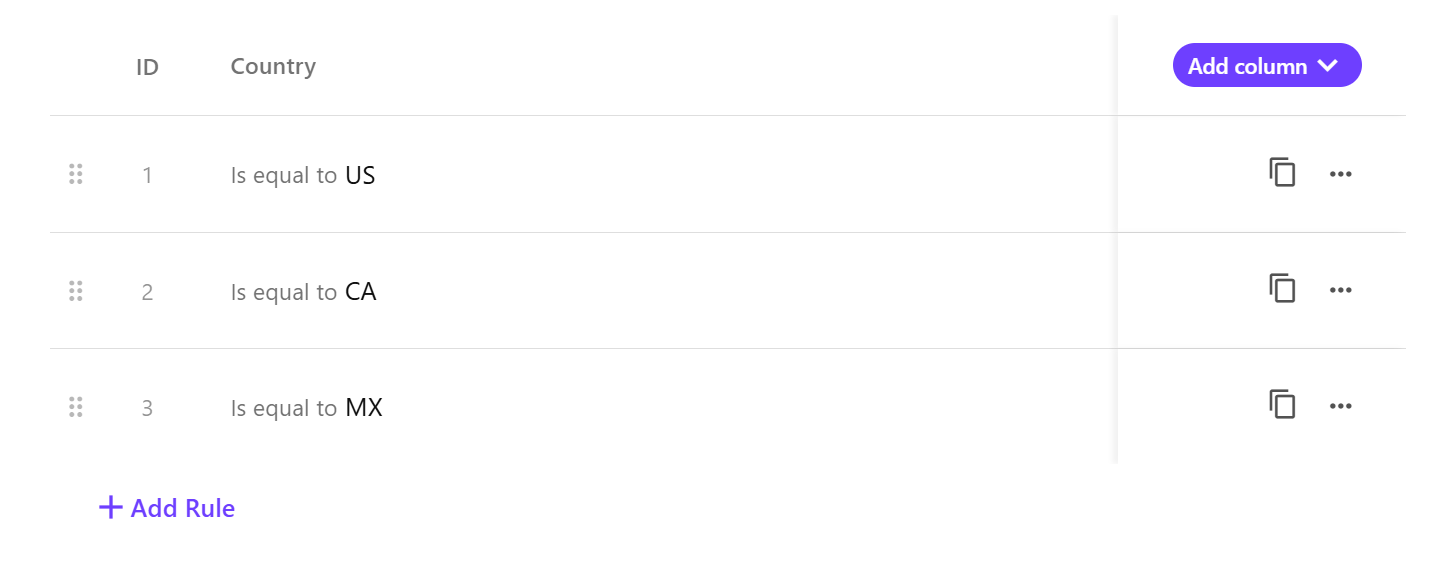
Each rule is mapped to a specific banner variant in Page builder. As a result, when the personalization is live, visitors are evaluated against these rules and shown the corresponding banner variant.
-
Visitors from the US see the US banner.

-
Visitors from Canada see the Canada banner.

-
Visitors from Mexico see the Mexico banner.

-
If no rules match, the original banner is displayed.