Decision table inputs
In component personalization, inputs define the data that personalization rules use to evaluate visitors and determine which component variant they see.
For example, you might use Country and Device type as inputs in the decision table if you want to target mobile visitors in specific countries.
Location-based personalization depends on available location data and may not always reflect a visitor’s exact physical location. VPNs, proxies, network routing, and upstream data sources can affect location accuracy.
When personalizing components in Page builder, you can use three input types in decision tables, described in the following sections: Profile data, Conditions, and Custom values.
Each input appears as a column in the personalized component's decision table.
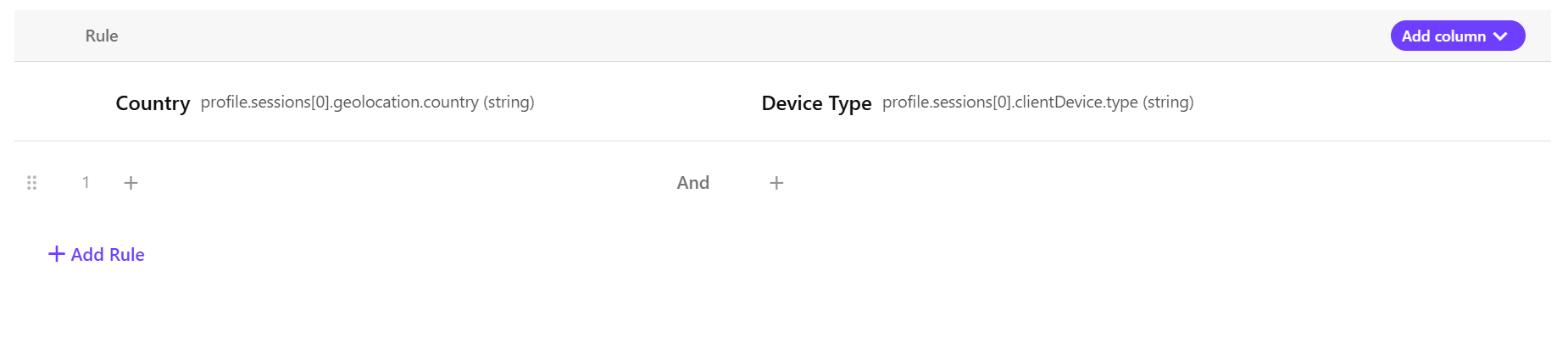
You can use a single input or combine multiple inputs to target specific audiences.
When you combine multiple inputs in a rule, a visitor must match all of them for the rule to apply.
Profile data
Use existing visitor profile attributes in SitecoreAI as inputs in decision tables for component personalization.
The following profile attributes are available as inputs:
|
Attribute |
Description |
Example values |
|---|---|---|
|
Channel |
The platform or pathway that your audience uses to connect with your brand. |
|
|
City |
The city associated with the visitor’s location. |
|
|
Continent |
The continent associated with the visitor’s location (using standard 2-letter codes). |
|
|
Country |
The country associated with the visitor’s location (in ISO 3166-1 alpha-2 format). |
US, CA, IE, DK, DE |
|
Date of birth |
The visitor’s date of birth. |
04/28/2000 |
|
Device type |
The device used by the visitor. |
|
|
|
The visitor’s email address. | |
|
First name |
The visitor’s first name. |
John |
|
Gender |
The visitor’s gender. |
|
|
Last name |
The visitor’s last name. |
Doe |
|
Operating system |
The operating system used on the visitor’s device. |
|
|
Referrer |
The source or website the visitor came from before visiting your site. |
google.com |
|
Region |
The region or state associated with the visitor’s location. |
Texas |
|
Type |
The visitor's profile type or status. |
|
|
UTM campaign |
The marketing campaign name captured from UTM (Urchin Tracking Module) parameters. |
spring-sale |
|
UTM medium |
The marketing channel captured from UTM parameters. |
|
|
UTM source |
The traffic source captured from UTM parameters. |
|
Conditions
SitecoreAI includes out-of-the-box conditions for common targeting scenarios, and you can create custom conditions for more advanced logic.
You can use these same conditions as inputs in decision tables for component personalization. When you select a condition, you configure how that input is evaluated.
For example, you can select the out-of-the-box Country condition to check whether a visitor is from Denmark. The condition input can evaluate to true, false, or null, which can then be used in a personalization rule.
Custom values
Use custom values as inputs in decision tables for component personalization when the data you need is not available through profile data or conditions.
Using JavaScript, custom values can combine profile attributes, visitor behavior, and calculated logic into a single reusable value.
Custom values can be either predefiend values provided by SitecoreAI or custom JavaScript values that you create for your own targeting logic.
Out-of-the-box (OOTB)
Use predefined custom values as inputs for common targeting scenarios.
-
First page - the first page viewed in the visitor’s current session. Returns
nullif no matching page view is found. -
Guest birthday - whether the visitor’s birthday matches the current date.
-
Number of page views - the total page views in the visitor’s current session
-
Top Affinity - the highest affinity value in the visitor profile. Returns
nullif no valid affinities are found.
Custom
Create your own JavaScript-based custom values when other input types do not provide the targeting flexibility you need.
This allows you to combine profile attributes, session activity, and visitor behavior into reusable values that match your business logic.
For example, the following custom value classifies visitors as high, medium, or low intent based on session count and page views: