Monitor the process of rebuilding the reporting database
The process of rebuilding the reporting database can take a long time. You can monitor the state of an active rebuild process on the RebuildReportingDB.aspx page by looking at the details in the Processed column, which shows how many entries have been processed. The EstimatedTotal column displays the total number of entries to be processed.
The following table describes the possible rebuild states during the rebuild process.
| Rebuild state | Description |
|---|---|
| NotRunning | No rebuild is requested or running. |
| Failed | The rebuild failed to complete. Possible reasons for a failed rebuild include:
|
| Starting | The rebuild process is in the preparation stage. Initialization of pre-rebuild checks have started. |
| StoppingDataRecording | This is a required step in the synchronization between the reporting database and the reporting secondary database. |
| ClearingStorage | The reporting.secondary database is being cleared. The target reporting.secondary database must be empty before the rebuild process starts. |
| WaitReadyToReceiveData | This is a required step in the synchronization between the reporting database and the reporting secondary database. |
| StartingHistoryProcessing | All prerequisites for the rebuild are complete; retrieving the data size selected for the rebuild and starting to process history data. |
| HistoryProcessing | The rebuild is in progress and history data is being processed. |
| Completed | The rebuild is complete. |
To start and monitor the process of rebuilding the reporting database:
-
Go to the
https://<CM hostname>/sitecore/admin/RebuildReportingDB.aspxpage.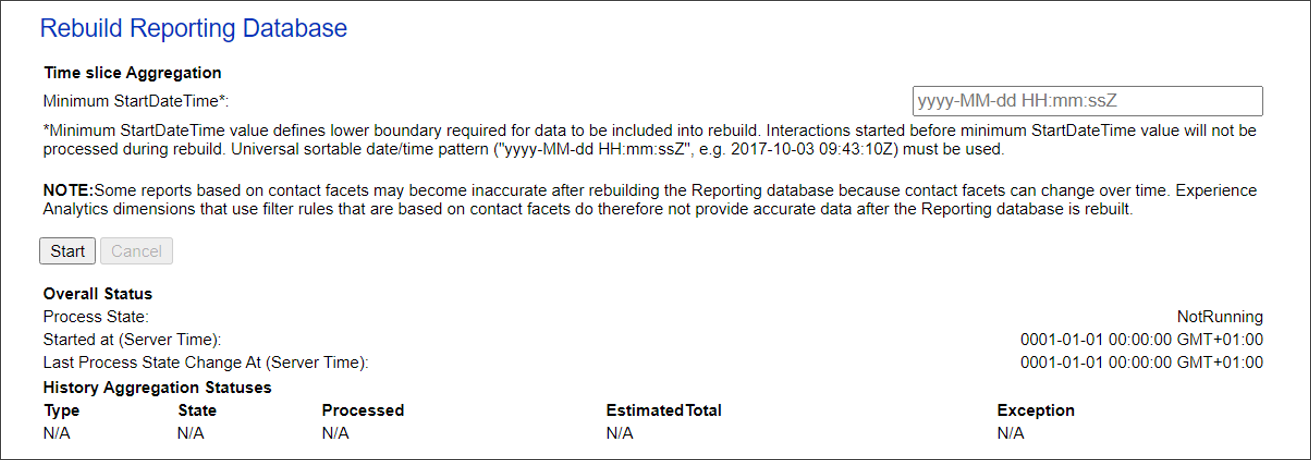
-
In the Minimum StartDateTime field, specify a start date and time and click Start.
Some reports based on contact facets might become inaccurate after rebuilding the Reporting database. This is because contact facets can change over time and, as a result, Experience Analytic dimensions that use filter rules based on contact facets do not provide accurate data.