1. Layout Service

Configure the Sitecore Layout Service to output HTML for MVC renderings

Version:

You can configure the Layout Service to output HTML instead of JSON to use it for scenarios such as statically rendering MVC applications with JSS.

To configure the Layout Service to output HTML for MVC renderings:

  1. Navigate to sitecore/layout/Renderings and enable HTML output for the renderings using one of the following methods:

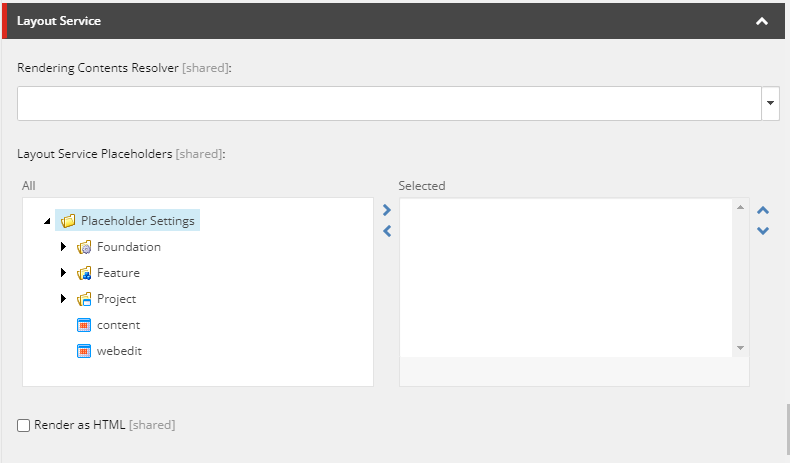
    • For the relevant renderings, to enable HTML output manually, select the Render as HTML check box. You must enable this option for all nested renderings as well.

      Tip

      To identify the components requiring this setting, look in the JSON output for the componentName property. The componentName matches the rendering item name.

      View of the Render as HTML checkbox
    • If you have Sitecore PowerShell Extensions installed, run the following script in the Sitecore PowerShell ISE tool, to select the Render as HTML check box for all renderings:

      Note

      To run the script, you must have Sitecore PowerShell Extensions installed.

      Get-ChildItem "/sitecore/layout/Renderings" -Recurse |
      	Where-Object { $_.TemplateName -eq "View rendering" -or $_.TemplateName -eq "Controller rendering" } |
      	ForEach-Object {
      		$val = $_.Fields["Render as HTML"].Value
      		if ($val -eq "1") {
      		    return
      		}
      		Write-Host "Setting '$($_.Name)'"
      		$_.Editing.BeginEdit()
      	    $_.Fields["Render as HTML"].Value = 1
      		$_.Editing.EndEdit()
      	}
    • Use a global configuration to disable JSON rendering and switch to HTML serialization for all renderings:

      <configuration xmlns:patch="http://www.sitecore.net/xmlconfig/"
                     xmlns:set="http://www.sitecore.net/xmlconfig/set/">
      	<sitecore>
      		<layoutService>
      			<!-- Disable JSON / enable HTML serialization for all MVC renderings -->
      			<serializableRenderingTypes>
      				<viewRendering>
      					<patch:delete />
      				</viewRendering>
      				<controllerRendering>
      					<patch:delete />
      				</controllerRendering>
      			</serializableRenderingTypes>
      		</layoutService>
      	</sitecore>
      </configuration>
  2. Publish your changes.

  3. Refresh the Layout Service endpoint and verify that the component data output is in HTML.

If you have suggestions for improving this article, let us know!