Order Linesレンダリングのカスタマイズ
このページの翻訳はAIによって自動的に行われました。可能な限り正確な翻訳を心掛けていますが、原文と異なる表現や解釈が含まれる場合があります。正確で公式な情報については、必ず英語の原文をご参照ください。
Order Linesレンダリングには、Scribanテンプレートの形式のレンダリング バリアントが含まれています。Order Linesレンダリングには、独自のデフォルトレンダリングバリアントルートと、マークアップの生成にScribanテンプレートを使用するデフォルトのレンダリングバリアント (/sitecore/Content/<tenant>/<site>/Presentation/Rendering Variants/Order Lines) があります。Scribanテンプレートは変更できますが、この場合は、ソフトウェアのアップグレード中にカスタマイズが上書きされないように、新しいカスタム レンダリング バリアントを作成することをお勧めします。レンダリングのラベルを変更することもできます。
The Order Lines - 非推奨のレンダリングは、既存のサイトでのみ使用でき、レンダリングバリアントのScribanテンプレートではなくMVCビューに基づいています。
次のコードは、既定のレンダリング バリアント内で定義されたOrder LinesレンダリングのScribanテンプレートを示しています。製品名、バリアント情報、および配送情報はMVCモデルに渡され、レンダリング バリアントと埋め込みアイテム を使用したScribanテンプレートで使用できますo_model。
{{ # Error message area }} {{if o_model.error_message}} <div class="error-message"> {{ o_model.error_message }} </div> {{ # If there is no error, order lines will be rendered }} {{ else }} <div class="order-lines"> {{ # Order lines header label }} <div class="order-lines-header"> <h3 title="{{ o_model.your_products_header_tooltip }}"> {{ sc_field i_datasource "Order Lines Header Label" }} </h3> </div>{{ # Order lines header, contains the column titles }} <div class="orderlines-header"> <div class="orderlines-header-productdetails"> {{ sc_field i_datasource "Product Details Label" }} </div> <div class="orderlines-header-unitprice"> {{ sc_field i_datasource "Unit Price Label" }} </div> <div class="orderlines-header-quantity product-quantity-header"> {{ sc_field i_datasource "Quantity Label" }} </div> <div class="orderlines-header-total line-total-header"> {{ sc_field i_datasource "Total Label" }} </div> </div> {{ # Order lines body, the following <div> will render all the order lines }} <div class="orderlines-body"> {{ # Loop through all the lines }} {{ for orderLine in o_model.lines }} <div class="orderlines-item {{ if orderLine.is_free_gift }}freegift-item{{ end }}"> <div class="orderlines-item-details"> {{ # The following <div> contains the product name, variant information and delivery information }} <div class="orderlines-item-productdetails"> {{ # The free gift label is rendered if the order line IsFreeGift property is true }} {{ if orderLine.is_free_gift }} <div class="orderlines-freegifttext"> <span>{{ sc_field i_datasource "Free Gift Label" }}</span> </div> {{ end }} <div class="product-image"> <img src="{{ orderLine.product_master_image | sc_imagelink 110 110 }}" /> </div> <div class="orderlines-info"> <a href="{{ orderLine.product_url }}"> <h4 class="product-name">{{ orderLine.product_display_name }}</h4> </a> {{ # The following <div> contains the product variant information }} <div class="product-variants"> {{ for property in orderLine.properties }} <div class="product-variant"> <span class="variant-label"> {{ if (object.has_key o_model.variant_labels property.key) o_model.variant_labels[property.key] else property.key end }} </span> <span class="variant-information"> {{ property.value }} </span> </div> {{ end }} </div> {{ # The following <p> contains the delivery method information }} {{ if orderLine.shipping_method_name }} <p class="orderlines-delivery"> <span> {{ sc_field i_datasource "Order Lines Delivery Label" }}: </span> <span class="shippingMethodName"> {{ orderLine.shipping_method_name }} </span> </p> {{ end }} {{ # The following <div> contains the delivery address information }} {{ if orderLine.address }} <div class="orderlines-delivery-address"> <span class="address-label">{{ sc_field i_datasource "Order Lines Address Label" }}:</span> <ul class="lineShippingAddress"> <li> <span class="lineShippingAddressLine"> {{ orderLine.address.address1 }}, </span> <span class="lineShippingAddressCity"> {{ orderLine.address.city }} </span> </li> <li> <span class="lineShippingAddressState"> {{ orderLine.address.state }}, </span> <span class="lineShippingAddressZipCode"> {{ orderLine.address.zip_postal_code }}, </span> <span class="lineShippingAddressCountry"> {{ orderLine.address.country }} </span> </li> </ul> </div> {{ # The following <p> contains the electronic delivery email address information }} {{ if orderLine.electronic_delivery_email }} <p class="orderlines-email">{{ orderLine.electronic_delivery_email }}</p> {{ end }} {{ end }} </div> </div> {{ # The following <div> contains the unit price and discount offers applied }} {{ if !orderLine.is_free_gift }} <div class="orderlines-item-price unit-price"> <span class="price-amount">{{ orderLine.price_text }}</span> {{ if orderLine.discount_offer_names.size > 0 }} <span class="discount-details"> <span>{{ sc_field i_datasource "Order Lines Discount Label" }}: </span> <span class="savings">{{ orderLine.discount_offer_names | array.join ", " }}</span> </span> {{ end }} </div> {{ end }} {{ # The following <div> contains the product quantity }} <div class="orderlines-item-quantity product-quantity"> {{ orderLine.quantity_text }} </div> {{ # The following <div> contains the total price and discount amount }} <div class="orderlines-item-total line-total"> <h4 class="total-amount">{{ orderLine.total_text }}</h4> {{ # If the order line is free gift, show the original price, otherwise show the discount }} {{ if orderLine.is_free_gift }} <span class="orderlines-freegiftlistprice">{{ orderLine.price_text }}</span> {{ else if orderLine.line_discount > 0 }} <span class="savings"> <span>{{ sc_field i_datasource "Order Lines Discount Label" }} </span> <span class="discount">{{ orderLine.line_discount_text }}</span> </span> {{ end }} </div> </div> {{ # Item sublines, contains the sublines for the current product }} {{ if orderLine.sub_lines }} <div class="orderlines-item-sublines"> {{ # Loop through all the sublines }} {{ for subLine in orderLine.sub_lines }} <div class="orderlines-subline-item"> {{ # Placeholder for blank space }} <div class="orderlines-subline-image-space"></div> {{ # The following <div> contains the subline product image }} <div class="product-image"> <a href="{{ subLine.product_url }}"> <img src="{{ subLine.product_master_image | sc_imagelink 110 110 }}" /> </a> </div> {{ # The following <div> contains the subline product name and variant information }} <div class="orderlines-info"> <a href="{{ subLine.product_url }}"> <h4 class="product-name">{{ subLine.product_display_name }}</h4> </a> <div class="product-variants"> {{ for property in subLine.properties }} <div class="product-variant"> <span class="variant-label"> {{ if (object.has_key o_model.variant_labels property.key) o_model.variant_labels[property.key] else property.key end }} </span> <span class="variant-information"> {{ property.value }} </span> </div> {{ end }} </div> </div> {{ # The following <div> contains the subline product quantity }} <div class="product-quantity"> {{ subLine.quantity_text }} </div> {{ # Placeholder for blank space }} <div class="orderlines-subline-total-space"></div> </div> {{ end }} </div> {{ end }} </div> {{ end }} </div>
</div> {{ end }}
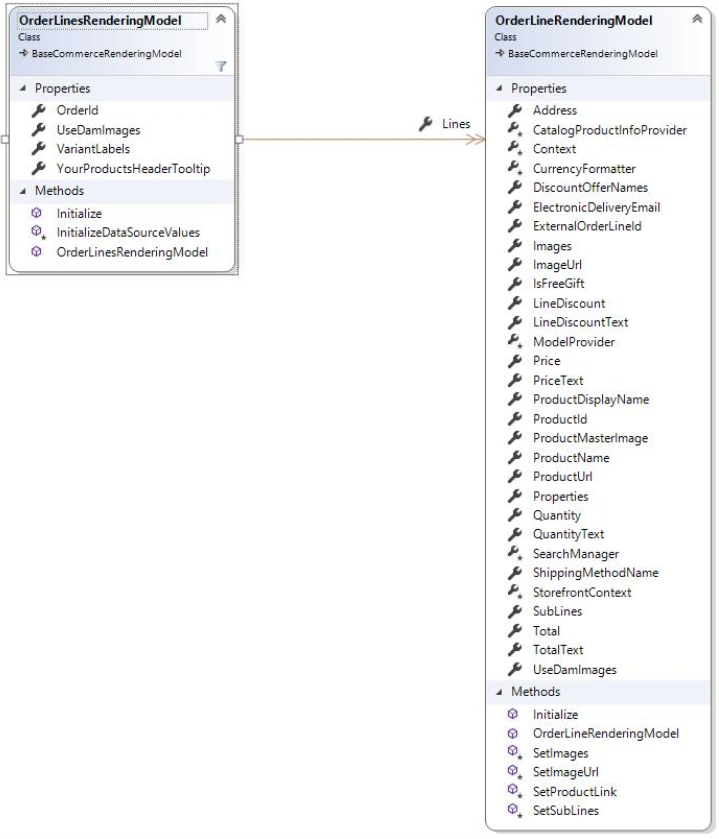
Order Linesレンダリング モデル
Order Lines Scribanテンプレートでは、埋め込みアイテムo_modelを使用して、OrderlinesRenderingModelモデルに含まれるプロパティとオブジェクトにアクセスします。Order Linesレンダリング モデルを次の図に示します。