
Commerce Search結果のMVCビュー
このページの翻訳はAIによって自動的に行われました。可能な限り正確な翻訳を心掛けていますが、原文と異なる表現や解釈が含まれる場合があります。正確で公式な情報については、必ず英語の原文をご参照ください。
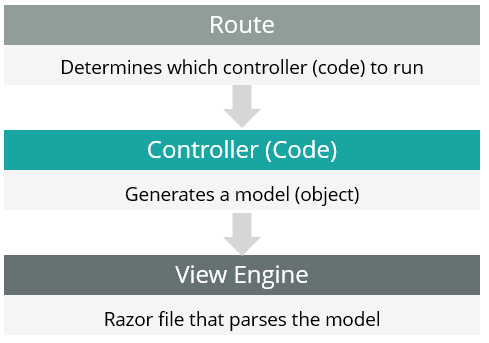
MVC(モデルビューコントローラ)モデルでは、HTTPリクエストを解析するコード(ルート)がモデル(オブジェクト)を生成するコントローラ(.NETコード)を指しています。このオブジェクトはビュー(SXAストアフロントのRazorビュー)によって解析されます。ビューはデータの表示方法を決定するプレゼンテーションコンポーネントで構成されています。
!注Commerce Search Results MVCビュー は必要に応じてカスタマイズ可能です。詳細については、「 デフォルトのレンダリングビュープロバイダーをオーバーライド」 および 「サイトごとのレンダリングHTMLカスタマイズ」をご覧ください。
Commerce Search Results MVCビューは /views/Commerce/CommerceSearchResultsの下にある独立したフォルダに格納されています。Commerce Search Results MVCビューの構造は以下の通りです:
/* Reference the model containing all the catalog content but excluding price and stock info */ @model Sitecore.XA.Feature.Search.Models.SearchResultsRenderingModel
@{ /* SXA handling of the data class variant attribute */ string variantClass = string.Empty; if (Model.Attributes.ContainsKey("class")) { variantClass = Model.Attributes"class".Aggregate(); }
/* Get a handle to the storefront context */
var storefrontContext = ServiceLocator.ServiceProvider.GetRequiredService
/* Component enclosing markup, including data properties specifying the search service endpoint and parameters as JSON */
/* Label translations originating from storefront Commerce Terms in Commerce Control Panel. Included as hidden markup as Scriban template cannot get a reference to it with the standard extension methods */ @Html.Hidden("InStockDisplayName", storefrontContext.GetProductStockStatusName(CatalogFeatureConstants.InventoryStatuses.InStock)) @Html.Hidden("OutOfStockDisplayName", storefrontContext.GetProductStockStatusName(CatalogFeatureConstants.InventoryStatuses.OutOfStock)) @Html.Hidden("BackOrderableDisplayName", storefrontContext.GetProductStockStatusName(CatalogFeatureConstants.InventoryStatuses.BackOrderable)) @Html.Hidden("PreOrderableDisplayName", storefrontContext.GetProductStockStatusName(CatalogFeatureConstants.InventoryStatuses.PreOrderable))
/* When exporting markup using Creative Exchange, show 'Results not found' output */ @if (WebUtil.GetQueryString(Sitecore.XA.Feature.Search.Constants.CreativeExchangeExport) != "true") {
- /\* Loop processing the content of the rendering variant against the model and current item \*/ @foreach (BaseVariantField variantField in Model.VariantFields) { @Html.RenderingVariants().RenderVariant(variantField, Model.PageItem, false, Model) }
@model Sitecore.XA.Feature.Search.Models.SearchResultsRenderingModel
@{
string variantClass = string.Empty;
if (Model.Attributes.ContainsKey("class"))
{
variantClass = Model.Attributes"class".Aggregate();
}
var storefrontContext = ServiceLocator.ServiceProvider.GetRequiredService
@Html.Hidden("InStockDisplayName", storefrontContext.GetProductStockStatusName(CatalogFeatureConstants.InventoryStatuses.InStock)) @Html.Hidden("OutOfStockDisplayName", storefrontContext.GetProductStockStatusName(CatalogFeatureConstants.InventoryStatuses.OutOfStock)) @Html.Hidden("BackOrderableDisplayName", storefrontContext.GetProductStockStatusName(CatalogFeatureConstants.InventoryStatuses.BackOrderable)) @Html.Hidden("PreOrderableDisplayName", storefrontContext.GetProductStockStatusName(CatalogFeatureConstants.InventoryStatuses.PreOrderable))
@if (WebUtil.GetQueryString(Sitecore.XA.Feature.Search.Constants.CreativeExchangeExport) != "true") {
- @foreach (BaseVariantField variantField in Model.VariantFields) { @Html.RenderingVariants().RenderVariant(variantField, Model.PageItem, false, Model) }
以下は、レンダリングがストアフロントサイト上で稼働している際の囲みマークアップの例です:
