
既存のPaaS環境でContent Hub Sitecore Connectを展開する
このページの翻訳はAIによって自動的に行われました。可能な限り正確な翻訳を心掛けていますが、原文と異なる表現や解釈が含まれる場合があります。正確で公式な情報については、必ず英語の原文をご参照ください。
既存のAzure PaaS環境でSitecore Connect for Content Hub(SCCH)を展開できます。
既存のPaaS環境に展開するには、既存のSitecore XMまたはXP Azure PaaS環境とMicrosoft Web Deployをインストールしている必要があります。
!注新しいSitecore Azure PaaS環境を展開する場合は、代わりに 「Deploy Sitecore Connect for Content Hub in new PaaS environment(新しいPaaS環境) 」の指示を使いましょう。
このウォークスルーでは、以下の方法を説明します:
インストールフォルダーを用意してください
インストールフォルダーを作成するには:
-
例えばファイルシステム内にローカルフォルダを作成します。 C:\Temp\SCCHInstallation。
-
Content Hub WDP PackageのSitecore Connectをダウンロードして、作成したローカルフォルダに保存してください。
-
ローカルフォルダで新しいファイルを作成し、名前をDeploy.ps1。
-
新しいファイルをメモ帳やVS Codeなどのエディタで開き、次のスクリプトを貼り付けます:
CmdletBinding(DefaultParameterSetName = "no-arguments") param( Parameter(HelpMessage = "Name of the resource group in Azure to target.") string$ResourceGroupName,
Parameter(HelpMessage = "Name of the web app in Azure to target.") string$WebAppName,
Parameter(HelpMessage = "Path to the WDP to deploy to the target.") string$WdpPackagePath,
Parameter(HelpMessage = "Content Hub Client Id.") string$CHClientId,
Parameter(HelpMessage = "Content Hub Client Secret.") string$CHClientSecret,
Parameter(HelpMessage = "Content Hub Username.") string$CHUserName,
Parameter(HelpMessage = "Content Hub Password.") string$CHPassword,
Parameter(HelpMessage = "Content Hub URI.") string$CHUri,
Parameter(HelpMessage = "Content Hub Azure Service Bus connection string path in.") string$CHServiceBusEntityPathIn,
Parameter(HelpMessage = "Content Hub Subscription name. (must be unique per Sitecore CM deployment)") string$CHServiceBusSubscription,
Parameter(HelpMessage = "Content Hub Azure Service Bus connection string path out.") string$CHServiceBusEntityPathOut,
Parameter(HelpMessage = "Content Hub Search Page Uri.") string$CHSearchPage,
Parameter(HelpMessage = "Content Hub External Redirect Key.") string$CHExternalRedirectKey = "Sitecore",
Parameter(HelpMessage = "Path to MSDeploy.") string$MsDeployPath = "C:\Program Files\IIS\Microsoft Web Deploy V3\msdeploy.exe",
Parameter(HelpMessage = "Skips Azure Login when True.") switch$SkipAzureLogin = $False,
Parameter(HelpMessage = "Amount of retry attempts. 6 by default which with default retryinterval would come down to 1 minute.") int$RetryAttempts = 6,
Parameter(HelpMessage = "Amount of time to wait between retries in milliseconds. 10000 by default which is 10 seconds which adds up to 1 minute with default retry attempts.") int$RetryInterval = 10000 )
Add-Type -AssemblyName "System.IO.Compression.FileSystem"
function PreparePath($path) { if(-Not (Test-Path $path)) { $result = New-Item -Path $path -Type Directory -Force } else { $result = Resolve-Path $path }
return $result }
function UnzipFolder($zipfile, $folder, $dst) { IO.Compression.ZipFile::OpenRead($zipfile).Entries | Where-Object { ($_.FullName -like "$folder/*") -and ($_.Length -gt 0) } | ForEach-Object { $parent = Split-Path ($_.FullName -replace $folder, '') $parent = PreparePath (Join-Path $dst $parent) $file = Join-Path $parent $_.Name IO.Compression.ZipFileExtensions::ExtractToFile($_, $file, $true) } }
function DownloadWebsiteFile($filePath, $downloadFolderName) { $basePath = Split-Path ".\$downloadFolderName\$filePath" $fileName = Split-Path $filePath -Leaf if(-Not (Test-Path ".\$downloadFolderName\$filePath")) { New-Item -Path $basePath -Type Directory -Force } $outFilePath = Join-Path (Resolve-Path "$basePath") $fileName Invoke-WebRequest -Uri "https://$WebAppName.scm.azurewebsites.net/api/vfs/site/wwwroot/$filePath" -Headers @{"Authorization"=("Basic {0}" -f $base64AuthInfo)} -Method GET -OutFile $outFilePath }
function UploadWebsiteFile($filePath, $uploadFilePath) { Invoke-WebRequest -Uri "https://$WebAppName.scm.azurewebsites.net/api/vfs/site/wwwroot/$filePath" -Headers @{"Authorization"=("Basic {0}" -f $base64AuthInfo);"If-Match"="*"} -Method PUT -InFile $uploadFilePath }
function ApplyTransform($filePath, $xdtFilePath) { Write-Verbose "Applying XDT transformation '$xdtFilePath' on '$filePath'..."
$target = New-Object Microsoft.Web.XmlTransform.XmlTransformableDocument; $target.PreserveWhitespace = $true $target.Load($filePath);
$transformation = New-Object Microsoft.Web.XmlTransform.XmlTransformation($xdtFilePath);
if ($transformation.Apply($target) -eq $false) { throw "XDT transformation failed." }
$target.Save($filePath); }
if(-Not (Test-Path $MsDeployPath)) { Write-Host "MS Deploy was not found at `"$MsDeployPath`"!" -ForegroundColor Red return }
if(-Not $SkipAzureLogin) { Write-Host "Logging into Azure..." -ForegroundColor Green & az login }
Write-Host "Fetching Publish Profile..." -ForegroundColor Green $publishProfile = az webapp deployment list-publishing-profiles --resource-group $ResourceGroupName --name $WebAppName --query "?publishMethod=='MSDeploy'" | ConvertFrom-Json $userName = $publishProfile.userName $password = $publishProfile.userPWD $base64AuthInfo = Convert::ToBase64String(Text.Encoding::ASCII.GetBytes(("{0}:{1}" -f $userName, $password)))
Write-Host "Preparing configuration..." -ForegroundColor Green $xdtsPath = (PreparePath ".\xdts") UnzipFolder $WdpPackagePath "Content/Website/App_Data/Transforms/scch/xdts" $xdtsPath Get-ChildItem $xdtsPath -File -Include "*.xdt" -Recurse | ForEach-Object { $targetWebsiteFile = $_.FullName.Replace("$xdtsPath\", "").Replace("\", "/").Replace(".xdt", "") DownloadWebsiteFile $targetWebsiteFile "Configuration" } $configurationPath = (PreparePath ".\Configuration") $currentDateTime = (Get-Date).ToString("dd-MM-yyyy-hh-mm-ss") $backupPath = (PreparePath ".\Backup-$currentDateTime") robocopy $configurationPath $backupPath /s
Write-Host "Preparing transformations..." -ForegroundColor Green $nupkgPath = Join-Path (Resolve-Path ".") "microsoft.web.xdt.3.1.0.nupkg" $xdtDllBinPath = PreparePath ".\bin" Invoke-WebRequest -Uri "https://www.nuget.org/api/v2/package/Microsoft.Web.Xdt/3.1.0" -OutFile $nupkgPath UnzipFolder $nupkgPath "lib/netstandard2.0" $xdtDllBinPath Add-Type -Path (Resolve-Path ".\bin\Microsoft.Web.XmlTransform.dll")
Write-Host "Fill ConnectionStrings..." -ForegroundColor Green $connectionStringsXdtPath = Join-Path $xdtsPath "App_Config\ConnectionStrings.config.xdt" ((Get-Content -Path $connectionStringsXdtPath -Raw).Replace("{client_id}", $CHClientId).Replace("{client_secret}", $CHClientSecret).Replace("{username}", $CHUserName).Replace("{password}", $CHPassword).Replace("{uri}", $CHUri).Replace("{Azure Service Bus connection string with incoming topic}", $CHServiceBusEntityPathIn).Replace("{Subscription name}", $CHServiceBusSubscription).Replace("{Azure Service Bus connection string with outcoming topic}", $CHServiceBusEntityPathOut).Replace("{Content Hub search page URI}", $CHSearchPage).Replace("{External redirect key}", $CHExternalRedirectKey)) | Set-Content -Path $connectionStringsXdtPath
Write-Host "Running transformations..." -ForegroundColor Green Get-ChildItem $xdtsPath -File -Include "*.xdt" -Recurse | ForEach-Object { $targetFilePath = $_.FullName.Replace($xdtsPath, $configurationPath).Replace(".xdt", "") if (-not(Test-Path $targetFilePath -PathType Leaf)) { Write-Verbose "No matching file '$targetFilePath' for transformation '$($_.FullName)'. Skipping..." } else { ApplyTransform $targetFilePath $_.FullName } }
Write-Host "Starting MSDeploy..." -ForegroundColor Green $verb = "-verb
" $source = "-source=`"$WdpPackagePath`"" $dest = "-dest,ComputerName=`"https://$WebAppName.scm.azurewebsites.net/msdeploy.axd?site=$WebAppName`",UserName=`"$userName`",Password=`"$password`",AuthType=`"Basic`"" $iisWebAppParam = "-setParam=`"IIS Web Application Name`",value=`"$WebAppName`"" $coreParam = "-setParam=`"Core Admin Connection String`",value=`"notUsed`"" $masterParam = "-setParam=`"Master Admin Connection String`",value=`"notUsed`"" $skipDbFullSql = "-skip=dbFullSql" $skipDbDacFx = "-skip=dbDacFx" $doNotDeleteRule = "-enableRule" $appOfflineRule = "-enableRule" $retryAttemptsParam = "-retryAttempts:$RetryAttempts" $retryIntervalParam = "-retryInterval:$RetryInterval" $verboseParam = "-verbose" Invoke-Expression "& '$MsDeployPath' --% $verb $source $dest $iisWebAppParam $coreParam $masterParam $skipDbFullSql $skipDbDacFx $doNotDeleteRule $appOfflineRule $retryAttemptsParam $retryIntervalParam $verboseParam"Write-Host "Uploading configuration..." -ForegroundColor Green Get-ChildItem $configurationPath -File -Recurse | ForEach-Object { $targetWebsiteFile = $_.FullName.Replace("$configurationPath\", "").Replace("\", "/") UploadWebsiteFile $targetWebsiteFile $_.FullName }
-
Sitecore Experience Platform(SXP)10.1より前のバージョンでSCCHをインストールし、dacpacファイルを使っている場合は、スクリプト内の $skipDbFullSqlを削除しパラメータ $skipDbDacFxしてください。スクリプト行は以下のようになります:
Invoke-Expression "& '$MsDeployPath' --% $verb $source $dest $iisWebAppParam $coreParam $masterParam $doNotDeleteRule $appOfflineRule $retryAttemptsParam $retryIntervalParam $verboseParam"
パラメータを削除した後、コアとマスター管理パラメータの接続文字列を更新してください:
$coreParam = "-setParam
=`"Core Admin Connection String`",value=`"`"" $masterParam = "-setParam=`"Master Admin Connection String`",value=`" `" !注Azure SQLデータベースに接続することでAzureポータルで接続文字列を確認できます。
-
ファイルを保存して閉じてください。
スクリプト入力を準備してください
スクリプトを実行し、コネクターをインストール・設定するためには、以下のパラメータを準備する必要があります:
-
ResourceGroupName - インストールしたいAzureのリソースグループ名。
-
WebAppName - インストールしたいAzureのWebアプリの名前。
-
CHClientIdおよびCHClientSecret - Content Hub OAuthクライアントIDおよびクライアントシークレットです。(これらの作成方法については認証を参照してください。)
-
CHUserNameそしてCHPassword - Content HubにアクセスするためのSitecore識別として使われるContent Hubユーザー名とパスワードです。
-
CHUri - 例えば、Content HubインスタンスへのURI https://mysandbox.stylelabs.io/。
-
CHServiceBusEntityPathInCHServiceBusEntityPathOut - これらの接続文字列を見つけるには、Content Hubで型M Azure Service Busの新しいアクションを作成します。CHServiceBusEntityPathInの接続文字列はHub outのもの、CHServiceBusEntityPathOutの は のHubの中にあるものをメモしてください。例えば:
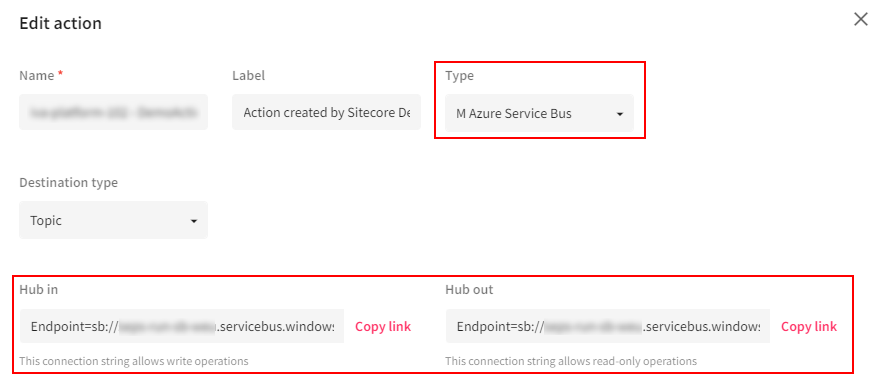
-
CHServiceBusSubscription - あなたのSitecoreサブスクリプションの名前。
-
CHSearchPage - 例えば、DAMアセットを選択するために使いたいSearchページのURI https://mysandbox.stylelabs.io/en-us/sitecore-dam-connect/approved-assets。
コネクタの設置と設定
コネクタの取り付けを実行し、設定を適用するには:
-
管理者権限でPowerShellウィンドウを開きます。
-
ローカルフォルダに移動してください。例えば:
cd "C:\Temp\SCCHInstallation"
-
次のコマンドを実行します:
az account set –subscription “
” -
準備済みのパラメータで次のコマンドを実行します:
.\Deploy.ps1 -ResourceGroupName "
" -WebAppName " " -WdpPackagePath "C:\Temp\SCCHInstallation\Sitecore.Connector.ContentHub.WDP.5.2.0-r00328.4145.scwdp.zip" -CHClientId " " -CHClientSecret " " -CHUserName " " -CHPassword " " -CHUri "https://mysandbox.stylelabs.io/" -CHServiceBusEntityPathIn " " -CHServiceBusSubscription " " -CHServiceBusEntityPathOut " " -CHSearchPage "https://mysandbox.stylelabs.io/en-us/sitecore-dam-connect/approved-assets" !注このコマンドはCMとCD Azure PaaS Web Applicationsの両方に対して実行する必要があります。
-
SCCHのDAM機能を使う場合、コネクターがContent Hubからアセットを選択できるようにし、すべてのホスト名をContent-Security-Policyタグに追加してください。
!注CMPまたはDAMを有効にしていることを確認してください。
インストールエラーのトラブルシューティング
既存のAzure PaaS環境にSCCHをインストールする際に、以下のエラーに遭遇する可能性があります。
エラー「System.Runtime.CompilerService.Unsafe」を読み込めませんでした
このエラーは、Azure redisキャッシュを設定したときに発生することがあります。バージョン4.0.4.1でバージョン競合エラーが出た場合System.Runtime.CompilerService.Unsafe 、webconfigファイルに以下のノードを追加してください: