Script types
When creating a web script, you must select the script type.
Action scripts
This type of script is the only script type that can be used by actions and triggers. These scripts are the most commonly used scripts, due to their capacity to cover multiple use cases. When used with Triggers, Actions can run Action scripts either In Process (immediately) or In Background.
Action script flow
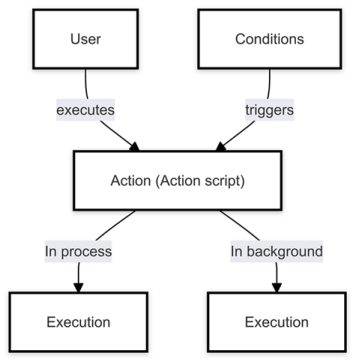
Other types of scripts
There are various other script types available as detailed in the following table.
| Script type | Description |
|---|---|
| Metadata processing | The system processes an asset through the processing worker, then runs a metadata processing script before completing the final execution step. |
| User pre-registration | User pre-registration scripts are executed before a new user is created. |
| User post‑registration | User post-registration scripts are executed after the new user is created. |
| User sign-in | User sign-in scripts are run every time a user logs into the application. Warning The User sign-in script might lock users out if it contains inconsistent user validations or other runtime errors. You can resolve this lock-out by de-activating the script using the REST API or SDK. |
| Shared | You use shared scripts to maintain and reuse commonly used code in a separate script that can be referenced by one or more scripts of any type. Note When building a shared script, all dependent scripts (those that reference the shared script) will be rebuilt as well, to keep the integrity of the entire dependency chain. The shared script can only be published if all scripts compile successfully. |
We recommend that you don't use the In Process Action scripts for UI-related interactions or for any time-consuming operations.
You can run action scripts during the following phases:
-
Pre-commit - in this phase, Action scripts are run before the triggering event. For example, if the triggering event is Entity modification, the Action script is run before the entity is modified. Pre-commit Action scripts can be used to populate default values.
ImportantThe Pre-commit phase is the only phase where scripts can modify the event's data.
-
Security - in this phase, Action scripts are run when the application asserts the triggering user's permissions. Security Action scripts can be used to perform additional security checks and to throw a SecurityException. For example, if the triggering event is Entity modification, the Action script is run when the application asserts that the triggering user is allowed to modify the entity.
-
Validation - in this phase, Action scripts are run when the application validates the triggering event's data. Validation Action scripts can be used to perform additional validations and to throw a ValidationException. For example, if the triggering event is Entity modification, the Action script is run when the application validates the entity's modified values.
-
Audit - in this phase, Audit Action scripts are run after the triggering event's data is finalized. Audit Action scripts can be used to log audit messages to internal or external logging systems.
-
Post - in this phase, Action scripts are run after the triggering event is finalized.