
Submit ideas for new Marketplace apps
The Marketplace lets the entire Sitecore community submit ideas for new applications. Each idea describes a feature or capability that, if developed into a Marketplace app, could address a specific need within SitecoreAI.
Any Sitecore Cloud Portal organization team member can submit ideas, view their progress, and upvote them to bring visibility to the most wanted Marketplace apps. Each Cloud Portal team member can upvote an idea once while it is in the Requested or Planned status. App ideas with the most upvotes get prioritized for development by Sitecore and its trusted partners.
If you're developing a public Marketplace app that implements an idea, link the app to the idea to increase visibility for both your app and your developer profile.
Each Cloud Portal organization can submit up to 50 ideas. When a user belongs to multiple organizations, the idea counts against the organization they were logged into when they submitted the idea.
If your organization has submitted 50 app ideas and needs to submit more, create a support case in the Cloud Portal.
View app ideas
To view all Marketplace app ideas:
- In the Cloud Portal, click Marketplace, and in the left-hand sidebar, in the App ideas and requests section, click Share your ideas. The Share your app ideas page appears, displaying a list of all existing app ideas.
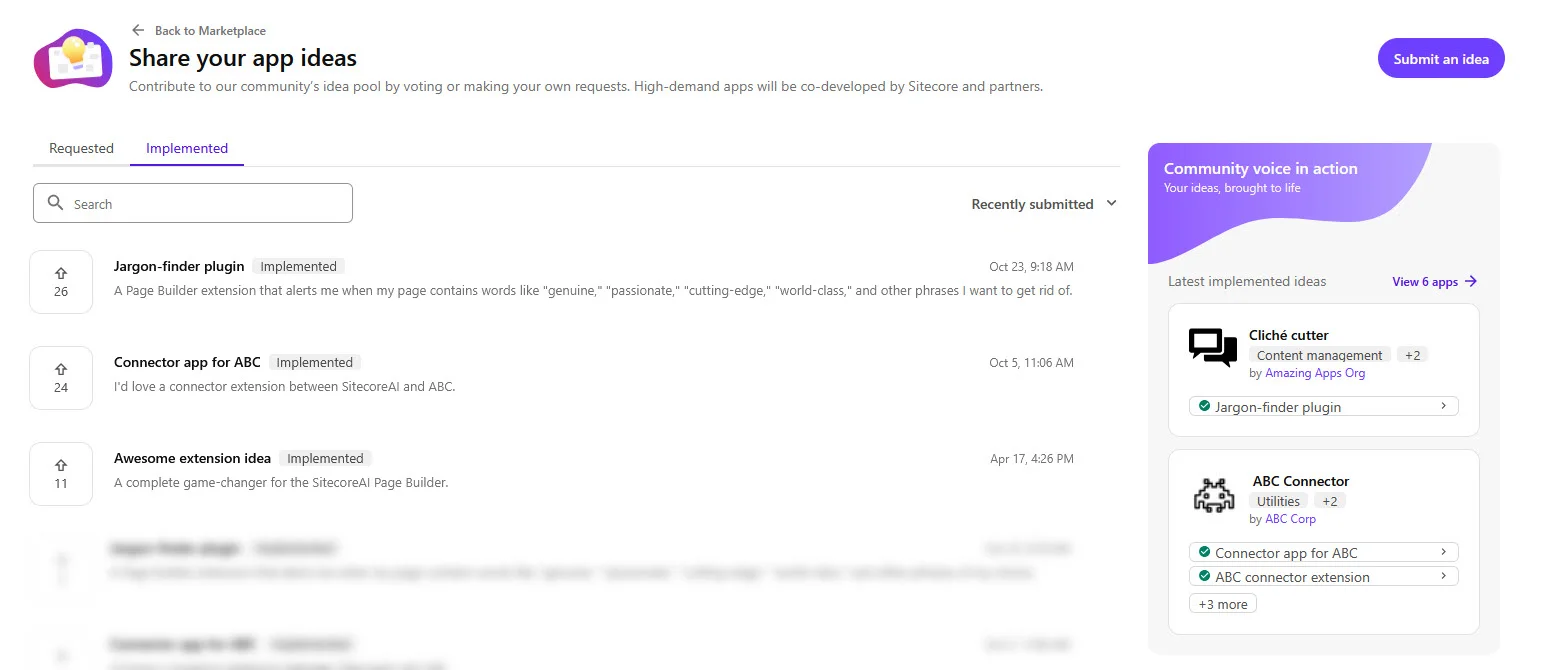
App idea statuses
An app idea's status shows whether a developer is building an app for it or a published app implements it. The status changes automatically based on the apps linked to the idea:
- Requested - no app is linked to the idea. Requested ideas do not display a status label.
- Planned - a developer has linked an app to the idea, but the app has not been published yet. You can still upvote the idea.
- Implemented - Sitecore has confirmed that a linked app implements the idea, and the app is published in the public Marketplace. Voting is disabled for implemented ideas.
If a linked app is deleted or suspended, the idea's status changes based on its remaining linked apps. If no linked app remains, the idea returns to the Requested status.
Find apps that implement an idea
On the Share your app ideas page, the Community voice in action section highlights the most recently published Marketplace apps that implement community ideas.
To find apps that implement an idea:
- On the Share your app ideas page, click Implemented to list ideas that a Marketplace app already implements.
- Click the idea you're interested in.
- On the idea details page, in the Inspired by this idea section, find a published app that implements the idea. You can then find the app in the Marketplace.
Submit an app idea
To submit an idea for a new Marketplace app:
-
On the Share your app ideas page, click Submit an idea.
-
In the Submit an idea modal, in the Idea title field, enter a short title that summarizes your app idea.
The maximum length for the title is 100 characters.
-
In the Description field, describe your app idea in detail.
The minimum length for the description is 100 characters. The maximum length is 2500 characters.
-
Click Submit.
The app idea immediately appears in the list of ideas for everyone in the Sitecore community to view and upvote.
Edit or delete your app idea
You can edit or delete an app idea you previously submitted if it has no upvotes yet. After the idea receives the first upvote, it's no longer possible to edit or delete the idea.
If you're part of multiple organizations, you must be logged in to the same organization where you submitted the idea to edit or delete it.
To edit or delete an app idea:
- On the Share your app ideas page, click your app idea.
- Depending on the change you want to make:
- To edit the idea, click Edit , make your changes, and then click Accept .
- To delete the idea, click Delete .
- To return to the list of app ideas, click Back to ideas.
Upvote an app idea
You can upvote an app idea in the Requested or Planned status to show interest and bring visibility to it. You cannot upvote Implemented ideas.
To upvote an app idea:
-
On the Share your app ideas page, click the upvote button to the left of the idea.
NoteTo undo your vote, click the upvote button again. You cannot undo your vote on Implemented ideas.
Share the link to an idea
You can copy the URL of an app idea to your clipboard to easily share it with other Sitecore Cloud Portal users.
To share the link to an idea:
-
On the Share your app ideas page, hover over the app idea you want to share, and click Share link.
The URL is immediately copied to your clipboard. Any logged-in Cloud Portal user can access the app idea by its URL, regardless of which organization they're logged in to.
Search existing ideas
You can search existing app ideas to quickly check if an idea similar to yours has already been submitted.
To search existing app ideas:
-
On the Share your app ideas page, in the search field, start typing a word you're looking for.
Only ideas that contain the search word in the title or description will display. Search results include ideas in all statuses, regardless of the selected status filter.
Filter ideas by status
You can filter app ideas by status to find requested, planned, or implemented ideas.
To filter ideas by status:
- On the Share your app ideas page, use the status filter to view Requested, Planned, or Implemented ideas.
Sort ideas
App ideas are sorted by most recent submissions by default. You can change sorting to list ideas by most votes instead.
To change sorting:
- On the Share your app ideas page, click the Recently submitted or Top voted button to the right of the search field.
- Depending on what you want to sort by, select one of the options:
- Recently submitted - to sort ideas by most recent submissions.
- Top voted - to sort ideas by most votes.