1. Developer guides

Analyze page content using brand review

Version: 0.4

In this walkthrough, you combine multiple GraphQL queries with the Brand Review REST API to build a content analyzer that evaluates page content against brand guidelines. When the SitecoreAI Page builder user clicks a button, your app retrieves the site structure, fetches all page content and data sources, extracts meaningful text, and generates a comprehensive brand compliance review.

Consider building such an interaction if you're building an app that helps content authors ensure their content complies with brand standards. For more information, see example scenarios for using the Brand Review REST API in your Marketplace app.
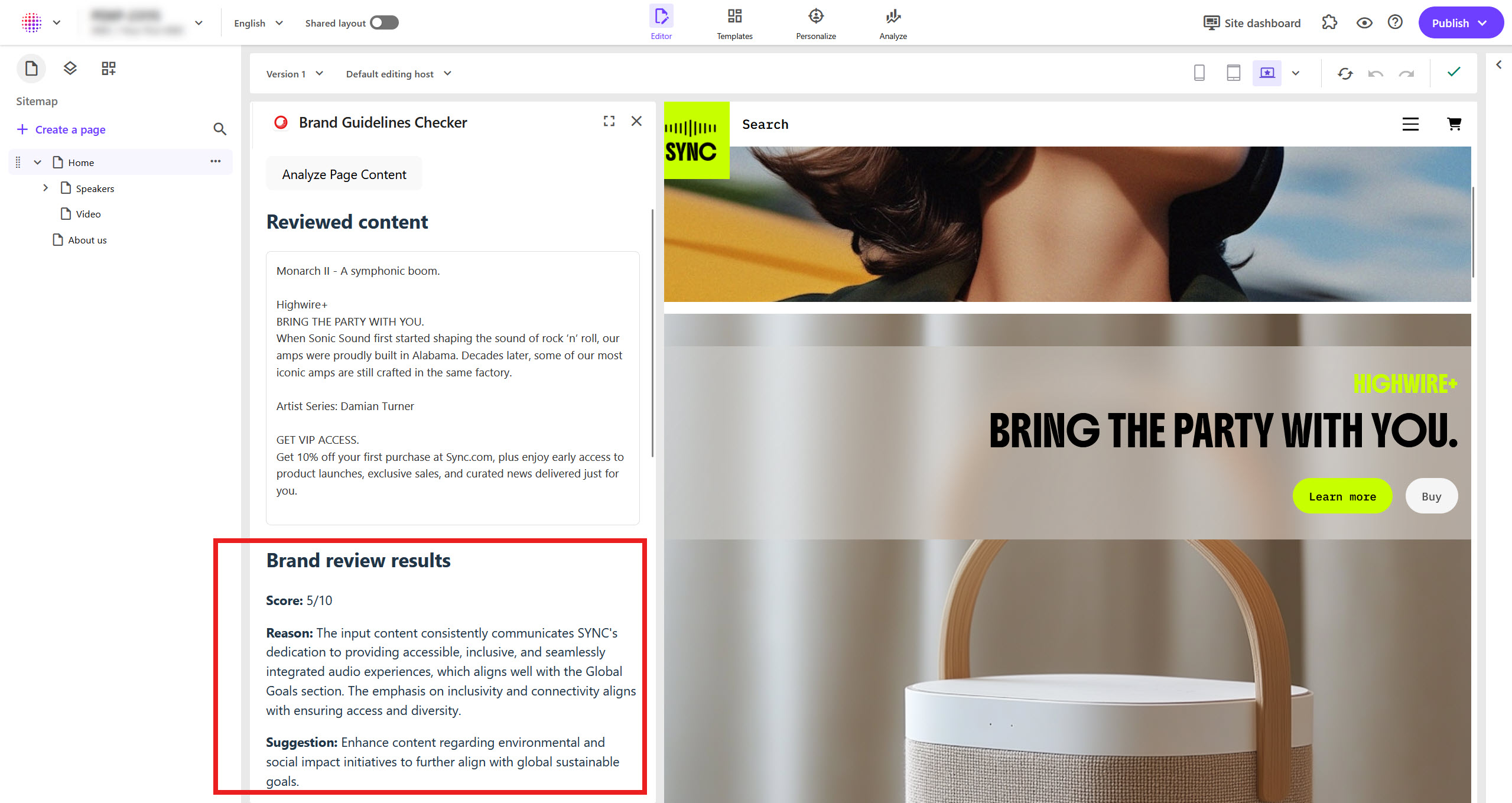
An example Marketplace app displays the evaluation results of some page content.

This walkthrough describes how to:

Before you begin
  • Complete the SDK quick start and initialize the xmc and ai packages.

    In this walkthrough, you update the code you added to your project in the quick start.

  • Open your Marketplace app in the SitecoreAI Page builder context panel extension point.

  • We recommend that you familiarize yourself with single operations, such as making a GraphQL query and making a Brand Review API request.

  • Retrieve your brand kit ID and section IDs using the Brand Management REST API. You use these IDs to make requests to the Brand Review REST API from your Marketplace app.

Create components and set up state

Before you can analyze page content, you need to create the necessary components and set up state management to pass data between them.

To create the necessary components and set up state:

  1. In the src folder, create a component for the GraphQL queries, and another one for the brand review request. You'll update the file contents in the next procedure:

    src/
    ├── components/
    │   ├── GraphQLQuery.tsx
    │   └── BrandReview.tsx
  2. Update the file where you run the useMarketplaceClient hook by importing the new components, creating state variables for the content to review, the brand review results, and the page context, and then include the new components in the return statement:

  3. In the same file, in the Effect Hook, below the "application.context" query, subscribe to page events to reset the review results when the user opens a different page. This ensures the user can click the button again to analyze the new page:

    client.query("pages.context", {
      subscribe: true,
      onSuccess: (data) => {
        console.log("Page has been updated:", data);
        setPageContext(data);
        setBrandReviewResults(null);
        setContentToReview("");
      },
    })

Retrieve page content and send it for brand review

After creating the components and setting up state, you make a GraphQL query that retrieves detailed page content including data sources. Then, you send the content to the Brand Review REST API for brand review.

To retrieve page content and send it for brand review:

  1. In components/GraphQLQuery.tsx, create the query and render a button Analyze Page Content:

    // src/components/GraphQLQuery.tsx
    
    import { ClientSDK } from "@sitecore-marketplace-sdk/client";
    
    // Query: Get page contents
    const getPageContentsQuery = (pageId: string, pagePath: string) => ({
      query: `query GetPageContents {
      page: item(where: { itemId: "${pageId}" }) {
        itemId
        name
        path
    
        fields(ownFields: true, excludeStandardFields: true) {
          nodes {
            name
            value
          }
        }
      }
    
      dataFolder: item(
        where: {
          path: "${pagePath}/Data"
        }
      ) {
        itemId
        name
        path
        template {
          name
        }
    
        dataSources: children {
          nodes {
            itemId
            name
            path
            template {
              name
            }
    
            fields(ownFields: true, excludeStandardFields: true) {
              nodes {
                fieldId
                name
                value
              }
            }
    
            children {
              nodes {
                itemId
                name
                path
                template {
                  name
                }
    
                fields(ownFields: true, excludeStandardFields: true) {
                  nodes {
                    fieldId
                    name
                    value
                  }
                }
              }
            }
          }
        }
      }
    }`,
    });
    
    export default function GraphQLQuery({
      appContext,
      client,
      pageContext,
      setContentToReview,
      setBrandReviewResults,
    }: {
      appContext: any;
      client: ClientSDK | null;
      pageContext: any;
      setContentToReview: (content: string) => void;
      setBrandReviewResults: (results: any) => void;
    }) {
      const makeGraphQLQuery = async () => {};
    
      return <button onClick={makeGraphQLQuery}>Analyze Page Content</button>;
    }
    
  2. Below the query and above the default function, paste the following helper functions that collect and sanitize meaningful text from a page:

    // Strip HTML tags from rich text fields, preserving line breaks
    function stripHtml(html: string): string {
      let text = html.replace(/<style[^>]*>[\s\S]*?<\/style>/gi, "");
      text = text.replace(/<meta[^>]*\/?>/gi, "");
      text = text.replace(/<\/(p|div|h[1-6]|li|tr|blockquote)>/gi, "\n");
      text = text.replace(/<br\s*\/?>/gi, "\n");
      const div = document.createElement("div");
      div.innerHTML = text;
      const result = div.textContent || div.innerText || "";
      return result.replace(/\n{3,}/g, "\n\n").trim();
    }
    
    // Check if a value is a Sitecore ID (e.g. {DD569624-99A3-4EE9-A1E9-25D6EFF74DFD})
    function isGuid(value: string): boolean {
      return /^\{?[0-9a-f]{8}-[0-9a-f]{4}-[0-9a-f]{4}-[0-9a-f]{4}-[0-9a-f]{12}\}?$/i.test(
        value.trim(),
      );
    }
    
    // Extract meaningful text from a field's raw value
    function extractFieldText(rawValue: string): string {
      const cleanValue = stripHtml(rawValue).trim();
      if (!cleanValue || isGuid(cleanValue)) {
        return "";
      }
      return cleanValue;
    }
    
    // Collect text from an array of field nodes
    function collectTextFromFields(
      fieldNodes: any[] | undefined,
      output: string[],
    ): void {
      fieldNodes?.forEach((field: any) => {
        if (field.value) {
          const text = extractFieldText(field.value);
          if (text) output.push(text);
        }
      });
    }
  3. In the makeGraphQLQuery function, retrieve the Context ID from the application context, and information about the current page from the page context:

    // Get the Sitecore Context ID from the application context:
    const sitecoreContextId = appContext.resourceAccess?.[0]?.context.live;
    
    // Check if the Sitecore Context ID is available:
    if (!sitecoreContextId) {
      console.error(
        "Sitecore Context ID not found in application context. Make sure your app is configured to use SitecoreAI APIs."
      );
      return;
    }
    
    // Get current page info from the page context:
    const pageId = pageContext?.pageInfo?.id;
    const pagePath = pageContext?.pageInfo?.path;
    
    // Page information check
    if (!pageId || !pagePath) {
        console.error(
        "Page context not available. Make sure you are in the Page builder.",
        );
        return;
    }
  4. Immediately below the page information check, add a try-catch block. This block makes the GraphQL request, combines the page contents into a single string, and generates the brand review for that string:

    try {
        // Get contents of the currently opened page
        const response = await client?.mutate("xmc.authoring.graphql", {
        params: {
            query: {
            sitecoreContextId,
            },
            body: getPageContentsQuery(pageId, pagePath),
        },
        });
    
        const pageContents: any = response?.data?.data;
    
        // Extract text content from the page and its data sources
        const textContent: string[] = [];
    
        // Extract from the page's own fields
        collectTextFromFields(pageContents?.page?.fields?.nodes, textContent);
    
        // Extract from data source fields and their nested children
        pageContents?.dataFolder?.dataSources?.nodes?.forEach(
        (dataSource: any) => {
            collectTextFromFields(dataSource.fields?.nodes, textContent);
    
            dataSource.children?.nodes?.forEach((child: any) => {
            collectTextFromFields(child.fields?.nodes, textContent);
            });
        },
        );
    
        // Combine all text content into a single string
        const contentToReview = textContent.join("\n\n");
        setContentToReview(contentToReview);
    
        if (!contentToReview) {
        console.warn("No text content found on this page.");
        return;
        }
    
        // Generate brand review with the extracted content
        const brandReviewResponse = await client?.mutate(
        "ai.skills.generateBrandReview",
        {
            params: {
            query: {
                sitecoreContextId,
            },
            body: {
                brandkitId: "<YOUR_BRAND_KIT_ID>",
                input: {
                content: contentToReview, // The extracted text content to review
                },
                sections: [
                {
                    sectionId: "<YOUR_BRAND_KIT_SECTION_ID>",
                },
                ],
            },
            },
        },
        );
    
        console.log("Brand review response:", brandReviewResponse);
    
        // Store the brand review results
        if (brandReviewResponse?.data) {
        setBrandReviewResults(brandReviewResponse.data);
        }
    } catch (error) {
        console.error("Error making query:", error);
    }

    Replace the brand kit placeholders with your brand kit details. To retrieve these details, use the Brand Management REST API.

Display the brand review

After creating all the API requests, you display the brand review results to the user.

To display the brand review:

  1. In components/BrandReview.tsx, create a component to display the brand review response:

    // src/components/BrandReview.tsx
    
    interface Field {
      fieldId: string;
      score: number;
      reason: string;
      suggestion: string;
    }
    
    interface Section {
      sectionId: string;
      score: number;
      reason: string;
      suggestion: string;
      fields: Field[];
    }
    
    export default function BrandReview({
      reviewResults,
      contentToReview,
    }: {
      reviewResults: Section[] | null;
      contentToReview: string;
    }) {
      if (!reviewResults) return null;
    
      return (
        <div>
          <h2>Reviewed content</h2>
          {contentToReview && (
            <div
              style={{
                marginBottom: "24px",
                padding: "12px",
                borderRadius: "6px",
                border: "1px solid #e0e0e0",
              }}
            >
              <div
                style={{ whiteSpace: "pre-wrap", fontSize: "14px", color: "#333" }}
              >
                {contentToReview}
              </div>
            </div>
          )}
    
          <h2>Brand review results</h2>
    
          {reviewResults.map((section) => (
            <div key={section.sectionId} style={{ marginBottom: "24px" }}>
              <p>
                <strong>Score:</strong> {section.score}/10
              </p>
              <p>
                <strong>Reason:</strong> {section.reason}
              </p>
              <p>
                <strong>Suggestion:</strong> {section.suggestion}
              </p>
    
              {section.fields?.length > 0 && (
                <div
                  style={{
                    marginTop: "12px",
                    paddingLeft: "16px",
                    borderLeft: "2px solid #ddd",
                  }}
                >
                  <h4>Field Details</h4>
                  {section.fields.map((field) => (
                    <div key={field.fieldId} style={{ marginBottom: "12px" }}>
                      <p>
                        <strong>Score:</strong> {field.score}/10
                      </p>
                      <p>
                        <strong>Reason:</strong> {field.reason}
                      </p>
                      <p>
                        <strong>Suggestion:</strong> {field.suggestion}
                      </p>
                    </div>
                  ))}
                </div>
              )}
            </div>
          ))}
        </div>
      );
    }
  2. Save all your file changes and start your app.

  3. In the SitecoreAI Page builder, open your web browser's Network tab, refresh the page, then open your Marketplace app.

  4. In the Marketplace app, click Analyze Page Content.

  5. On the Network tab, find POST requests made to graphql? and to generate?. These are the requests you made to the GraphQL API and the Brand Review API when you clicked the button in your app.

  6. Your app displays the brand review.

Next steps

You've now built a content analyzer that combines multiple GraphQL queries with the Brand Review REST API to evaluate page content against brand guidelines.

Next, you can:

  • Explore the Authoring and Management GraphQL API to make other complex queries and mutations. For example, to update the contents of the page using the recommendations returned by the Brand Review API.

    Then, develop the functionality of your app that reloads the canvas after updating the page contents.

If you have suggestions for improving this article, let us know!