- Marketplace SDK concepts
Understanding mutations
Mutations let you create, update, and delete data in Sitecore from your Marketplace app, and they are a common development task you perform with the Marketplace SDK.
Commonly used mutations include reloading the page canvas, opening a different page in response to some other action that happens in the SitecoreAI Page builder, making GraphQL queries, and making POST, PUT, PATCH, and DELETE requests to Sitecore REST APIs.
Note the following about mutation operations:
-
Extension points - some operations are only available in certain extension points. For example, page-related mutations are only available in the SitecoreAI Page builder.
-
API access - operations with Sitecore APIs require that you install the SDK package associated with those APIs.
If your app architecture supports server-side API calls to AI skills APIs, you can use the experimental functions to access those APIs directly from the server.
If your app architecture supports server-side API calls to AI skills APIs, you can use the experimental functions to access those APIs directly from the server.
Common mutations
This section describes commonly used mutations and example responses. To make these mutations, refer to the developer guides.
SitecoreAI Authoring and Management GraphQL API
Interacting with the Authoring and Management GraphQL API lets you manage SitecoreAI content. For example, retrieve the contents of the current page, modify it, then update it in SitecoreAI.
All requests to SitecoreAI APIs must contain the Context ID of your SitecoreAI environment, which you can retrieve from the application context.
To use this API in your app, refer to the following developer guides:
Here's an example request and response:
The response is nested in data.data:
SitecoreAI Sites REST API
Interacting with the SitecoreAI Sites REST API lets you manage SitecoreAI sites, site collections, jobs, languages, and more.
All requests to SitecoreAI APIs must contain the Context ID of your SitecoreAI environment, which you can retrieve from the application context.
To use this API in your app, refer to the Make a SitecoreAI Sites REST API request developer guide.
Here's an example request and response:
The response is nested in data:
Brand Review REST API
Interacting with the Brand Review REST API lets you add AI-powered content evaluation features to your Marketplace app, helping content authors prepare on-brand texts, images, and files. The API evaluates whether input content and assets comply with the guidelines defined in a brand kit. For the evaluation, you decide whether to use all brand kit sections, a combination of sections, or only one section.
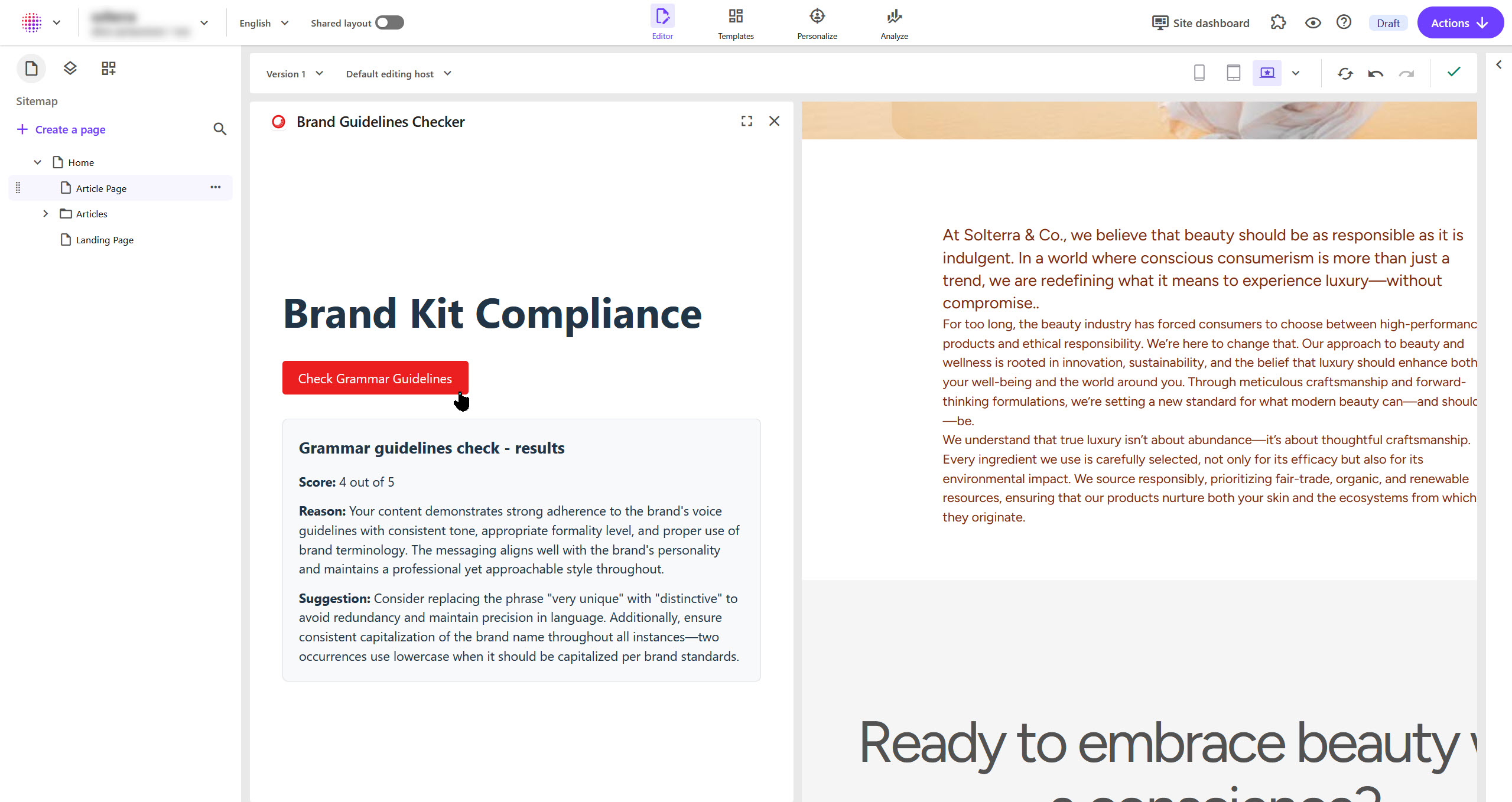
Consider a scenario where a content author adds new content to a page. After making the changes, the content author clicks the Check Grammar Guidelines button in your Marketplace app. At this point, your Marketplace app makes a request to the Brand Review API to evaluate if the newly added content is consistent with the writing style and tone defined by your brand, as defined in the Grammar Guidelines section of the brand kit. The API then returns an evaluation score, a reason for the score, and suggestions for improvements. Finally, your Marketplace app displays the API response to the content author. This enables the content author to improve their content and make it compliant with the brand guidelines.
All requests to AI skills APIs must contain the Context ID of your SitecoreAI environment, which you can retrieve from the application context.
To use this API in your app, refer to the following developer guides:
Here's an example request and response:
Here's an example response, containing an evaluation score, a reason for the score, and suggestions for improvements for every brand kit section included in your request:
Here are more examples of what you can include in the body object.
-
To send an image for brand review:
-
To send a Base64 encoded image for brand review:
-
To send a document for brand review:
-
To send a document that requires authentication:
-
To combine text, images, and documents in a single request: