View silent test results
After you start a silent test for a decision model variant, you can view the results when the following requirements are fulfilled:
- An experiment is associated with the decision model that the decision model variant belongs to.
- The decision model variant is in a state of Test.
- Enough guests have visited your organization's site while the decision model variant is in a state of Test.
To view the results of a silent test:
-
On the navigation menu, click Decisioning.
-
In the list of all decision models, click the name of the Decision Model that contains the decision model variant.
-
On the Decision Model page, click the View Results link on any Variant Decision Model tile in the Test panel.
The test results display:
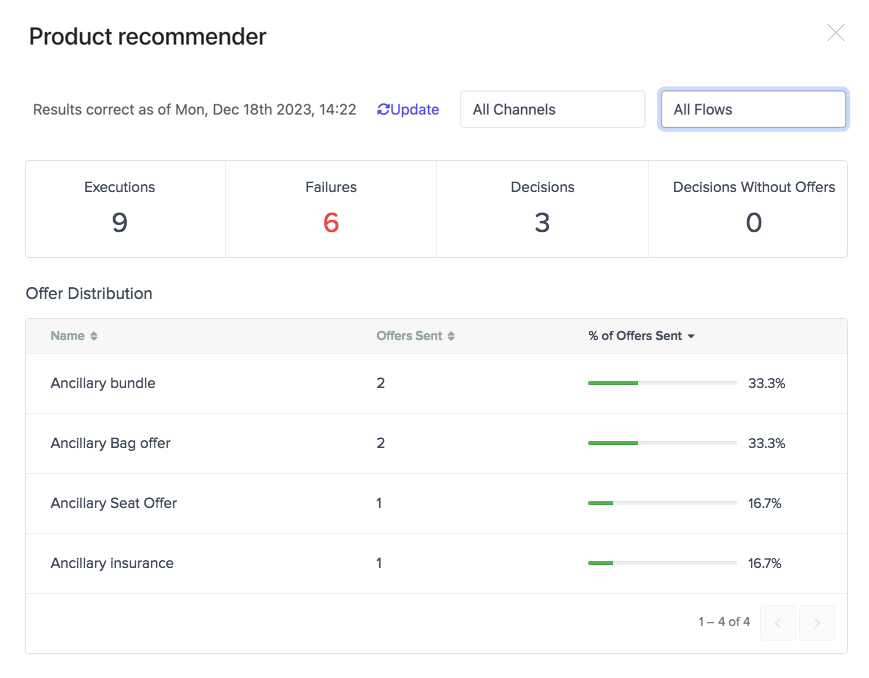
The silent test results provides these filters and data:
Screen item Description Update Click to refresh the results of the silent test. All Channels Filter the results of the test by channel. All Flows Filter the results of the test by all experiments or flows that are connected to the decision model to which the decision model variant belongs. Executions Number of flow executions that have used the decision model variant. Failures Number of flow executions that tried to use the decision model variant but failed. Decisions Number of decisions that returned offers from the decision model variant. Decisions Without Offers Number of decisions that didn't return offers from the decision model variant. Name Name of the offer that would have been shown to the guest. Offers Sent Number of specific offers that hypothetically would have been shown to the guest. % of Offers Sent Percentage of the specific offer that hypothetically would have been shown to the guest. -
Click
 to close the silent test dialog and return to the Decision Model page.
If you have suggestions for improving this article, let us know!