Sitecore Content Serialization
Sitecore Content Serialization (SCS) is the primary tool developers use to synchronize structural changes to items such as templates, renderings, layouts, and settings with application code in Sitecore AI.
In Sitecore AI, everything is an item. When developers change code that depends on templates or configuration items, those items must be versioned and deployed together with the code.
What serialization does
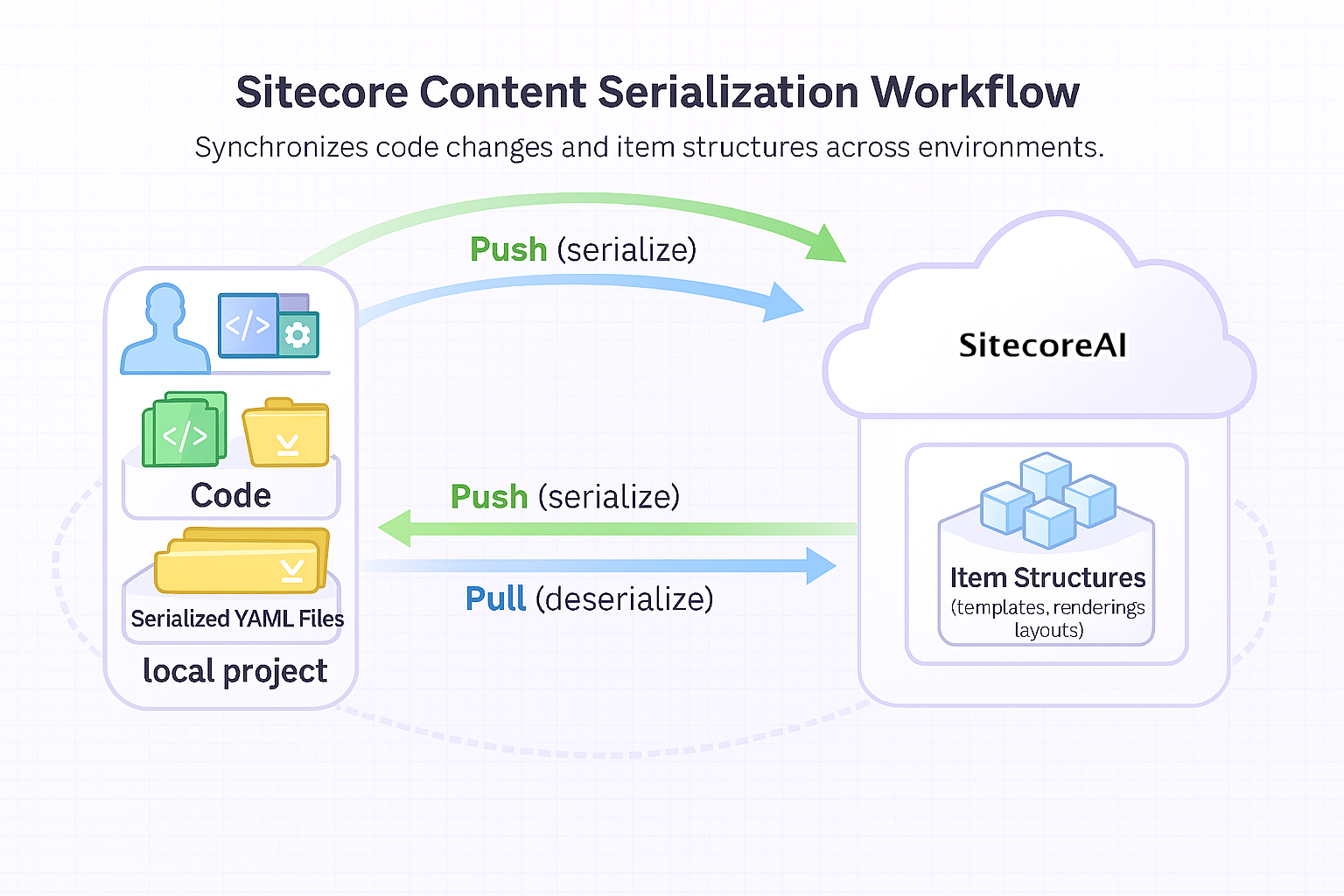
Serialization converts SitecoreAI items into YAML files that represent their structure and field values. These YAML files are stored on disk, typically in a project repository under source control.
With SCS, you can:
- Pull items from SitecoreAI to disk, creating or updating their YAML representation.
- Push items from disk to SitecoreAI, applying the definitions stored in source control.
This is bidirectional synchronization between:
- The SitecoreAI environment
- Your local project
- Your source control repository
When a developer modifies a structural item, for example, by updating a template, the item is pulled to disk as a YAML file. That file becomes part of the codebase and can be reviewed, versioned, and deployed alongside related code changes.
Pushing serialized items ensures that SitecoreAI environments reflect the item definitions stored in source control.
Why developers use serialization
Although serialization is often associated with content transfer in other systems, in SitecoreAI it serves a broader purpose.
Serialization is primarily used to:
- Synchronize structural item changes (templates, layouts, renderings, placeholder settings).
- Keep code and item definitions versioned together.
- Enable teams of developers to work consistently.
- Ensure environments remain aligned during deployment.
Without serialization:
- Template changes made in one environment may not exist in another.
- Code might depend on fields or templates that are missing.
- Teams can overwrite each other’s structural changes.
Serialization turns item definitions into version-controlled artifacts, just like code.
What serialization ensures
When you change code and also change a template that the code depends on:
- Serialization makes sure both changes travel together.
- If you deploy the code, the template change goes with it.
- If another developer pulls the latest code, they also get the template structure.
- Across all environments (development, test, and production) the structure stays consistent.
How serialization fits into the workflow
Serialization is controlled by configuration files in the repository used to manage serialized items (for example, a backend solution when running Sitecore AI locally):
sitecore.json(project-level configuration)*.module.jsonfiles (module-level item definitions)
These files define:
- Which items are included
- How they are scoped
Typical developer flow
-
Modify a structural item in SitecoreAI
For example, add a new field to a template.
-
Pull the item to disk
The updated template is stored as a YAML file in the local project.
-
Commit the YAML file to source control
The template structure is versioned alongside the code that depends on it.
-
Apply code and serialized item changes to other environments
Code and item changes are applied together in Sitecore AI.
This flow ensures:
- Code and item structures stay aligned.
- Developers work from the same definitions.
SCS stores serialized items as YAML files in your project (by default under a serialization path defined per module). These files are committed to source control and become part of the deployment process.
For a complete list of configuration properties, see Sitecore Content Serialization configuration reference.
Manual and automatic synchronization
You can synchronize items in two ways:
-
Manual - Using Sitecore CLI, you can:
- Pull items from Sitecore AI
- Push items to Sitecore AI
-
Automatic (watch mode) - You can enable a watch command in Sitecore CLI that monitors changes and automatically pulls updated items to disk during development.
Sitecore CLI works on Windows, macOS, and Linux.
Using SCS with SitecoreAI environments
SCS connects to SitecoreAI via the Content Management API and supports:
- Pulling items from SitecoreAI to disk
- Pushing serialized YAML files to SitecoreAI
SCS defines what items are serialized and synchronized.
How serialized items are deployed in managed SitecoreAI environments is configured separately in the build configuration (for example, xmcloud.build.json in Accelerate scenarios).
Deployment options may include Items as Resources (IAR) – items deployed to the file system, typically for developer-controlled configuration.
Serialization defines the source of truth. Build configuration defines how that source of truth is applied during deployment.
Other contexts in which serialization is useful
Although primarily used for developer synchronization, serialization can also be used to:
- Back up structural items
- Move items between environments
- Share configuration between teams
- Promote specific structural item trees across instances
However, it is not intended for synchronizing individual media assets at scale.
What should be serialized
As a general principle:
- Serialize items created or modified by developers that code depends on.
- Do not serialize base items provided by the default Sitecore AI installation unless intentionally customizing them.
Typical items that require serialization include:
- Templates and branch templates
- Rendering items
- Layout definitions
- Placeholder settings
- Site root items
- Structural configuration under project folders
What should not be serialized
The Migration node at /sitecore/system/Modules/PowerShell/Script Library/Migration is a system-managed path. This node is automatically deleted and recreated by the platform during initialize operation when Pathway application is used.
- Do not store custom scripts under this path — they will be removed.
- Do not include this path in your serialization configuration (
.module.json) — IAR protection on this node will cause upload failures (502/504 errors). - Create custom PowerShell scripts under a separate, dedicated folder in the Script Library instead.