Compile the sample Commerce Engine
You can customize the Sitecore XC Engine, using the SDK package provided in the release package.
When you make changes to the Sitecore XC Engine (using the SDK), you must re-compile the Commerce Engine.
To compile and package the Sitecore XC Engine using the command line method (recommended):
-
Start a command prompt as administrator and go to the Sitecore Commerce Engine SDK root directory (that is, where you extracted the SDK zip file).
-
Run the following command:
dotnet.exe restore Customer.Sample.Solution.slnNoteThe default
dotnetpath is"C:\Program Files\dotnet\dotnet.exe". You must specify the solution name because there are two.slnfiles under the Engine SDK root directory. -
Run the following command:
dotnet.exe publish Customer.Sample.Solution.sln -o <output-dir>NoteMake sure that the installed version of the .NET Framework is the DevPack/SDK edition, not the Runtime edition. The
dotnet publishcommand fails if only the Runtime edition is installed. -
Zip the contents of the output folder (where you published the
Customer.Sample.Solution). Make sure that the root of the .ZIP file contains the compiled DLLs and folders, for example: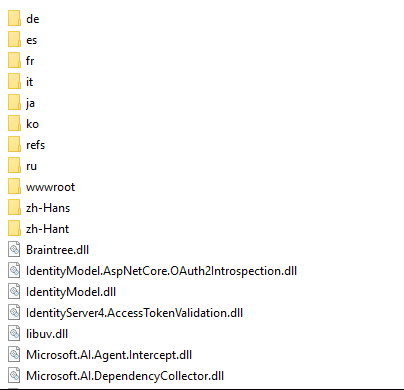
-
Copy the zipped
Sitecore.Experience.Commerce.Engine.*.zipfile to your deployment root.
To compile and package the Sitecore XC Engine using Visual Studio:
-
Launch Visual Studio.
-
From the
Sitecore Commerce Engine SDKfolder, open theCustomer.Sample.Solution.slnfile -
To build the solution, on the menu bar, click Build.
-
To publish the
Sitecore.Commerce.Engineproject to your file system, click Publish. -
Zip the contents of the output folder (where you published the
Customer.Sample.Solution. Make sure that the root of the .zip file contains the compiled DLLs and folders, for example: -
Copy the zipped
Sitecore.Experience.Commerce.Engine.*.zipfile to your deployment root.