Configure environments
You use environments to configure connections to Sitecore instances including authentication and authorization credentials. Environments are stored in the .sitecore/user.json file under the project root.
Create an environment
To create an environment:
-
In Sitecore Module Explorer, right-click Environments and click New Environment.
-
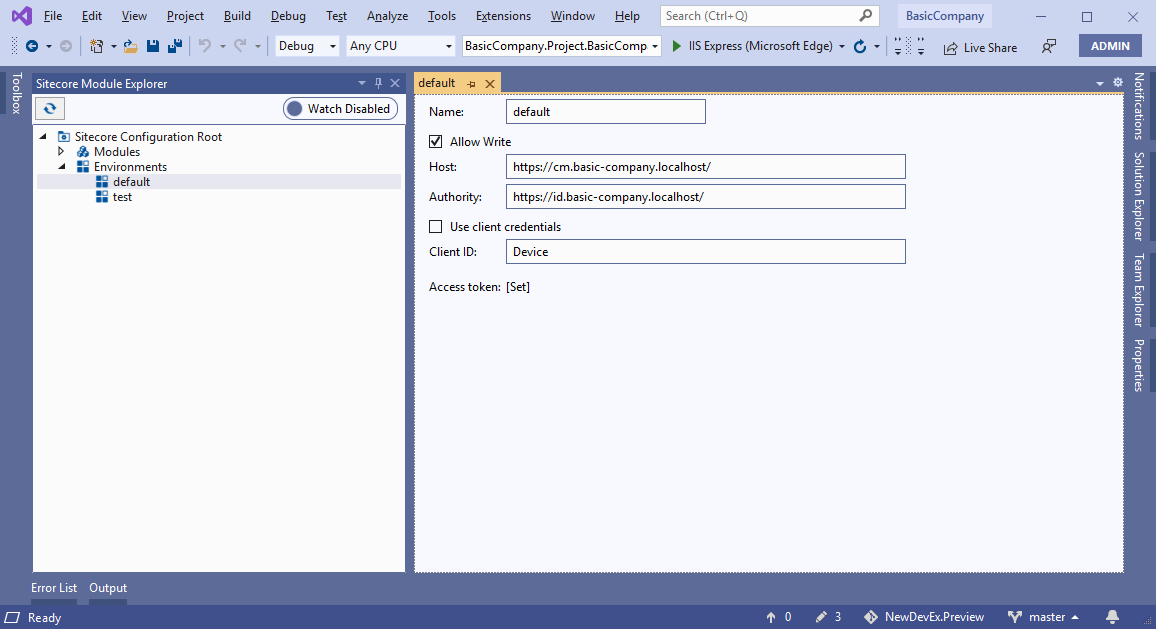
In the environment window, enter the following:
Field Content Name The name of the environment. NoteIf you name the environment
default, the Sitecore Command Line Interface uses this environment unless another is specified.Allow write Allow writing to the Sitecore instance. Host The URL of the Sitecore instance. Authority The URL of the Sitecore Identity Server or other identity service. Use client credentials Log in using OAuth2 client credentials. Client ID The client ID. See the Sitecore Command Line Interface login documentation for more details.
-
Save the environment.
Edit an environment
To edit an environment:
-
In Sitecore Module Explorer, double-click the environment.
-
In the environment window, edit the following:
Field Content Name The name of the environment. NoteIf you name the environment
default, the Sitecore Command Line Interface uses this environment unless another is specified.Allow write Allow writing to the Sitecore instance. Host The URL of the Sitecore instance. Authority The URL of the Sitecore Identity Server or other identity service. Use client credentials Log in using OAuth2 client credentials. Client ID The client ID. See the Sitecore Command Line Interface login documentation for more details.
Remove an environment
To remove an environment:
- In Sitecore Module Explorer, right-click the environment and click Remove Environment.
- In the dialog box, click Yes to remove the environment.