Configure includes
Version:
Includes are children of modules and describe what Sitecore instance items to serialize.
Create an include
To create an include:
-
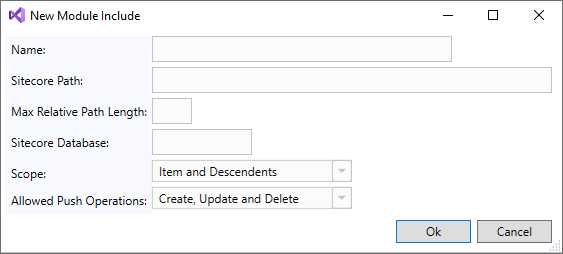
In Sitecore Module Explorer, right-click a module and click Add Include.
-
In the New Module Include window, enter the following:
Field Content Name The name of the rule that becomes a folder name in your file system. Sitecore Path The path to the relevant Sitecore instance items. Max Relative Item Path Length The maximum relative item path length for this include. Sitecore Database The database containing the items. Scope The scope of how deep into the item tree structure to apply the include. Allowed Push Operations How the items can be created, updated, or deleted. See the Sitecore Content Serialization structural overview and the Sitecore Content Serialization configuration reference for more details.
-
Click OK.
Edit an include
To edit an include:
-
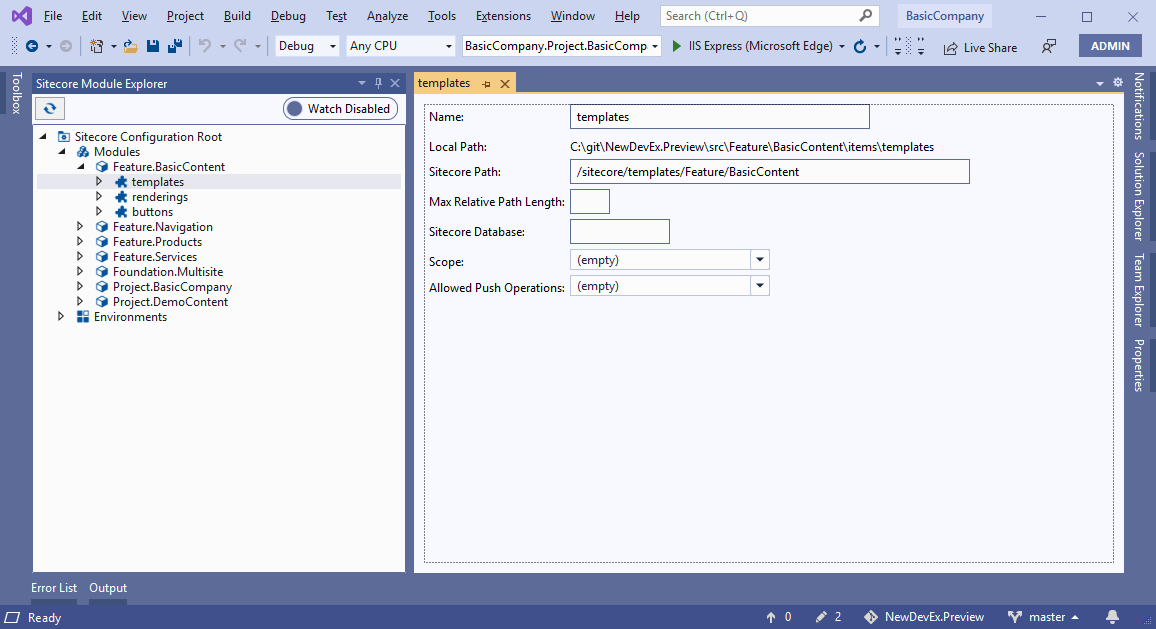
In Sitecore Module Explorer, double-click the include.
-
In the include window, edit the following:
Field Content Name The name of the rule that becomes a folder name in your file system. Sitecore Path The path to the relevant Sitecore instance items. Max Relative Item Path Length The maximum relative item path length for this include. Sitecore Database The database containing the items. Scope The scope of how deep into the item tree structure to apply the include. Allowed Push Operations How the items can be created, updated, or deleted. See the Sitecore Content Serialization structural overview and the Sitecore Content Serialization configuration reference for more details.
-
Save the include.
Remove an include
To remove an include:
- In Sitecore Module Explorer, right-click the include and click Remove Include.
- In the dialog box, click Yes to remove the include.
If you have suggestions for improving this article, let us know!