Configure module globs
Version:
The search paths used to locate your modules are called module globs. You must configure the module globs for Sitecore Content Serialization to find them. Typically, a solution has a file system structure like the following:
To configure module globs:
-
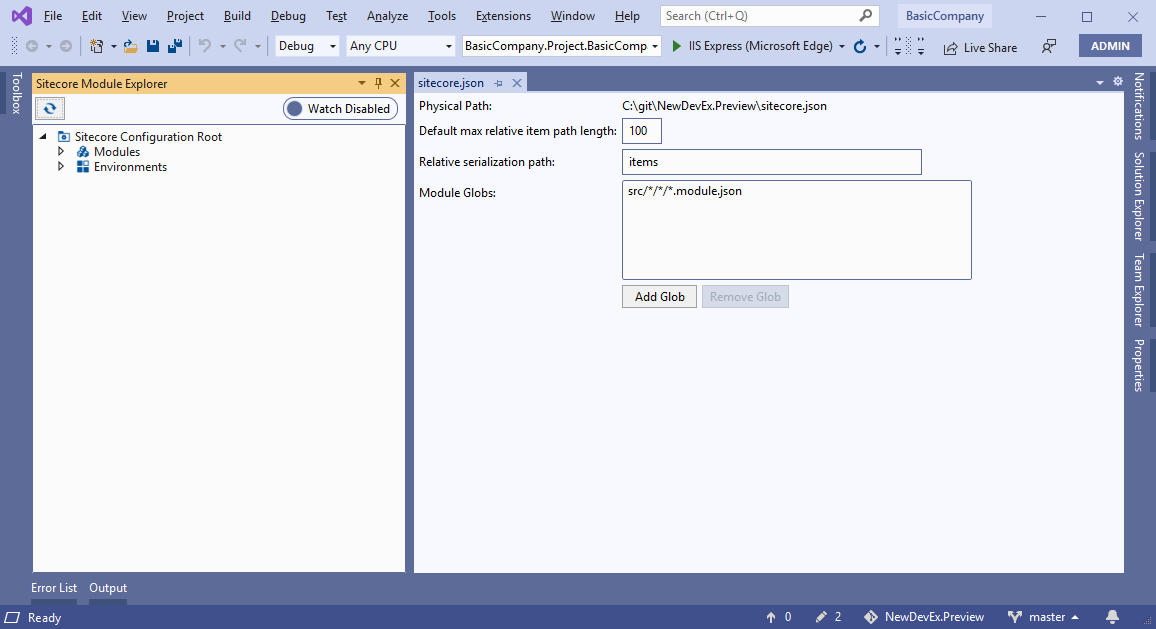
In Sitecore Module Explorer, double-click Sitecore Configuration Root.
-
In the Sitecore Configuration Root window, edit the following:
Field Content Default max relative item path length Configure the maximum relative item path length allowed in the file system. Relative serialization path Configure the relative serialization path for items in all modules. Module Globs Add the paths to your modules. You can use wildcards for this. For example, to tell SCS that you keep *.module.jsonfiles located in/srcsubfolders, addsrc/*/*.module.json. Or, if you want to keep module files in thesrc/Feature/BasicCompany/Accordion/subfolder, addsrc/*/*/*/*.module.json. -
Save the Sitecore Configuration Root.
If you have suggestions for improving this article, let us know!