Sitecore Module Explorer
Version:
Sitecore Module Explorer lets you navigate Sitecore Content Serialization configuration files as items in a tree structure:
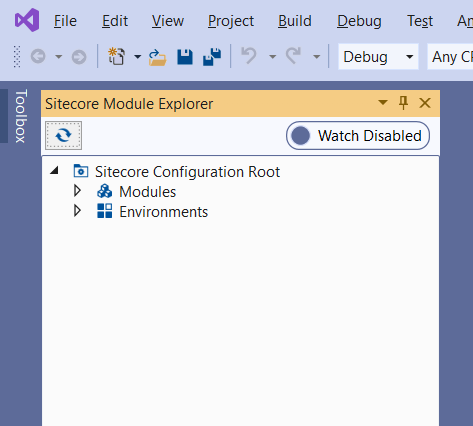
The Sitecore Module Explorer displays two buttons at the top:
| Button | Function |
|---|---|
| Refresh | Refreshes the tree structure. |
| Watch Enabled/Disabled | Turns Sitecore Content Service automatic serialization on and off. |
The tree structure in its initial state displays the following items:
| Item | Represents/contains |
|---|---|
| Sitecore Configuration Root | Represents the sitecore.json project root configuration file. |
| Modules | Contains all the configured modules that can be located by following the glob paths defined in the sitecore.json file. |
| Environments | Contains all the environments defined in the user.json file. |
You can double-click the items to edit them in a Visual Studio form or in the Visual Studio text editor. You can also right-click the items to open their context menus. Any item that is contained in a .json file has a View Code option in its context menu that lets you view and edit the raw file content.
If you have suggestions for improving this article, let us know!