Configure rules
In Sitecore Module Explorer, rules modify the behavior of includes. An include can have multiple rules, and the order of the rules dictates the order they are evaluated.
Create a rule
To create a rule:
-
In Sitecore Module Explorer, right-click on an include or on the child
Rules/folder and click Add Rule.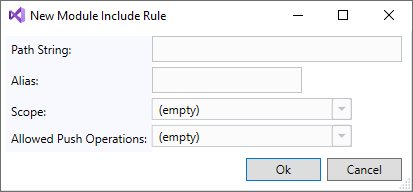
-
In the New Module Include Rule window, enter the following:
Field Content Path String The path to the relevant Sitecore instance items. Alias An optional alias to shorten the relative serialization path for this item. Scope The scope of how deep into the item tree structure to apply the rule. Allowed Push Operations How the items can be created, updated, or deleted. See the Sitecore Content Serialization structural overview and the Sitecore Content Serialization configuration reference for more details.
-
Click OK.
Edit a rule
To edit a rule:
-
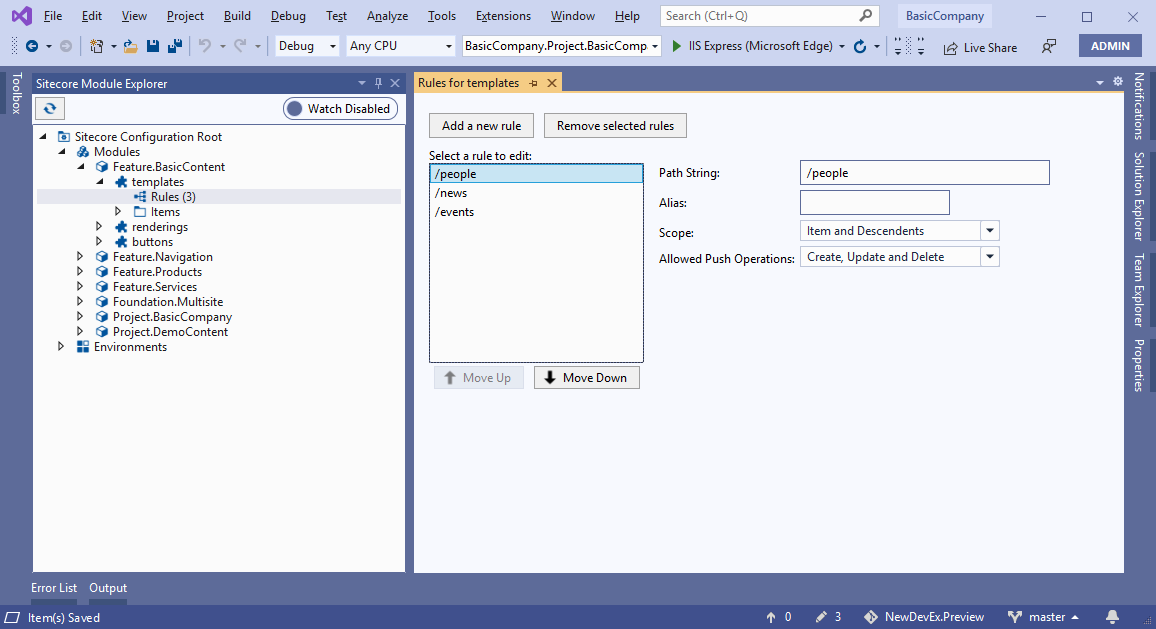
In Sitecore Module Explorer, in the module, in the include, double-click Rules.
-
In the Rules window, click the rule you want to edit and then edit the following fields:
Field Content Path String The path to the relevant Sitecore instance items. Alias An optional alias to shorten the relative serialization path for this item. Scope The scope of how deep into the item tree structure to apply the rule. Allowed Push Operations How the items can be created, updated, or deleted. See the Sitecore Content Serialization structural overview and the Sitecore Content Serialization configuration reference for more details.
-
Save the rule.
Click Move UpDown and Move Down to re-order the rules.
Remove a rule.
To remove a rule:
- In Sitecore Module Explorer, right-click the rule and click Remove Rule.
- In the dialog box, click Yes to remove the rule.