View your organization's identity rules
This topic describes how to view the identity rules for your organization's tenant.
Team members with an Organization Admin, Organization Developer, Organization Read Only, or Organization Owner role in Sitecore Cloud Portal can view identity rules.
You can do this after your organization's tenant is created and before you start sending events to Sitecore CDP. We recommend you familiarize yourself with identity resolution before reading this topic.
To view your organization's identity rules:
-
On the navigation menu, click
 , Identity rules.
 -
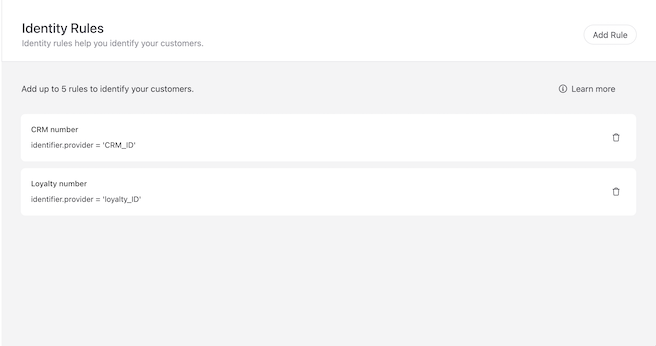
The Identity Rules screen displays the identity rules for your organization's tenant. Each identity rule has a human-readable name and a unique identifier. Sitecore CDP uses the string value of
identifier.providerto identify a guest as a customer. This must be the same name as theproviderattribute in theIDENTITYevent that your organization sends to Sitecore CDP. If it is not the same, Sitecore CDP can not successfully evaluate identity rules.In the following image, the organization uses two identity rules:
- CRM number - with
CRM_IDas theidentifier.provider. - Loyalty number - with
loyalty_IDas theidentifier.provider.
Sitecore CDP evaluates identity rule(s) in the order in which they display to determine if there is a matching guest profile. If Sitecore CDP does not find a match with the first listed identity rule, it evaluates the next, and so on. If no guest profiles are matched, Sitecore CDP assigns or retains a guest type of
visitor.Using this same example, your organization must send an
IDENTITYevent that contains anidvalue for either theCRM_IDorloyalty_IDattributes, for Sitecore CDP to identify a guest. The followingIDENTITYevent meets the required identity rules because it contains at least one of the requiredproviderattributes,CRM_IDorloyalty_ID:To view a more robust example of an
IDENTITYevent that meets the requirements of this organization's identity rules, you can view examples ofIDENTITYevents. - CRM number - with