Email conversion funnel
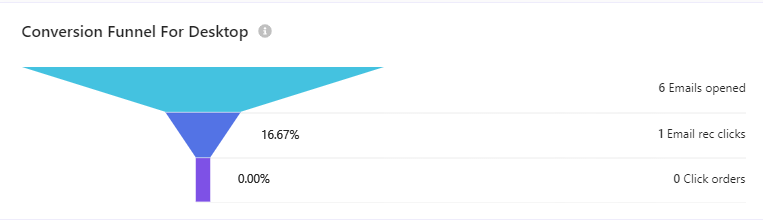
The Email conversion funnel report displays a purchase funnel related to several email campaigns or to a particular email campaign for mobile devices or desktop. The funnel metrics, in successive order and distinct colored segments, are view, clicks, click orders, and direct orders. Drop-off percentages and values measured through the funnel, are also displayed.
The following is a screenshot of an email conversion funnel on a desktop.
To export data, click  and then click Export Data.
Data filters
You can narrow down the data you see in reports using the filters at the top of the report dashboard or section. Changing these values regenerates the reports.
The following drop-down filters and options are available for this report:
- Date range - includes Yesterday, Last 7 days, Last 14 days, Last 30 days, and Customized range.
- Devices - includes Desktop, Tablet, Mobile, and Bot.
Metrics and KPIs
This report uses the following metrics and properties:
Emails opened - the number of emails opened from those sent.
Email recommendation clicks - the number of times visitors clicked one or more items in an email recommendation widget. This metric is also known as Email clicks.
Click-assisted orders - the number of orders from sessions or visits when a visitor purchased one or more products different from those clicked.