Content resolvers
When you create a component (rendering), you can use content resolvers to determine how to handle its data. Resolvers allow you to pull content from different areas of the content tree. For example, if the component data source points to an item, you can choose a content resolver that renders the fields of that item, or its child items. When you publish the component, the resolver determines which related data is pushed to Experience Edge.
Content resolvers are not supported when using Edge runtime publishing (v2).
In the Content editor, you can navigate to Sitecore/System/Modules/Layout Service/Rendering Content Resolvers to see the list of predefined resolvers; however, you don't need to open this list or configure the resolvers to use them. Also, most components don't require a content resolver definition. If no resolver is assigned to a component, by default, its data source fields are rendered.
The following content resolvers are not supported in SitecoreAI. Do not use:
-
Resolvers in the Experience Accelerator folder.
-
The Sitecore Forms resolver.
-
Custom content resolvers.
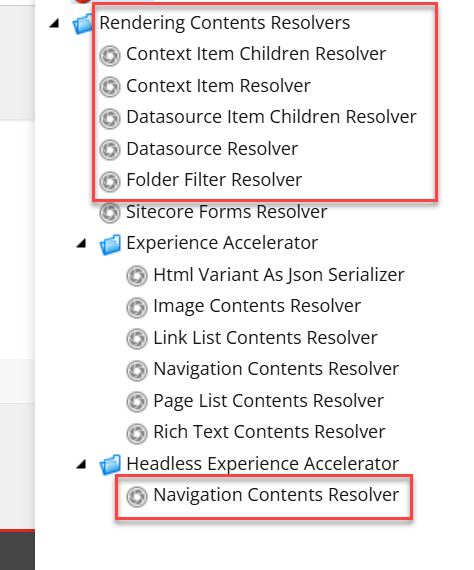
The following screenshot highlights the supported content resolvers in the Content editor:
The following content resolvers are supported in SitecoreAI:
Context Item Children Resolver
Retrieves all the child items of the context item (this is usually the page on which the component is rendered). Used to display a list of child elements, such as when creating a navigation menu or a list of related articles.
Context Item Resolver
Retrieves content from the context item, which is usually the page on which the component is rendered. Used to display content directly from the page itself.
Datasource Item Children Resolver
Retrieves all the children of the datasource assigned to the component, and not the parent. This resolver is useful in cases where you don't want to render the datasource parent (for example, in a gallery display, only render the images saved as children, but not the parent which contains information about the gallery item).
Datasource Resolver
Retrieves content from the component datasource. This is the default rendering behavior when no resolver is assigned.
Folder Filter Resolver
Retrieves the children of a datasource, while excluding folders. This is useful for sorting and organizing items in folders, without rendering the folder items, only their content.
Navigation Contents Resolver
If you apply this resolver, make sure you select the one in the Headless Experience Accelerator folder and not the one in the Experience Accelerator folder. It retrieves content that is used in navigational components, such as menus or breadcrumbs. It can pull items based on their hierarchy in the content tree, ensuring that the site structure is accurately reflected in the navigation.