Publishing to Experience Edge
When you create a website with Sitecore, you create various types of content items in the content management system (CMS). These items are published to Sitecore Experience Edge as web pages, site layout, navigation, and other elements; you render your website by using a head application that consumes its content from Experience Edge.
The following diagram illustrates the publishing pipeline:

Best practice: workflows
We strongly recommend implementing workflows to control publishing. If you rely on manual publishing instead, you might accidentally publish content before it's ready. The following sections explain how dependencies can cause items to be published unintentionally, which you can prevent by implementing workflows.
Using workflows, you can:
- Control which content is published to Edge, and ensure it's only published when it's ready.
- Manage content review processes.
Selecting content
Sitecore offers several options for selecting the content to publish. Each option has different implications for the publishing pipeline and its performance.
Single item publishing
There are two types of publishing for single items: Smart and Republish.
- Smart publish - each item has a revision ID that, by default, is updated whenever changes to that item are saved. With Smart publish, Sitecore compares the revision ID of the item on the content management instance to the revision ID of the same item in Edge. If both revision IDs are the same, the item isn't published.
- Republish - the item and its dependencies will always be published.
We recommend making sure the Related items check box is always selected when publishing, ensuring all related items are properly updated during the publishing operation. If it's turned off, related content might be skipped, resulting in inconsistencies and a partial publish.
In addition, you can choose to publish all the subitems (children) of an item.
Publishing all items
You can publish all items by selecting the Publish Site option in the Content Editor. When doing so, there are three types of publishing available:
- Incremental publish - publishes changed items, based on the history of changes made to items. This is the most efficient way to publish all changed items, and is only available when publishing an entire site from the Publish menu in the Content Editor ribbon.
- Smart publish - publishes changed items, based on the revision IDs of each item. This type of publishing can take longer, because it scans the entire item tree, not the list of saved changes.
- Republish - republishes all items in the content tree. This operation is expensive and more time-consuming than other publishing types.
The publishing pipeline
The publishing pipeline is a complex, multistep process that completes a publish operation. In the context of Experience Edge, the pipeline interacts with three main components:
- Sitecore publishing – establishes an initial queue of items to publish based on the root item selected for publishing, and the publishing method that was applied.
- Experience Edge connector – transforms Sitecore CM items into Experience Edge entities. It receives metadata from Experience Edge, sends the entities, and receives acknowledgements.
- Layout service – generates the JSON for items that have a layout. This is different according to the chosen type of publishing:
- Snapshot publishing - stores the JSON as a single entity on Experience Edge.
- Edge runtime publishing - stores the main structure layout, with separate references to each data source.
Calculating additional entities to publish
A single Sitecore item can be translated to multiple Experience Edge entities. For example, when an item has a layout, it will produce both an item and a layout entity in Experience Edge.
Definition of dependencies
When an item is published to Edge, its dependencies are calculated. Depending on the item being published, there might be a large number of dependencies; for example: a simple page item is dependent on every data source it includes. Another example is a template item; every item in the site that inherits from the template has a dependency on the template. If the template changes, all its dependent items need to be republished.
Some components create dependencies when used in a page layout:
- Partial designs - any page that uses a partial design is its dependent.
- Publishing groups - all the items in a publishing group are dependents of each other.
Calculating and resolving dependencies
When you publish an item, the system queries Edge and the master database to find all other items that depend on that item and adds them to the publishing pipeline. Because these items are being published, all items that depend on the new items are also published. Any items identified as a dependency are included in the publication, regardless of whether they have changed. The process repeats until no new publishable items are found.
Dependencies are calculated at item level, so it isn't possible to determine which changes cause an item to be published. For example, you might change a data source item of a page in the navigation. Because the page is dependent on the data source item, and is rendered by the navigation component, any page containing the navigation component will be republished.
The ExperienceEdge.ComputeContentDependencies setting controls whether dependencies are computed for items referenced in supported link and list field types during the publishing process. This setting is disabled by default. When enabled, referenced items are stored as dependencies so that publishing a changed referenced item can also republish the dependent item. After enabling or disabling this setting, you must republish the site so that dependency data is recalculated for all items in Experience Edge. This setting can also be configured using an environment variable (Sitecore_ExperienceEdge_dot_ComputeContentDependencies).
The dependency resolution process is one of the main reasons to implement workflows: it's possible for one user to make a change that causes a page another user is working on to be published. Even a simple two-step workflow consisting of Draft and Publish statuses is sufficient to ensure a website only shows completed content.
Benefits of Edge runtime publishing
SitecoreAI customers can opt to use Edge runtime publishing. If you choose this publishing method, when a datasource item is published it won't trigger publishing of items that depend on it. This eliminates cascade publishing of a potentially huge number of items. The layout is assembled at delivery time (runtime) instead of publishing time, which improves the publishing speed, at the cost of slower initial delivery.
Smart publish determines which item to publish before calculating dependencies. Using Edge runtime publishing in combination with smart publish allows skipping items and their dependencies if they haven't changed.
Content resolvers are not supported with Edge runtime publishing.
Here's a comparison table that can help you decide which publishing mechanism is best suited to your implementation:
| Functionality | Snapshot | Edge runtime publishing | Comments |
|---|---|---|---|
| Publishing time | Baseline speed. | Faster, usually fewer items are published. | Edge runtime publishing optimizes publishing by reducing the number of published items. |
| Entities published | All dependencies. | Layout-only or datasource-only. | Edge runtime is more selective, which can reduce overhead, but might require careful dependency management to avoid missing content. |
| Integrated GraphQL | Calculated at publish time. Only refreshed after a republish. | Dynamically fetched from Edge at runtime and therefore rendered correctly, in real time, everywhere it's used. However, we recommend that you avoid having a large number of components that include integrated GraphQL, or an integrated GraphQL query that includes multiple or nested queries, because this can cause page performance issues at runtime. | Although dynamic fetching is highly suited for correctly rendering Integrated GraphQL queries, it introduces runtime performance risks if you have heavy or complex usage of integrated GraphQL. Monitoring and optimization are key. |
| First response after cache clear | Faster. | Slower. In some front-end hosting applications, like Vercel, if you are using static site generation (SSG), build timeouts might be more frequent. We recommend using on-demand incremental static regeneration (ISR) with Edge runtime publishing, which ensures content is served at all times. | Edge runtime can be slower initially, especially in static hosting setups. Using ISR mitigates this, especially for websites with frequent content updates. |
| Content resolvers | Supported. | Not supported. |
Deletion
When publishing child items (subitems) of a parent item, the publishing pipeline compares the child items on Edge with those in the CMS back end. If an item exists on Edge but is either missing from the CMS or is not eligible for publishing due to restrictions, the item and its child items are deleted from Edge.
An automatic deletion can also be triggered when running an incremental publish, because it relies on the change history, which includes a record of the deletion from the CMS. Incremental publish is available in the Publish menu on the Content Editor ribbon.
Best practice: batch publishing to improve performance
Triggering large numbers of small publishing jobs for single items is less efficient than batch publishing multiple items in one job and can lead to significantly longer publish times. Each publish job has fixed overhead work, regardless of how many items are in it, such as preparing the publish pipeline and updating and clearing caches. Therefore creating many small publish jobs involves repeating that overhead many times. Batching items into a single publish job reduces this overhead, as the setup and cache clearing occur just once instead of being repeated for each item.
The following diagram shows the comparative time to complete a publishing job when publishing six items in one job versus six separate publish jobs of one item each:
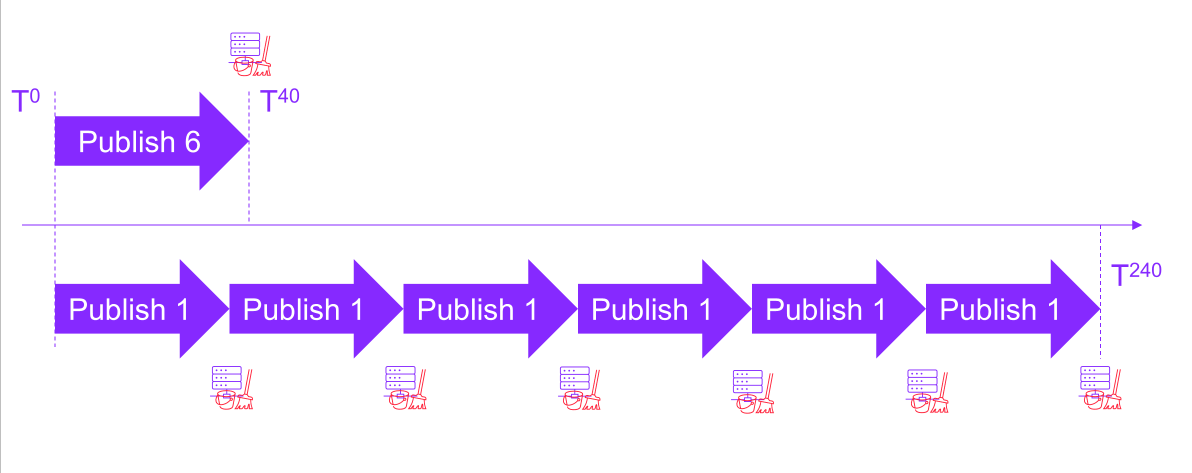
To publish multiple items without publishing the entire site, in the Content Editor, select a parent item and use the Publish subitems option, or use automation to group items into a single publishing operation.
To improve publishing performance when publishing multiple items in Page builder, publish only selected pages and reference items instead of publishing the entire site.