Share data sources and presentation between sites
SitecoreAI lets you share styles, data sources, page designs, partial designs, and variants between the sites within one site collection. This is helpful if you want to impose the styling of a master site on your local sites or if you want to be able to use data sources from other sites.
Examples:
- You have a main site and many subsites and you want all sites to use the same styles, the same footer, and the same variants.
- You want to share data sources, for example promos or videos, between your sites.
You can assign a site to be a master site in Sites as well as in the Content Editor.
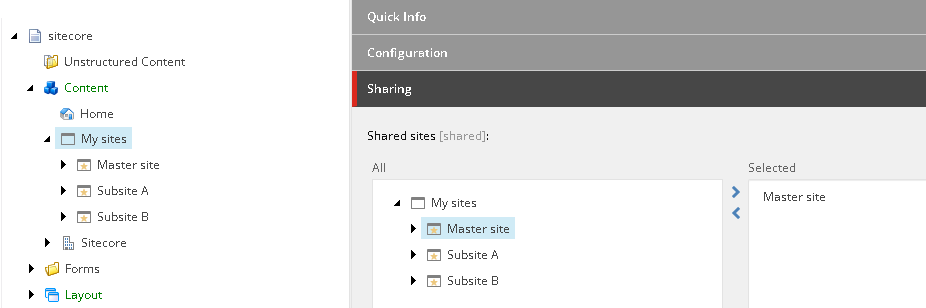
To make a site a shared site in the Content Editor:
-
Navigate to the site collection and scroll down to the Sharing section.
-
In the Sharing section, double-click the site that you want to share to move it to the Selected pane. The other sites within the same site collection can now use its presentation and data sources.
 Note
NoteYou can share as many sites as you want. However, if you are sharing more than one site, you must pay special attention to the naming of your site data because otherwise finding the correct item from the correct site can be difficult.