Split test overview
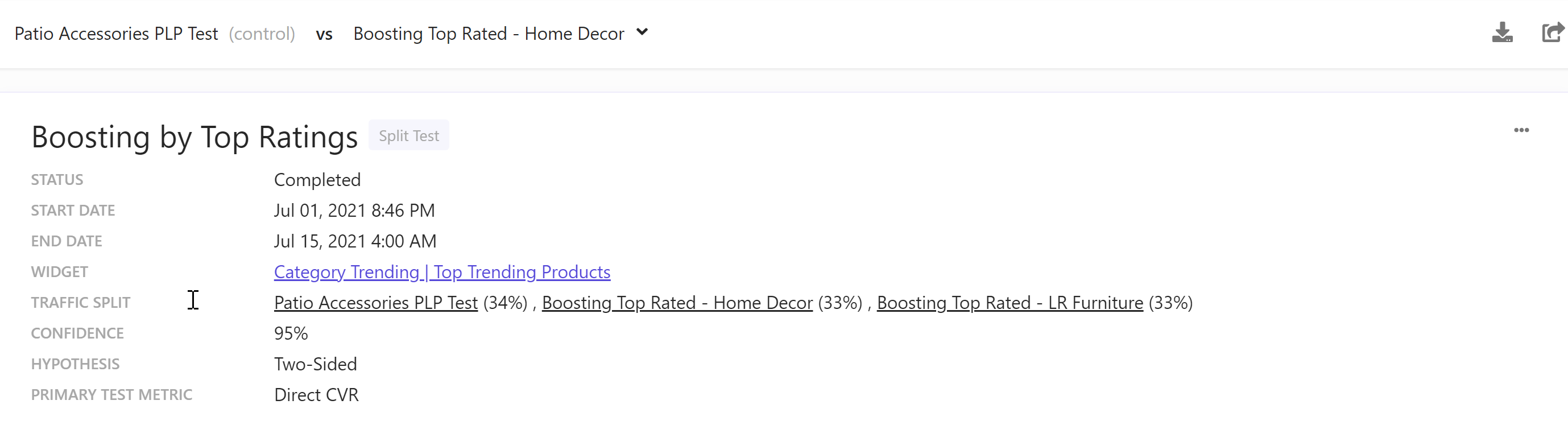
The Split test overview report describes the key test conditions and links to the widget and widget variations of the split test.
Note
The first variation in the list of variations for a test is always the control variation. All other variations are tested against it.

The following table describes the properties of the Split test overview report.
| Property | Description |
|---|---|
| Name | Name of the split test. |
| Status | Status of the split test. Options are Running, Completed, and Scheduled. |
| Start date | Date and time when the test started or starts. |
| End Date | Date and time when the test ended or ends. |
| Widget | Name of and link to the Discover widget whose variations are in the test. |
| Traffic Split | Split percentages of the widget variations in the test. Hover your mouse over a widget variation name to display all the widget variation rules active during the test. |
| Confidence | Probability that the hypothesis is true. Default value is 95%. |
| Hypothesis | Predicted difference between two widget variations in a Discover split test. Default value is Two-Sided. |
| Primary test metric | Metric that is used to decide the winner. |
Note
When you test more than two variations, all variations are run against the first variation because tests are always run between two variations.
In a Split test report, use the drop-down menu above the Split test overview report to select a variation for its test results.
This drop-down menu is only available for tests with more than two variations.
If you have suggestions for improving this article, let us know!