Split test results
Using the Split test results report, you can analyze the results using different primary test metrics and their related metrics.
To change the primary test metric, in the Primary test metric drop-down menu in the top right-hand side of the report, select another value.
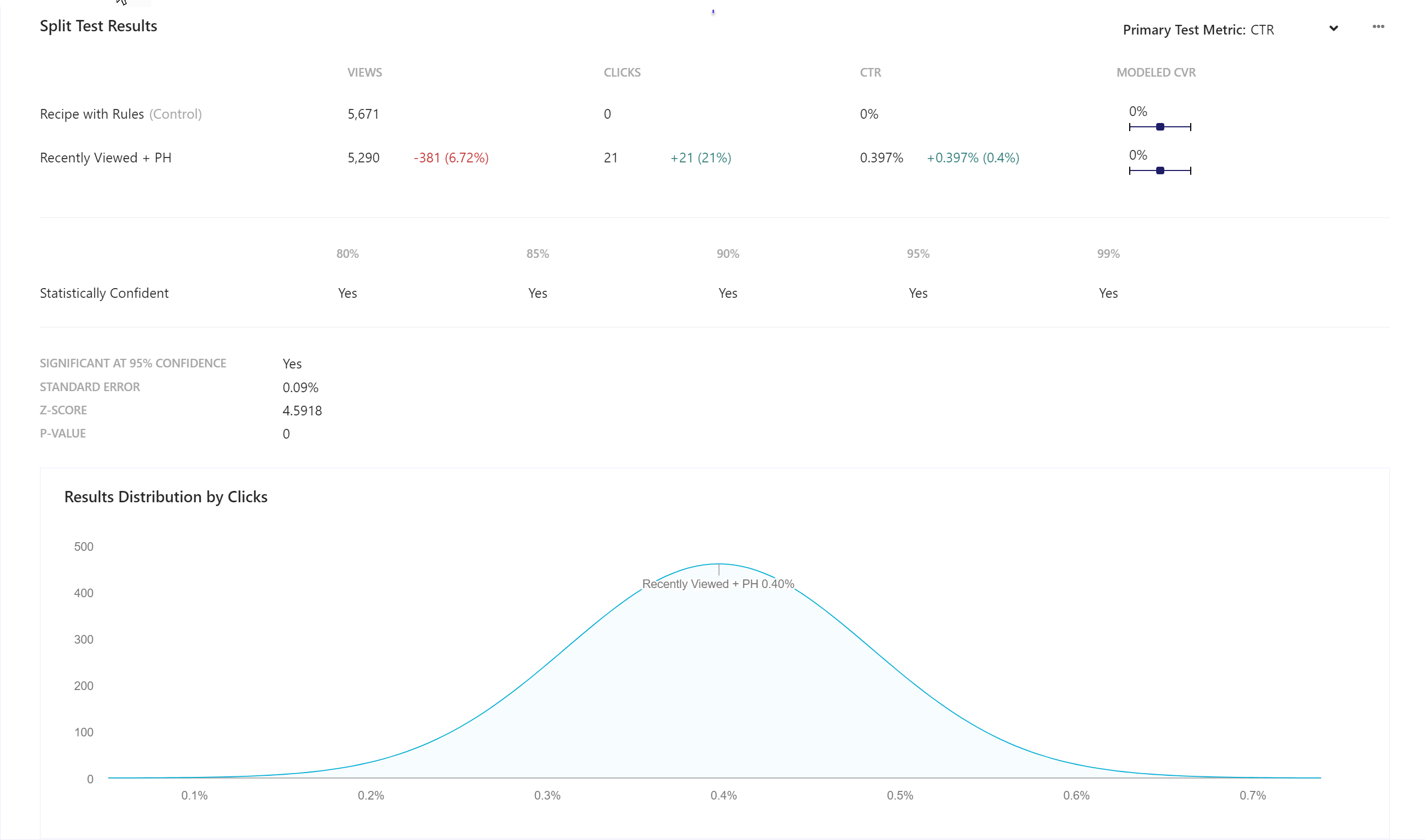
For each value chosen from the Primary test metric drop-down menu, the report refreshes and displays the following:
- A tabular presentation of tested widget variations and related metrics.
- Statistical confidence at the following levels 80%, 85%, 90%, 95%, and 99%.
- Standard deviation and probability values at 95% confidence.
- Line chart plotting the results distribution for each tested widget variation.
To export data, click  and then click Export Data.
Primary test metric and related metrics
The following table lists the related metrics used in our analysis with a primary test metric:
| Primary test metric | Related metrics for analysis |
|---|---|
| Direct CVR | Click-assisted visit, direct conversion, and modeled CVR. |
| Click-assisted CVR | Click-assisted visit, click-assisted conversion, and modeled CVR. |
| CTR | Views, clicks, and modeled CVR. |
Interpreting split test results
The report provides detailed test results at a commonly accepted confidence level of 95%, which is not conservative nor aggressive.
In a typical split test, the hypothesis is two-sided or run with two widget variations, and the null hypothesis is that the variations are similar. You can analyze the results using the following table:
| z-score or standard deviation | Analysis for confidence level of 95% |
|---|---|
| Less than -1.96 or greater than + 1.96 | The null hypothesis is rejected. The two variations are significantly different. |
| Between - 1.96 an 1.96 | The null hypothesis cannot be rejected. |
Metrics and KPIs
In the reports, attributed metrics and KPIs represent records that reflect the type of visitor interaction to which they are attributed.
For example, a click-assisted metric records sessions or visits where the visitor purchased one or more products different from those that they clicked.
Visitor interaction types include:
- Direct - refers to a visitor clicking one or more products and purchasing one or more products that they clicked.
- Click-assisted - refers to a visitor purchasing one or more products different from those they clicked.
- View-assisted - refers to a visitor viewing one or more products.
- Unassisted - refers to a visitor not viewing and not clicking a product but converting.
The following describes the metrics and KPIs in this report:
Click visits - the number of visits with at least one click on or within a Discover widget.
Click conversion - the number of click-assisted conversions.
Click-assisted conversion rate (CVR) - the ratio of click-assisted converted visits and the total number of visits.
Modeled CVR - the ratio of converted visits and the total number of visits modeled by Sitecore.