Context ID environment variables
The Context ID environment variable simplifies setting up and configuring SitecoreAI solutions. It's a unified identifier that maps to all your configured resources, such as content, sites, files, forms, and integration settings. You include the Context ID in your development setup, and SitecoreAI handles the rest. Context ID also handles potential future system configurations added to the SitecoreAI solution, saving you additional configuration to support new features or integrations.
When you create an environment, two Context IDs are created automatically:
- Live Context ID - provides access to content published to Experience Edge using the Delivery API. Use this Context ID for production sites.
- Preview Context ID - provides access to all content, including drafts and unapproved content in your SitecoreAI environment, using the Preview API.
To simplify application setup, JSS and Content SDK apps include support for the Context resources:
- JSS support for Context IDs comes from the JSS add-on and requires an app based on version 21.6 or later. Use the upgrade guides to update your apps as needed.
- All Content SDK apps fully support Context IDs out of the box.
The Context ID generated by SitecoreAI should be treated as secret. For client-side requests, create a public scoped Context ID with permissions scoped only to that request.
Getting your Context IDs
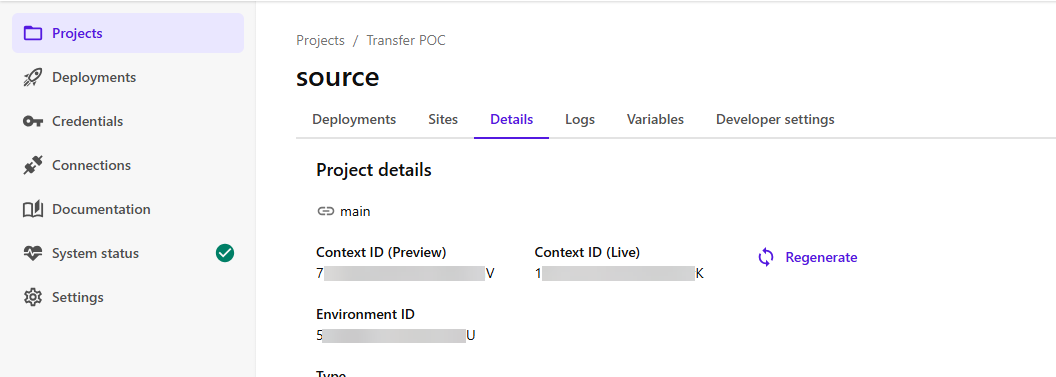
You can copy both the live and preview context identifiers from the following locations in the Deploy app:
-
The Details tab for an environment, under the headings Context ID (Preview) and Context ID (Live) .
-
The Developer settings tab. The Context ID is the value of
SITECORE_EDGE_CONTEXT_ID.-
If you're using Content SDK and need to make client-side requests to the Edge endpoint, you can also add the
NEXT_PUBLIC_SITECORE_EDGE_CONTEXT_IDto your app with the same value asSITECORE_EDGE_CONTEXT_ID.WarningUsing
NEXT_PUBLIC_SITECORE_EDGE_CONTEXT_IDwill expose your Context ID on the client. For client-side usage, create a scoped Context ID that includes only the required resources.When using the Content SDK to make client‑side requests to the Edge endpoint, NEXT_PUBLIC_SITECORE_EDGE_CONTEXT_ID must be set in order for client‑side interactions to be associated with the correct context and included in analytics tracking.
-
Regenerate an environment's Context IDs
To permanently revoke an environment's Context IDs and generate new ones in their place, you can regenerate the Context IDs. You might do this when someone has unauthorized access to one of your Context IDs or after revoking a token.
When you regenerate the Context IDs, all apps and services using an old Context ID will need to be updated with the new one. You'll also need to redeploy the environment.
To regenerate an environment's Context IDs:
- On the Details tab for an environment, click Regenerate.
- In the Regenerate Context IDs dialog, copy and make a record of your current Context IDs. After regenerating the Context IDs, you can search your code for instances of the old Context IDs and replace them with the new ones.
- Click Regenerate.
Next steps
After regenerating the Context IDs, any apps and services that use the old Context IDs will stop working until you do the following:
- Replace the revoked Context IDs with the replacement ones in all relevant apps and services, such as in your local environment variables file or your configuration settings for Vercel or similar.
- Redeploy the affected environment.