Synchronize items between remote and local SitecoreAI instances with the Sitecore CLI
When multiple developers develop a SitecoreAI solution or when using multiple SitecoreAI environments, you can synchronize the databases for the environments using Sitecore Command Line Interface (CLI) serialization commands. You can use CLI serialization commands against local and remote SitecoreAI Content Management (CM) environments.
You must have the following:
-
A remote Sitecore CM instance.
-
Sitecore CLI version 5.0 or later, with the XM Cloud plugin installed.
Some code examples, images, and UI labels may still use XM Cloud while engineering assets are being updated.
This walkthrough describes how to:
- Log in to the CLI
- Connect the CLI to a remote SitecoreAI environment.
- Run serialization operations.
Log in to the CLI
To log in to the CLI:
-
In the project working directory, in a command-line window, log in to SitecoreAI using the CLI by running the command:
shell
Follow the steps in the user interface to log in and authorize your device.
Connect the CLI to the SitecoreAI environment
To support running commands such as serialization push on a remote SitecoreAI CM instance, you must connect the Sitecore CLI plugins to the remote environment.
If you followed the walkthrough to set up your full-stack local development environment, you can skip this section. If you have not, and you encounter issues, refer to that documentation for any steps you might have missed in your setup.
To connect the CLI to a remote SitecoreAI environment:
-
In a command-line window, in the project working directory, run the
cloud environment connectcommand and enter the environment ID:TipYou can retrieve the environment ID by running the following command:
dotnet sitecore cloud environment list --project-id
The command creates a new endpoint or updates an existing endpoint for the connected environment in the
.sitecore/user.jsonfile.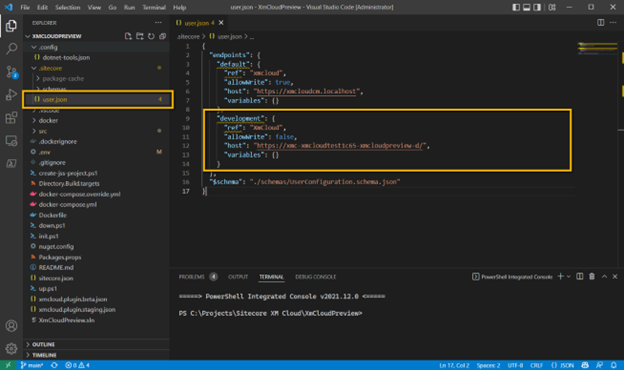
When connected, you can use Sitecore CLI commands that run against a remote instance. You specify the instance with the option --environment-name (or -n ) with the value of an endpoint key defined in the .sitecore/user.json file. For example:
Run serialization operations
With a connected CLI, you can run serialization pull and push operations against the remote Sitecore XM CM instance. You must provide the environment name, as defined in the .sitecore/user.json file.
To pull items from the remote CM instance to the local file system:
-
In a command-line window, in the project working directory, run the command:
shell
To push items from the local file system to the remote CM instance:
-
In a command-line window, in the project working directory, run the command:
shellNoteThe
serialization pushcommand does not publish items. To publish content in an environment, refer to Publish and validate content.
You can also run other Sitecore CLI commands in the SitecoreAI environment by providing the environment name.