Update a domain for Sitecore endpoints
You can update Managed Cloud Containers solutions with new domains for Sitecore endpoints. This topic describes how to update a domain, both when you use your own DNS zone, and when you use the Sitecore DNS zone.
Update a domain for Sitecore endpoints using your own DNS zone
To update a domain when you use your own DNS zone:
-
Prepare a wildcard certificate (
.pfx) for a new top-level domain. For example:*.example.com. -
Configure DNS records for new domains (cm/cd/id/grafana). Add CNAME for your custom domains pointed to Azure Frontdoor:
“{infrastructure_id}fdr.azurefd.net".NoteBecause unbounding old CNAMEs from Azure Frontdoor leads to downtime, you must plan this maintenance during low business hours.
-
Create CNAMEs that point to Azure Frontdoor.
-
Open a support ticket with Sitecore Cloud Ops to unbound the old CNAME from Azure Frontdoor.
-
Follow steps 3-9 from the next section - Update a domain for Sitecore endpoints using Sitecore DNS zone.
Update a domain for Sitecore endpoints using Sitecore DNS zone
To update a domain when you use Sitecore DNS zone:
-
Prepare a wildcard certificate (
.pfx) for a new top-level domain. For example:*.example.com. -
Create a service request to update CNAME.
-
Update Key Vault secrets for the changed domains. Create a new version of the following secrets:
sitecore-cd-host-namesitecore-cm-host-namesitecore-id-host-namegrafana-host-name
-
Upload a new version of the certificate created in step 1 to the Key Vault certificates storage.
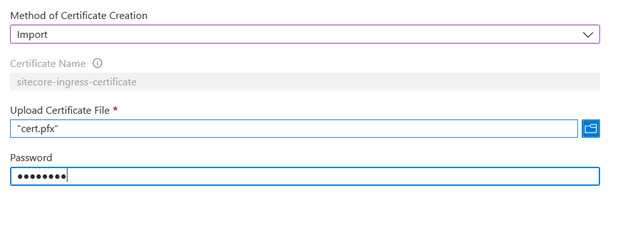
-
Important
Update Key Vault secrets for the new certificate:
-
sitecore-ingress-certificate-pfx-base64 -
sitecore-ingress-certificate-password
-
-
Run the Frontdoor pipeline. Open the Frontdoor designer and make sure that the Frontdoor configuration was updated with new domains:
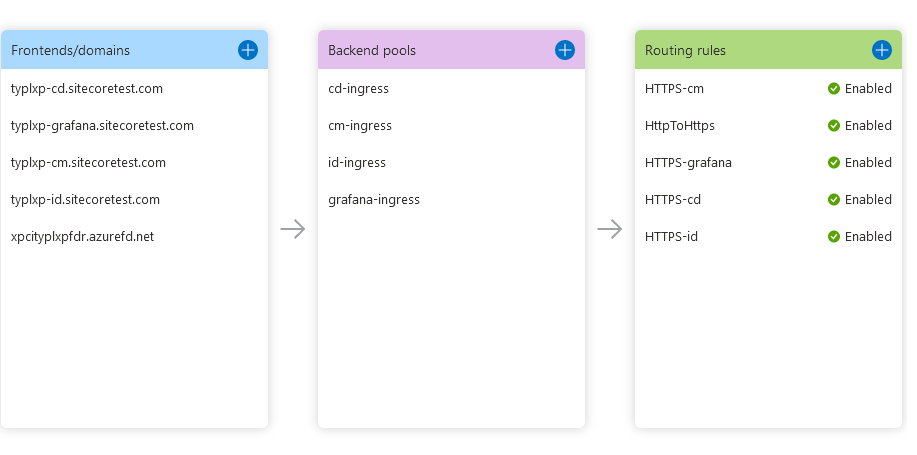
-
Restart cm/cd/id/Grafana pods using
Restart Deployment Pipeline. -
Run the Application pipeline.
-
Contact Sitecore Managed Cloud Support and update the Grafana reply URL in the Grafana application.
NoteUpdating domains leads to downtime (less than 30 minutes).