
Customize the site creation pipeline
The Run New Site Pipeline pipeline is part of the Storefront Components Site Setup component (/sitecore/System/Settings/Feature/Commerce Experience Accelerator/Storefront Components/Storefront Components Site Setup).
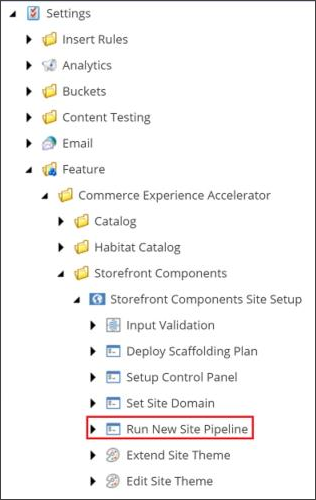
By default, the Run New Site Pipeline pipeline contains the newCxaSiteCreated pipeline, which contains a single processor (QueueDomainCreatedEvent). This processor, which is executed when a new site is created, synchronizes and persists the site domain across all Sitecore instances as summarized in the following table:
| Pipeline | Processor | Description |
|---|---|---|
newCxaSiteCreated | QueueDomainCreatedEvent | Queues a domain-created remote event that will be handled by the DomainCreatedEventHandler processor to create the new domain of the new site in the Content Delivery (CD) and other Content Management (CM) instances. |
You can extend and customize the newCxaSiteCreated pipeline by adding custom processors to it or by replacing the default one.
To extend and customize the pipeline:
-
On the server, navigate to the
\src\Commerce.XA\Framework\Foundation\Common\src\App_Config\Include\Foundation\Commercefolder. -
Open the
Sitecore.Commerce.XA.Foundation.Common.configfile and, in the following section, customize or extend the pipeline as required.
All processors defined under the newCxaSiteCreated pipeline are executed when a commerce site is created.
The processors are initiated in order. The QueueDomainCreatedEvent processor does not need to be the first processor listed.