Sitecore Connect Trial
Sitecore Connect is a low-code and no-code integration platform that enables seamless connections between Sitecore products and third-party applications. Built on Workato’s iPaaS platform, Sitecore Connect provides a user-friendly drag-and-drop interface, a code editor, testing tools, and a wide range of prebuilt connectors, APIs, and other development tools to streamline your integrations.
Sitecore Connect includes ready-to-use connectors for Sitecore products like , XP, XM, CDP, Content Hub, Send, and OrderCloud. With these connectors, you can perform Sitecore-to-third-party integrations for a variety of tasks, such as:
- Content management - streamline content creation and distribution by connecting Sitecore Content Hub DAM with Adobe Creative Cloud.
- Marketing automation - integrate with third-party platforms. For example, send data from Facebook or Google Sheets to Sitecore Send.
- Data synchronization - simplify export of audience data by receiving the audience export output from Sitecore CDP for transmission to third-party systems.
Exploring Sitecore Connect for free
Experience the capabilities of Sitecore Connect with a trial, available to existing customers who access their Sitecore products through the Sitecore Cloud Portal.
Org Owners and Org Admins can enable Sitecore Connect trial through the Sitecore Cloud Portal. The Connect trial is ideal for customers who want to explore Sitecore Connect's core features.
With the Connect trial, you'll get:
- Full access to Sitecore Connect’s tools and features.
- Up to 5,000 tasks per year to explore automation capabilities.
- No time restrictions, allowing you to use the trial for as long as needed.
- Comprehensive support with documentation, training, and access to support.
Preparing for your Connect trial
To get the most out of your Sitecore Connect trial, it's important to familiarize yourself with the primary building blocks that drive its functionality. These building blocks serve as the foundation for building, organizing, and executing automated workflows in Sitecore Connect.
Here’s a quick overview:
- Project - a central repository for integration assets such as recipes, connections, and sub-folders. Organize projects by use case, department, application, or process to keep assets structured and accessible.
- Connector - a tool that enables secure access and integration between applications. Each connector includes specific authentication methods, triggers, and actions for the target application.
- Recipe - an automated workflow made up of steps that perform specific tasks. Each recipe begins with a trigger and includes one or more actions to take when the trigger event occurs.
- Task - a unit of work processed each time a recipe performs an action that uses compute resources. Every action performed by a recipe, such as data retrieval or record creation, is counted as one task.
For example, to integrate a Sitecore product with a CRM platform, you would start by creating a project in Sitecore Connect. Next, select the appropriate connector for the two applications, then build a recipe by setting up triggers, defining actions, and specifying the desired outcome.
Monitoring your usage
During your Sitecore Connect trial, you receive up to 5,000 tasks per year to explore and automate your workflows. To ensure you don’t run out before fully evaluating the platform, it’s important to monitor your consumption.
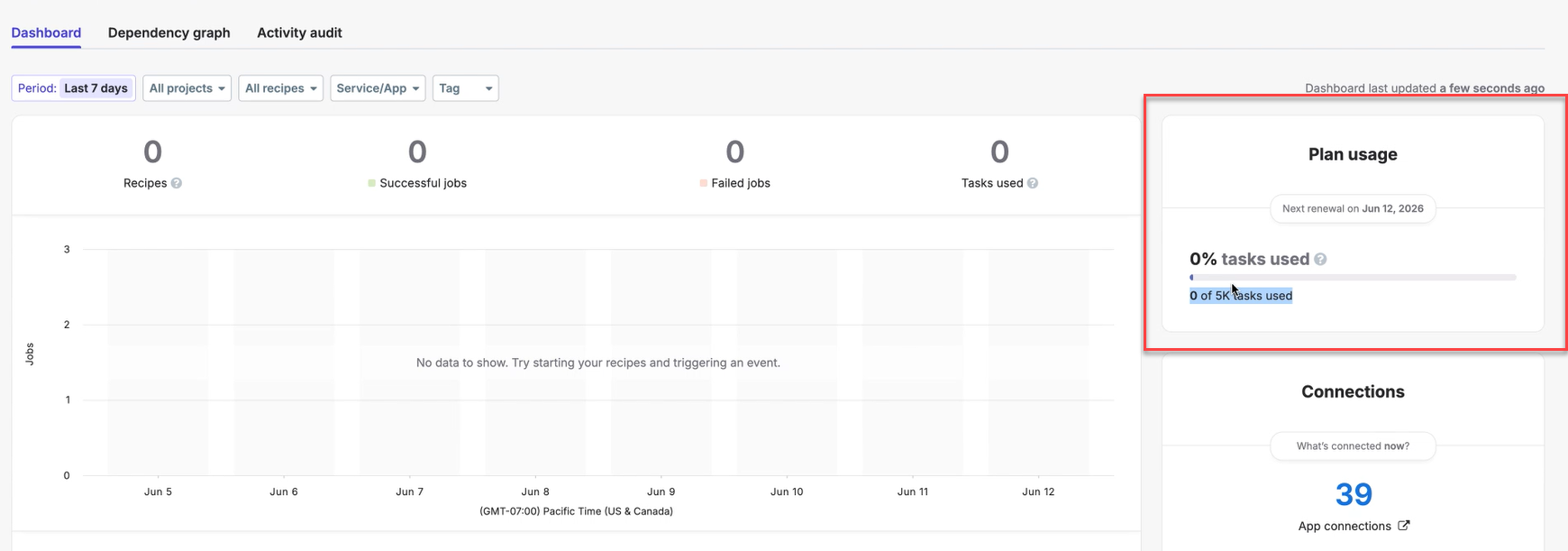
On the Sitecore Connect Dashboard, the Plan usage section enables you to track your task usage across your workspace. It shows:
- Real-time progress bar of how many of your 5,000 tasks per year have been executed.
- Remaining tasks before you hit your trial's yearly task limit.
- Next renewal date, when your task allowance resets.
Upgrading from Connect trial to a paid tier
To upgrade your Connect trial to a paid tier of Sitecore Connect, contact your account executive.
As part of the upgrade process, the following instances are created:
- Production instance - a new production instance is provisioned with a full Sitecore Connect version based on your selected paid tier. This is the primary environment for your live integrations.
- Non production instance - your Connect trial instance is transitioned to a non-production instance. All resources created during the trial will remain here, allowing you to continue using them without interruption.
Accessing support and learning resources
During your Connect trial, you have full access to our Help Center, which includes Sitecore Connect user documentation, training resources, and Connect trial FAQ to help you get started.
If you encounter technical issues during your Sitecore Connect trial, you can create a support case in Sitecore Cloud Portal.