
Public app analytics
The Cloud Portal App studio provides metrics and dashboards to track your public Marketplace apps' performance from discovery to user engagement and long-term retention across Sitecore organizations.
Analytics data is available for public Marketplace apps created and published by your organization. Custom Marketplace apps do not have analytics data.
The app developer's own activity is excluded from analytics calculations, including app details page views, installations, app openings, and uninstallations. Activity by other team members in the developer's organization is included.
You can measure the performance of your public apps in three areas of App studio:
- Studio page - compare installation, usage, and uninstallation metrics for the past 30 days.
- Insights page - view the statuses of your public apps, and review installation, usage, and uninstallation metrics.
- Analytics tab of an individual app - view discovery, installation, engagement, and uninstallation metrics for one public app. This tab is available for apps in the Published, Suspended, or Scheduled deletion status.
These metrics help you identify engagement trends, evaluate app adoption, and prioritize opportunities to improve onboarding and app functionality.
View metrics in Studio
The Studio page lets you compare performance across your public apps so you can identify apps to investigate in more detail.
To view public app performance metrics:
-
In the Cloud Portal, click App studio > Studio.
-
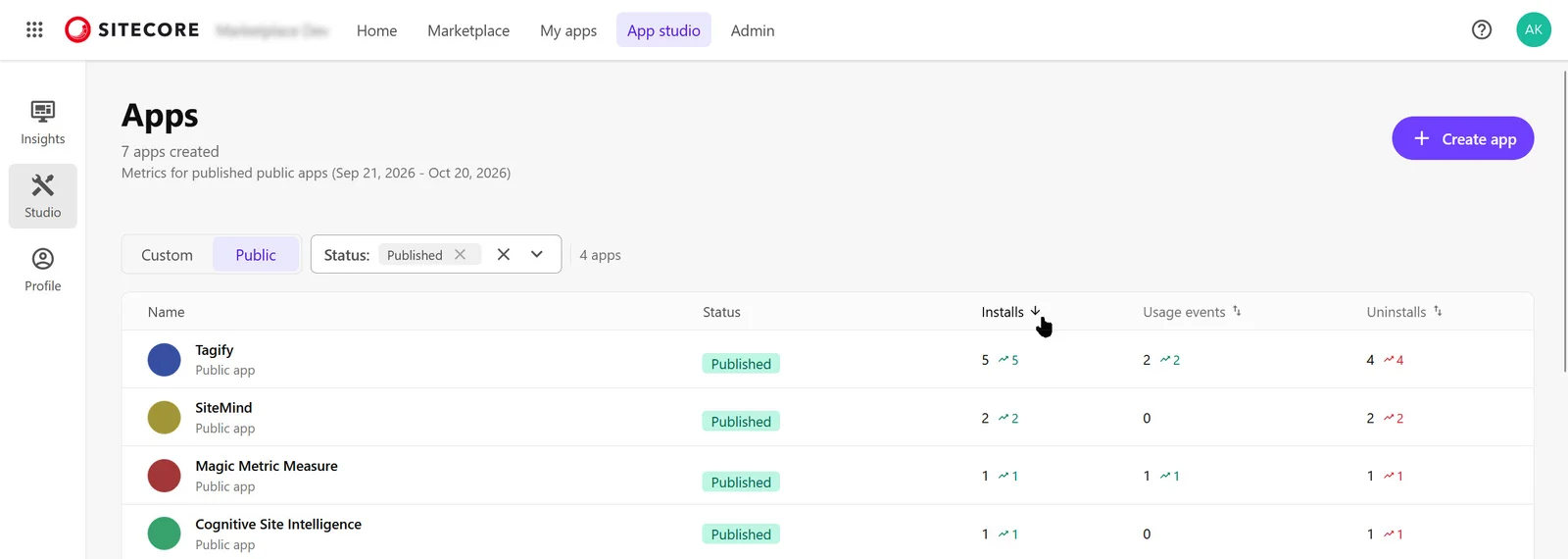
Above the app list, select Public.
-
Optionally, use the Status filter to filter apps by status.
-
Review the Installations, Usage events, and Uninstallations columns.
Metrics on the App studio page cover the past 30 days. More date ranges are available on the Insights page and an individual app's Analytics tab.
The metrics cover the past 30 days. The exact date range appears above the app list. Data refreshes daily. Green or red trend indicators next to each metric show the daily change.
- Installations - the number of organizations that installed the app during the past 30 days. Each organization is counted once, even if it installed the app multiple times.
- Usage events - the number of usage events recorded for the app during the past 30 days. The activity that counts as a usage event is opening the app in one of its extension points.
- Uninstallations - the number of organizations that uninstalled the app during the past 30 days. Each organization is counted once, even if it uninstalled the app multiple times.
-
Optionally, sort the app list by clicking a metric's column heading. The first click sorts in descending order. To sort in ascending order, click the same heading again.
For more metrics, open the Insights page or an individual app's Analytics tab.