- GraphQL APIs
Query examples for the Delivery GraphQL API
This topic describes query examples for the Delivery GraphQL API.
Although some differences exist between the Preview GraphQL API and the Delivery GraphQL API, they share the same query and response shape, so you can try the queries in both APIs. You can test the queries in the GraphQL IDEs during development, before you use them in your application.
Note that the item IDs and paths in the query examples will not necessarily match those in your solution.
-
Review the GraphQL schema, including the relevant Sitecore concepts, the GraphQL entry points, and the available fields for search when creating queries.
-
Note the following about languages: If you specify a language value in the query, the results will only include items in that language. If your site supports a fallback language, enable publishing language fallback before making queries.
Starter queries
To get started, make the following queries in order. In the queries, replace paths, site names, and languages with values from your environment.
List sites with basic information
Retrieve information about all your sites, including every site name, language, and root path:
Query
Result
Get the Home item's rendered output
The rootPath retrieved in the previous query is the entry point into your site. Appending /home to the root path lets you retrieve details for your site's home page. For example, you can use the rendered field to retrieve the page layout data.
Query
Result
Get an item and its fields
Using fields, you can retrieve the name and value of every content field stored on the item itself.
Query
Result
Get an item by ID or path
You can query items anywhere in your content tree by path or ID to read their fields and other properties. You can use inline fragments to cast items to their projected data template type and fields to their field type.
Query
Result
Layout and route data
Get item layout for a URL
Most often used with Headless SDKs, you can find items by their site name and HTTP URL and then obtain their Layout Service output for rendering by framework-specific Sitecore placeholder implementations.
Query
Result
Build site navigation
This sample query combines finding the site root with the ability to traverse item children. You can use the hasLayout argument to find only items with layout (navigable pages) and the includeTemplateIds argument to filter on a (base) data template.
Query
Result
Build a page breadcrumb
You can use the ancestors field on the item graph type to create breadcrumb navigation. Use the hasLayout argument to find only items with layout (navigable pages), and includeTemplateIds to filter on a (base) data template.
Query
Result
Search and filtering
For information about search operators, see Search operator behavior.
Search for items using CONTAINS
Query
Here's an example of searching for items using the CONTAINS operator in a user-defined field:
Result
Search for items using EQ
Query
Here's an example of searching for items that match exactly using the EQ operator:
Result
Search for items using multiple operators
Query
Here's an example of searching using both the CONTAINS and the EQ operators:
Result
Get items filtered by multiple paths
You can filter items based on multiple paths. This query example assumes the following site structure:
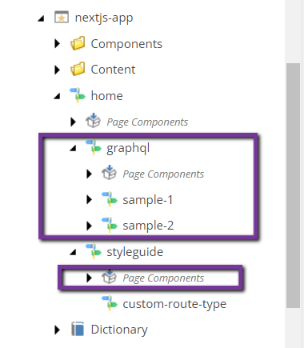
Assume that the /home/graphql and home/styleguide/Page Components items have the UUIDs 0C6F4AAF-DD7E-5FAF-B9B0-61070D496055 and AB99BA2B-B606-51E3-BAD9-FD8358DE1333, respectively. You want to get the /home items and descendants that are not /home/graphql and home/styleguide/Page Components or their children. The following query uses the NCONTAINS operator to exclude the path of these items and their children from the result.
Query
Result
The search query result does not contain items with the paths /home/graphql and home/styleguide/Page Components or any of their descendants but returns the /home item and the remaining child items.
Get items filtered by dates and numbers within a range
You can use the CONTAINS, NCONTAINS, EQ, and NEQ operators to query for numbers and dates.
In addition, you can use the GT, GTE, LT, and LTE operators to query a range of numbers or dates.
When using range operators, the value must be wrapped in quotation marks. The date comparison supports all standard date/time formats, as well as yyyyMMddTHHmmssZ. Dates are stored in UTC format, but the values supplied in the query are treated as local time.
Before using range operators for the first time, republish the content you want to query, to rebuild the internal data structure. Otherwise, the value will be compared lexicographically as strings. For example, without republishing, a value of 3 is considered greater than 123.
Query - date range
Here's an example of querying items within a date range:
Result - date range
Query - number range
Here's an example of querying items within a number range:
Result - number range
Paginate items in an item bucket
When you work with Sitecore item buckets, a common requirement is to paginate all the items that descend from a particular template within that bucket. The following search query is helpful for these use cases.
Query
Result
Site discovery and structure
Get the root item of a site
The Experience Edge schema does not currently allow querying of sites and their root items, but you can still find the root item of a site by using the layout query.
Query
Result
Get all site paths/pages
You can use the site query to find all the items in a specific language with layout data/presentation details on that site. This is useful, for example, for obtaining paths for a static site generator. The route results are paginated and, by default, return only 10 results. You must use the endCursor property with the first and after query arguments to paginate the results.
Query
Result
Site metadata and operations
Get information about all content sites
You can fetch information about all the content sites in a site query using the allSiteInfo field. For example, to get the name and root path of the first 100 available sites, use the following query:
Query
Result
Get information about a specific content site
You can use the siteInfo field in a site query to get information about a specific content site. For example, the following query returns the site name and root path.
Query
Result
List redirect rules
When querying for information about a specific site, you can request a list of redirect rules. In the following example query, the response includes the redirect type, target, pattern, and whether the redirection preserves any query string parameters.
Query
Result
Get error-handling pages
When querying for information about a specific site, you can request information on all the pages involved in the error-handling process. The result can help you determine if all the required error codes are handled and by which pages.
Query
Result
Get robot information
You can request information about which search engine crawlers can access the site using a site query.
Query
Result
Get the sitemap of an SXA site
You can query for the path to the media items generated for an SXA site sitemap.
Query
Result
Get dictionary entries
You can retrieve individual dictionary entries for a site by using the site query. You can combine cursor arguments to apply paging to the results. If those aren't provided, the default is a first page size of 500.
Query
Result
SDK rendering helpers
Use item fields with Sitecore Headless SDKs
The various Sitecore Headless SDKs all contain helpers for rendering field values. These helpers assist with rendering complex fields (such as images or links) and editable values in the context of inline editing. Item fields in the Experience Edge schema include jsonValue that outputs the field in a format compatible with these field helpers.
For example, the following link field could be rendered in React or Next.js using the Link field helper: