Standard and custom actions
Sitecore contains a number of standard actions. You can also create custom actions and configure them to call .NET methods.
Auto Submit Action
The Auto Submit Action moves the content item to the next state if the user belongs to the specified role.
It is based on the /sitecore/Templates/System/Workflow/Auto Submit Action template.
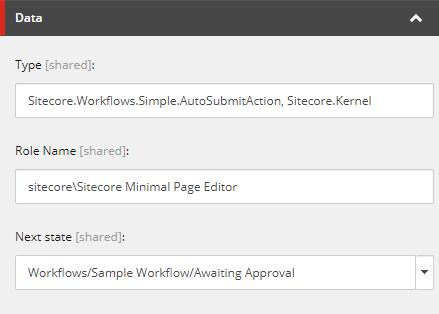
The Data section contains the following fields:
| Field | Value |
|---|---|
| Type | The construct classname,assembly_name specifies the class and the file it is stored in. |
| Role Name | The only role that the action is available to. You can only enter one role, and you receive an error if the field is empty. |
| Next State | When the action is triggered, it moves the content item to the state specified in this field. |
Auto Publish Action
The Auto Publish Action appears under the Approved state of the Sample Workflow.
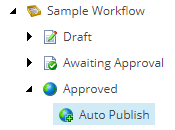
It is based on the common /sitecore/Templates/System/Workflow/Action template.
The Data section contains the following fields:
| Field | Value |
|---|---|
| Type | The construct classname,assembly_name specifies the class and the file it is stored in. |
| Parameters | A collection of name-value parameters separated by an ampersand (&), that control the publishing options. Supported parameters - a Boolean parameter that indicates whether to publish child items. The acceptable values are 1 and 0.smart - a Boolean parameter that indicates whether to compare revisions during a publish job, to avoid republishing unmodified items (smart publish). The acceptable values are 1 and 0.related - a Boolean parameter that indicates whether to publish items with their related items. Acceptable values are 1 and 0.targets - a comma-separated list of names of publishing targets (items defined in /sitecore/system/publishing targets). If none are specified, the content is published to all the targets in /sitecore/system/publishing targets. For example=webNA,webEU,webAPalllanguages - a Boolean parameter that specifies whether to publish the content in all the languages defined in /sitecore/system/languages. The acceptable values are 1 and 0. When set to 0, the content is published in the context language of the current item, or in the languages specified for the languages parameter.languages - a comma-separated list of language versions to publish. The language of the currently selected item is included implicitly. If no languages are specified, the content is published only in the language of the current item (see the description of the following itemlanguage parameter for more details). For example, these values set the publishing languages to English and Ukrainian=en,uk-UAitemlanguage - a Boolean parameter that indicates whether to use the language of the current item. Acceptable values are 1 and 0. If set to 0, only the languages explicitly named in the languages parameter are published. For example, if you set the actions to languages=en,uk-UA&itemlanguage=1, and trigger a publishing action workflow for a de version of an item, the item is published in the language versions for en, uk-UA, and de. In the same scenario, if itemlanguage=0, it's published only in en and uk-UA. |
Email Action
The Email Action sends email messages.
It is based on the /sitecore/templates/System/Workflow/Email Action template.
The Data section contains the following fields:
| Field | Value |
|---|---|
| To | The email address of the recipient. You can specify multiple addresses, separated by a comma. |
| From | The email address of the sender. |
| Subject | The subject of the email. |
| Message | The text content of the email. The field type is multiline text; HTML isn't supported. |
| Mail server | The URL of the SMTP server used to send emails. |
| Type | Use this field to override the provided .NET implementation method with a custom method. The construct classname,assembly_name specifies the class and the file it is stored in. |
Validation Action
The Validation Action executes the validation rules specified in the Validation Rules field of a workflow.
It is based on the /sitecore/Templates/System/Workflow/Validation Action template.
The Data section contains the following fields:
| Field | Value |
|---|---|
| Type | This field inherits the value Sitecore.Workflows.Simple.ValidatorsAction, Sitecore.Kernel from the default Action. |
| Max Result | The maximum response from the validator. The possible values are the value of this field is Error, items with errors pass, but items with critical or fatal errors do not pass. Validator classes define errors that result in specific validator responses. |
| Unknown | The message shown to the user when the validation result is Unknown. |
| Warning | The message shown to the user when the validation result is Warning. |
| Error | The message shown to the user when the validation result is Error. |
| Critical error | The message shown to the user when the validation result is CriticalError. |
| Fatal error | The message shown to the user when the validation result is FatalError. |