The CXACartContext service
The CXACartContext service handles cart related methods and manages the cart count caching.
The CXACartContext service, introduced in Sitecore XC 10, replaces the CartContext service. Events previously performed by CartContext such as TriggerCartUpdateEvent and SubscribeHandler have been moved to consume CXAObservable instead.
The CXACartContext service performs the following methods. It interacts with CXAObservable and uses various shared events.
- Method: Description
IsCartCountCached: Gets a boolean value indicating whether the cart count should be cached. If it is true, the cart count is stored in the browsersessionStorage.IsCachedCartCountAvailable: Gets a boolean value indicating whether the cart count is available in the browsersessionStorage. If it is true, the cached cart count is retrieved using theGetCachedCartCountmethod.GetCachedCartCount: Gets the value of the cart count.UpdateCachedCartCount: Updates the cart count in the browsersessionStorage.DeleteCachedCartCount: Removes the cached cart count from the browsersessionStorage.AddCartLine: Calls toAddCartLineAPI endpointAddBundleCartLine: Calls toAddBundleCartLineAPI endpoint.AddCartLinesWithSublines: Calls toAddCartLinesWithSublinesAPI endpoint.RemoveCartLine: Calls toRemoveShoppingCartLineAPI endpoint.UpdateCartLineQuantity: Calls toUpdateCartLineQuantityAPI endpoint.GetCart: Calls toGetCartAPI endpoint.If there are multiple calls toGetCartmethod at the same time, the calls are pooled and only one Ajax call is executed to the GetCart API endpoint. TheCXACartContextservice keeps a copy of the cart object after the cart is first retrieved. The cart object is then returned to the callback functions whenever there is subsequent call to this method. The cached cart object is invalidated every time a cart method is performed, such as applying promotion code.GetMinicart: WhenrecalculateTotalsis true or if the context is retrieving the cart or has the cached cart object, it forwards the call toGetCartmethod. Otherwise it calls toGetMinicartAPI endpoint.GetCartLinesCount: Calls toGetCartLinesCountAPI endpoint.RemoveMinicartLine: Calls toRemoveMinicartLineAPI endpoint.GetPromoCodes: Forwards the call toGetCartmethod because the backend returns the same cart object and can be shared with otherGetCartcalls to reduce unnecessary Ajax calls.ApplyPromotionCode: Calls toApplyDiscountAPI endpoint.RemovePromotionCode: Calls toRemoveDiscountAPI endpoint.
CXACartContext emits the event CXAEvent.CartUpdated via CXAObservable when the cart object is received in the response of certain Ajax calls, including:
AddCartLineAddBundleCartLineAddCartLinesWithSublinesRemoveCartLineUpdateCartLineQuantityGetCartGetMinicartRemoveMinicartLineGetPromoCodes
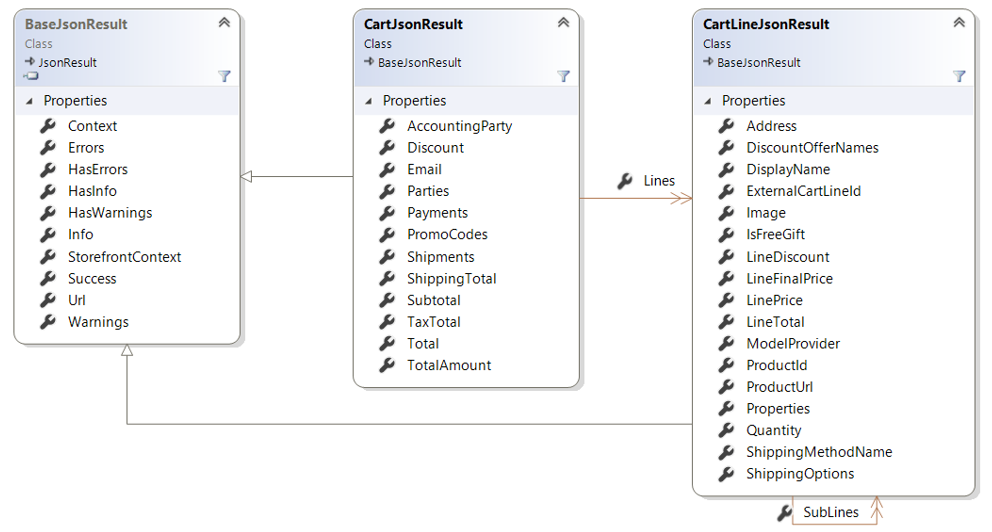
All the methods above might be calling to different API endpoints, but all the API endpoints return the same CartJsonResult model so the event can be emitted with the cart object as the event argument.
SXA Storefront uses several shared events. The following sections contain details about the cart model and illustrate the call sequence.
Updated cart model
The following class diagram shows the model for the CXAEvent.CartUpdated event, which is found in the cart-minicart-model.js, the cart-freeegiftselections-model.js, as well as the cart-lines-model.js. If the the Free Gift Selection rendering, Minicart rendering, or the Shopping Cart Lines rendering subscribes to the CXAEvent.CartUpdated event, the response returned is Sitecore.Commerce.XA.Feature.Cart.Models.JsonResults.CartJsonResult, which is the updated cart.
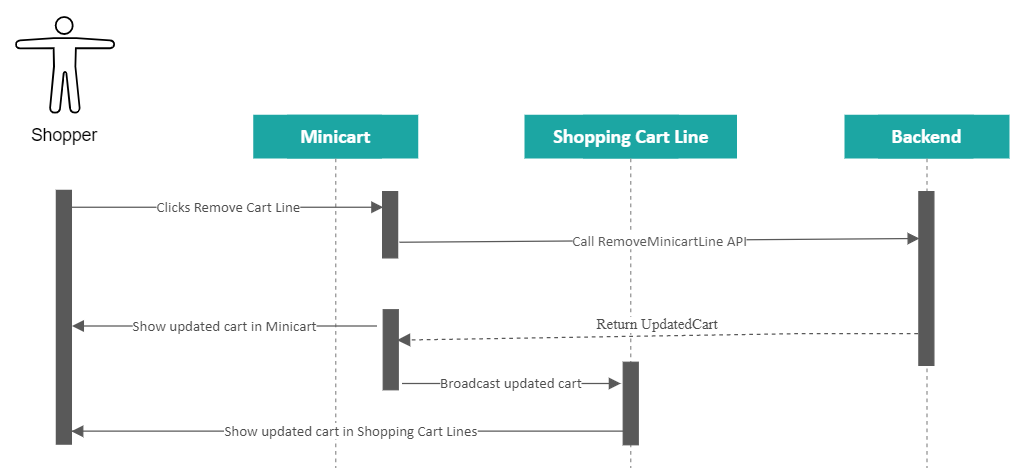
Minicart update call sequence
The following diagram shows the call sequence for Minicart updates.