Walkthrough: Customizing the Address Editor rendering
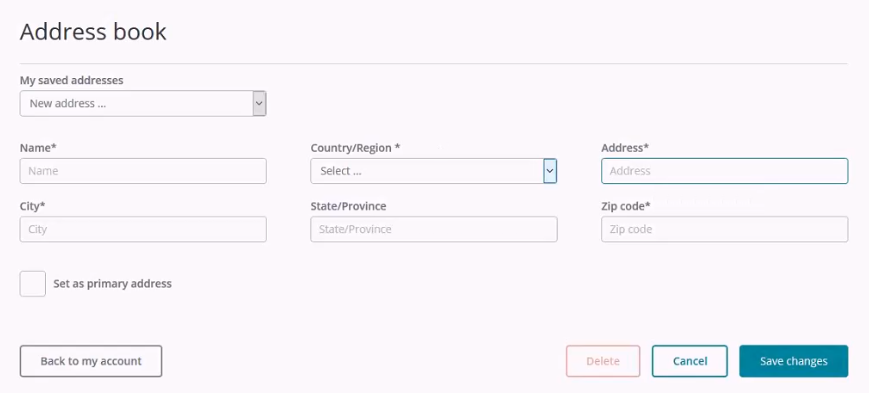
This walkthrough explains how to customize the Address Editor rendering by adding a new address field to the address book component.
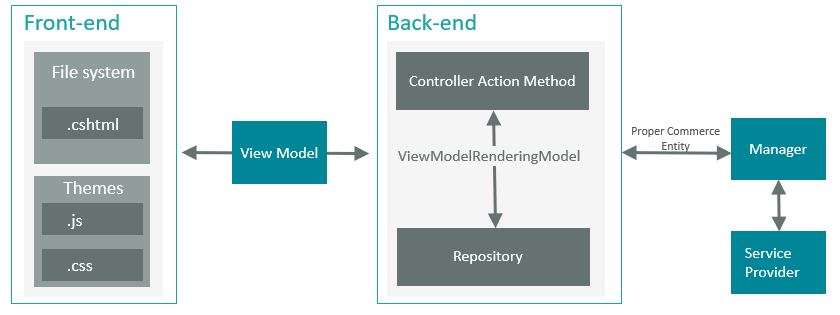
The basic MVC architecture of the SXA Storefront is shown in the following diagram. In the same way as any MVC rendering, both the front-end and back-end components are included. The front-end consists of a View file and the JS script, which is part of the Commerce base theme.
This walkthrough describes how to:
- Extend the Address Editor component
- Customize the rendering data source
- Add the property mapping to the View model
Extend the Address Editor component
To customize the rendering, you must first extend the Address Editor component, for example, by adding a new text field named Address2.
To extend the Address Editor component:
-
In Visual Studio, create a new project of type
class library. -
In the Models folder, create a new class called
MyAddressEditorInputModelthat inherits from the standard StorefrontAddressEditorInputModelclass, and add the following code:This code snippet overrides the component
ToPartyEntitymethod with a new implementation that calls the original implementation and then maps theAddress2property. -
In the
AccountAddressControl.csfile, create an endpoint to accept the new view model:NoteThis code snippet includes a call to the base constructor.
-
Register the new controller and model in the IoC using a patch file (in this example called
Sitecore.Commerce.XA.Samples.AddressEditorExtensions.config) containing the following code: -
To customize the view, add the markup to show the new field on the rendering, copy the default rendering/view
AddressEditor.cshtmlto your custom view folder, and add the following: -
From the base template Scripts folder, download the
JSfile for the component.The component JS logic is contained in a base template located at /sitecore/media library/Base Themes/Commerce Components Theme.
-
Modify the
account-address-editor-model.jsfile and apply the required changes to add theAddress2field binding to the Knockout view model. You do this by updating theAddressEditorItemViewModel(address) and adding the following line right after theAddress1field initialization line: -
Upload the modified file and override the existing file in the base theme.
Customize the rendering data source
To show the label and tooltip for the new custom field, you must customize the rendering data source.
To customize the data source:
-
To create a new folder in which to save customized renderings, in the Content Editor, right-click the sitecore/Templates/Feature folder, and click Insert, Template folder.
ImportantWe recommend that you create a new folder for customized renderings so that they are not over written when a Sitecore upgrade is installed.
-
In the Message window, enter a name for the folder and click OK.
-
In the content tree, select the newly created folder and, on the Folder tab, click New Template.
-
In the Name field, specify a name for the template, and select the default Address Editor data source template as the base template (/sitecore/templates/Feature/Commerce Experience Accelerator/Account/Datasource/Address Editor) , click Next and, on the Location page, accept the newly created folder as the location, click Next and then click Close.
-
Select the template you created in step 5 and, on the Builder tab, add a new simple text field for Address 2.
-
Save your changes.
-
In the Data folder for the site, create a new content item based on the newly created data source template and configure the Address Editor rendering to use it as the data source.
Add the property mapping to the View model
To view the Address2 field in the Address Book component, add the property mapping to the view model of the component.
To add the property mapping to the View model:
-
Create a new model called
MyAddressItemJsonResultthat inherits from the defaultSitecore.Commerce.XA.Feature.Account.Models.JsonResults.AddressItemJsonResultand override theInitializemethod: -
Create another model class called
AddressItemListJsonResultthat inherits fromSitecore.Commerce.XA.Feature.Account.Models.JsonResults.AddressItemListJsonResultand override theInitializemethod: -
Override the
AddressItemListJsonResultregistration in the IoC to use the new implementation introduced and add it to the patch file (Sitecore.Commerce.XA.Samples.AddressEditorExtensions.config) that you created previously: -
Compile the project.
-
Copy the
.dllfile to the bin folder for the site and copy theview .chtmlfile to its corresponding custom view folder. -
Reload the pages that contain the customized component.