Edit a rich text field in the Horizon editor
Version: 9.3
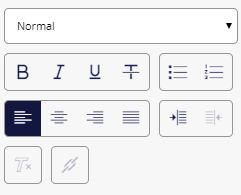
When you edit a rich text field in Horizon, the rich text formatting tools appear in the right-hand pane.
Note
The style sheets for your website determine the appearance of the different paragraph types.
To apply a paragraph style:
- Click the paragraph and then select a paragraph style from the drop-down menu.
To apply formatting such as justification, bullets, or numbering to a paragraph:
- Click the paragraph and then click the appropriate button in the right-hand pane.
To apply font formats such as bold or italic to text:
- Select the text to format and then click the appropriate button in the right-hand pane.
To remove formatting:
- Select the formatted text and click Remove formatting
 .
.
You can also create links in rich text fields.
If you have suggestions for improving this article, let us know!