Sitecore Documentation
  • Learn
  • Downloads
  • Changelog
  • Roadmap
CDPCloud Portal
Sitecore CDP
        • Understanding transactional data
        • View guest orders
        • View guest properties
        • Debug a guest event
        • View a guest reference
    • Profile traits
    • Search for a guest in Sitecore CDP
    • View a guest list
    • Use debug mode
  • Data browser
  • Glossary
  1. View a guest profile
  1. Sitecore CDP
  2. Managing guests

Debug a guest event in Sitecore CDP

If you enable the debug feature flag, you use the Event Viewer screen to debug specific events and monitor general platform health. The screen shows a table of events for a selected guest, and details of each event.

Note

The total number of available events depends on your retention policy for live storage.

To use the debug screen:

  1. Search for the guest.

  2. On the Guest Profile screen, click Event Viewer.
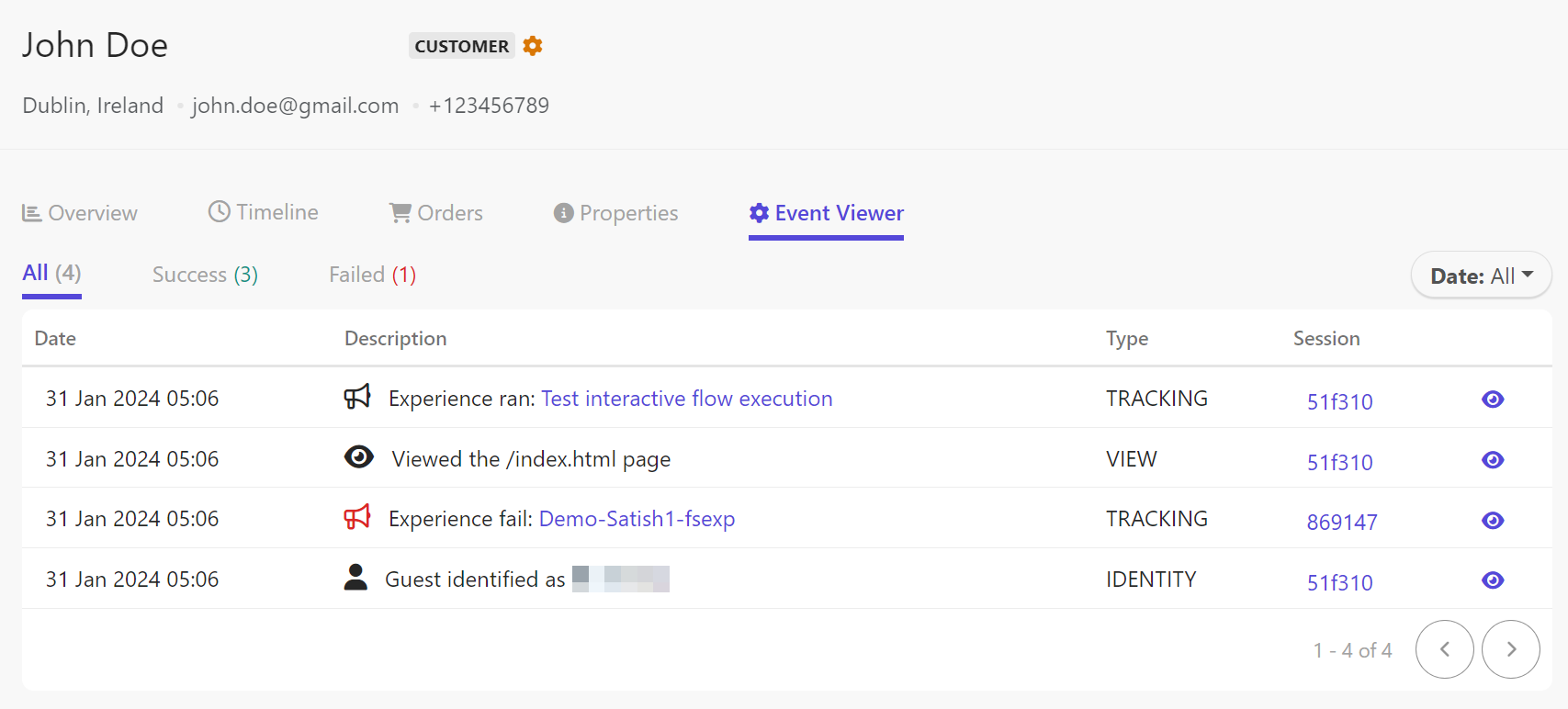
    The Event Viewer screen is used to debug events in Sitecore CDP.
  3. By default, all events are shown. To view only failed events, click Failed. To view only successful events, click Success.

  4. By default, the date filter shows all events. To view a different timeframe, click the Date drop-down menu and click one of the following:

    • Last Hour
    • Last Day
    • Last 7 Days
    • Last 30 Days
    • This Month
    • Previous Month
    • Last 12 Months
    • Last 2 Years
    • A specific date - click the date selector and select the date.
  5. If you are using SmartHub CDP and the event is an experience, you can click the experience name to open it.

  6. To view all events captured for a particular session, click the session name.

  7. To open the event details in a key-value table format, click the eye icon.
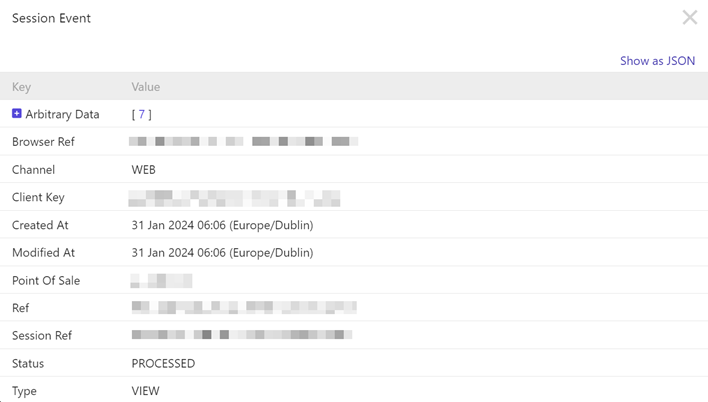
    The Session Event screen shows the key-value details of an event.

    The following details appear for most events:

    AttributeDescription
    Browser RefAn identifier of the browser used in this event.
    ChannelThe channel captured during this event.
    Client KeyYour organization's client key.
    Created AtThe time at which the event was first ingested into Sitecore CDP.
    Modified AtThe time at which the event was fully processed.
    Point of SaleThe point of sale (storefront) at which the event occurred.
    RefAn identifier of this event.
    Session RefAn identifier of the session during which this event occurred.
    StatusThe status of the event processing. For most events, even failed ones, the status is PROCESSED.
    TypeThe event type.
  8. To view the details as a JSON object, click Show as JSON in the event details screen. The following is an example JSON structure of an event:

    {
      "ref": "cc123-123-***-***-***",
      "clientKey": "***",
      "createdAt": "2024-01-31T06:`15:05`.199Z",
      "modifiedAt": "2024-01-31T06:`15:05`.220Z",
      "type": "TRACKING",
      "status": "PROCESSED",
      "channel": "WEB",
      "pointOfSale": "retailsite.com",
      "browserRef": "***-***-***-***-***",
      "sessionRef": "***-***-***-***-***",
      "flowExecutionRef": "***-***-***-***-***",
      "arbitraryData": {
        "flowExecution": {
          "ref": "***-***-***-***-***",
          "occurredAt": 1648714504380,
          "flowRef": "***-***-***-***-***",
          "flowFriendlyId": "modal_pop_up",
          "flowVariantRef": "***-***-***-***-***",
          "guestRef": "***-***-***-***-***",
          "flowExecutionTimeMs": 2381,
          "status": "SUCCESS",
          "decision": {
            "decisionModelRef": "***-***-***-***-***",
            "decisionModelVariantRef": "***-***-***-***-***",
            "decisionModelExecutionTimeMs": 2306,
            "results": [
              "{\"ruleId\":\"NBO_2\",\"search1\":\"discount\",\"search2\":\"shoes\",\"search3\":\"bag\",\"search4\":\"accessories\"}"
            ]
          }
        },
        "category": "EXECUTED"
      },
      "flowExecution": {}
    }
If you have suggestions for improving this article, let us know!

Documentation Assistant

This assistant uses AI to generate responses based on Sitecore documentation. While it has access to official sources, answers may be incomplete or inaccurate and should not be considered official advice or support.
Powered by
k
kapa.ai
Protected by reCAPTCHA

© Copyright 2026, Sitecore A/S or a Sitecore affiliated company.
All rights reserved.

Privacy policySitecore Trust CenterTerms of use