Brand kits
Brand kits help organizations maintain consistent branding across channels, teams, and content types by defining a brand's identity such as guidelines, tone, messaging rules, and other distinguishing traits.
A brand kit is a structured resource created from your uploaded brand documents. The platform analyzes these documents to extract brand knowledge and uses it to populate the brand kit sections. Once published, brand kits can be used in SitecoreAI to generate brand-aligned content.
Setting up a brand kit
You can create a brand kit to support different needs, whether you're managing a single brand, maintaining global guidelines, or campaign-specific toolkits. The platform allows you to manage multiple brand kits simultaneously, each representing a distinct brand, product line, or campaign.
To set one up, a brand manager creates a brand kit. It starts as a blank template with unfilled sections like Brand Context, Global Goals, Tone of Voice, and more.
Next, the brand manager uploads brand documents such as brand books, style guides, and visual guidelines.
During brand ingestion, the platform analyzes these documents, extracts all information, and builds a database of brand knowledge. This brand knowledge is then used to populate the brand kit sections.
Accessing a brand kit
To access a brand kit, in the navigation menu, click Design. Then, in the left sidebar, select Brand kits.
From the Brand Kits page, select the brand kit you want to access.
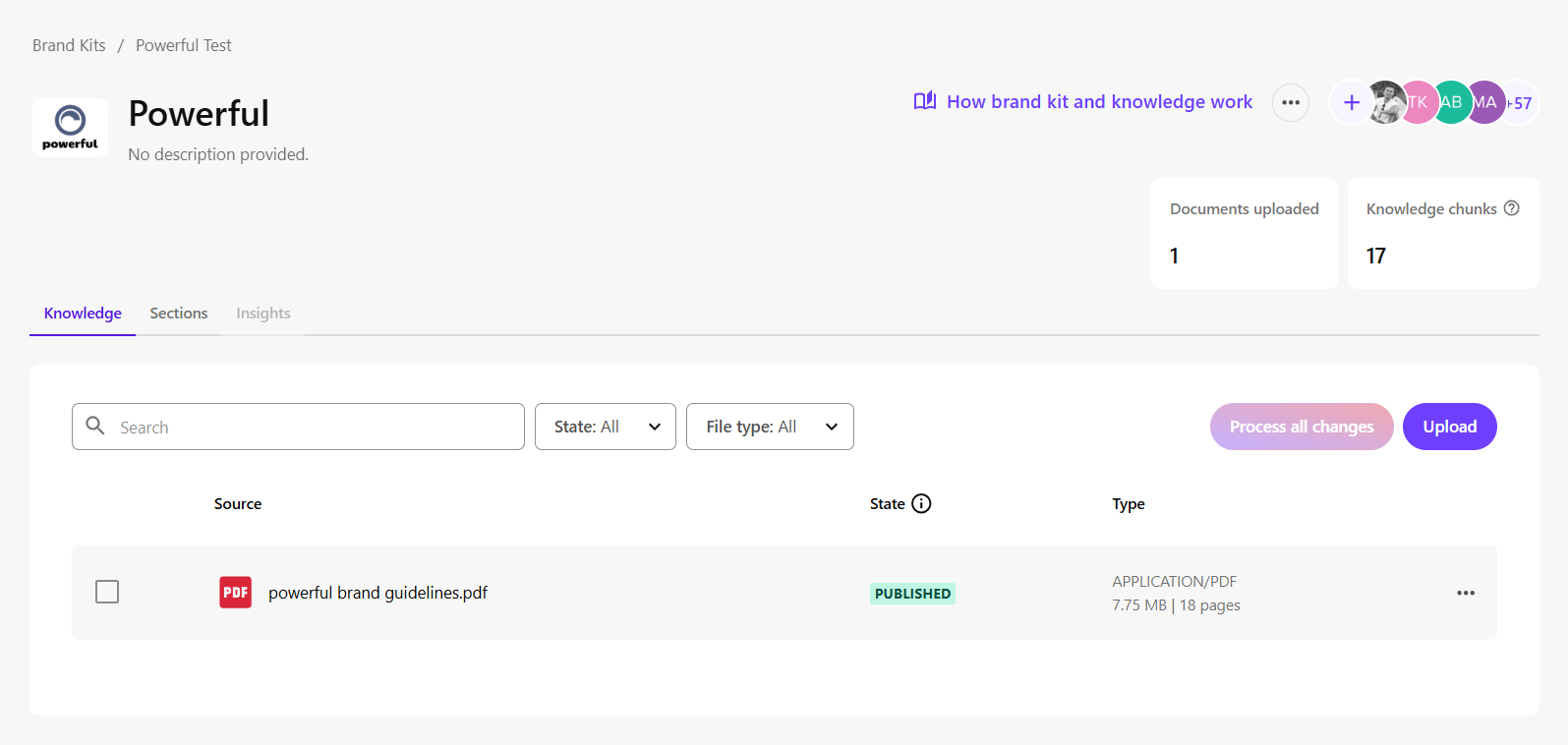
You'll see two main tabs on the brand kit page:
- Knowledge - contains your uploaded documents. These files build your brand knowledge.
- Sections - displays the default brand kit sections, such as Brand Context, Global Goals, and Tone of Voice. These sections are populated using content from your brand knowledge.
Brand knowledge and brand kit sections together form the brand kit. Sitecore copilots use both to generate content that stays aligned with your brand.
You'll also see metrics on the brand kit page:
- Documents uploaded - total number of PDF files added to the brand kit.
- Knowledge chunks - number of pages extracted from your uploaded documents and converted into usable, retrievable content within your brand knowledge.
Understanding the brand kit sections
Brand kits include predefined sections designed to capture the most important information about your brand, such as Brand Context, Global Goals, Tone of Voice, and more. These sections start empty and are populated using your brand knowledge.
Some sections are automatically used by SitecoreAI copilots with every prompt to ensure AI-generated responses follow your brand standards.
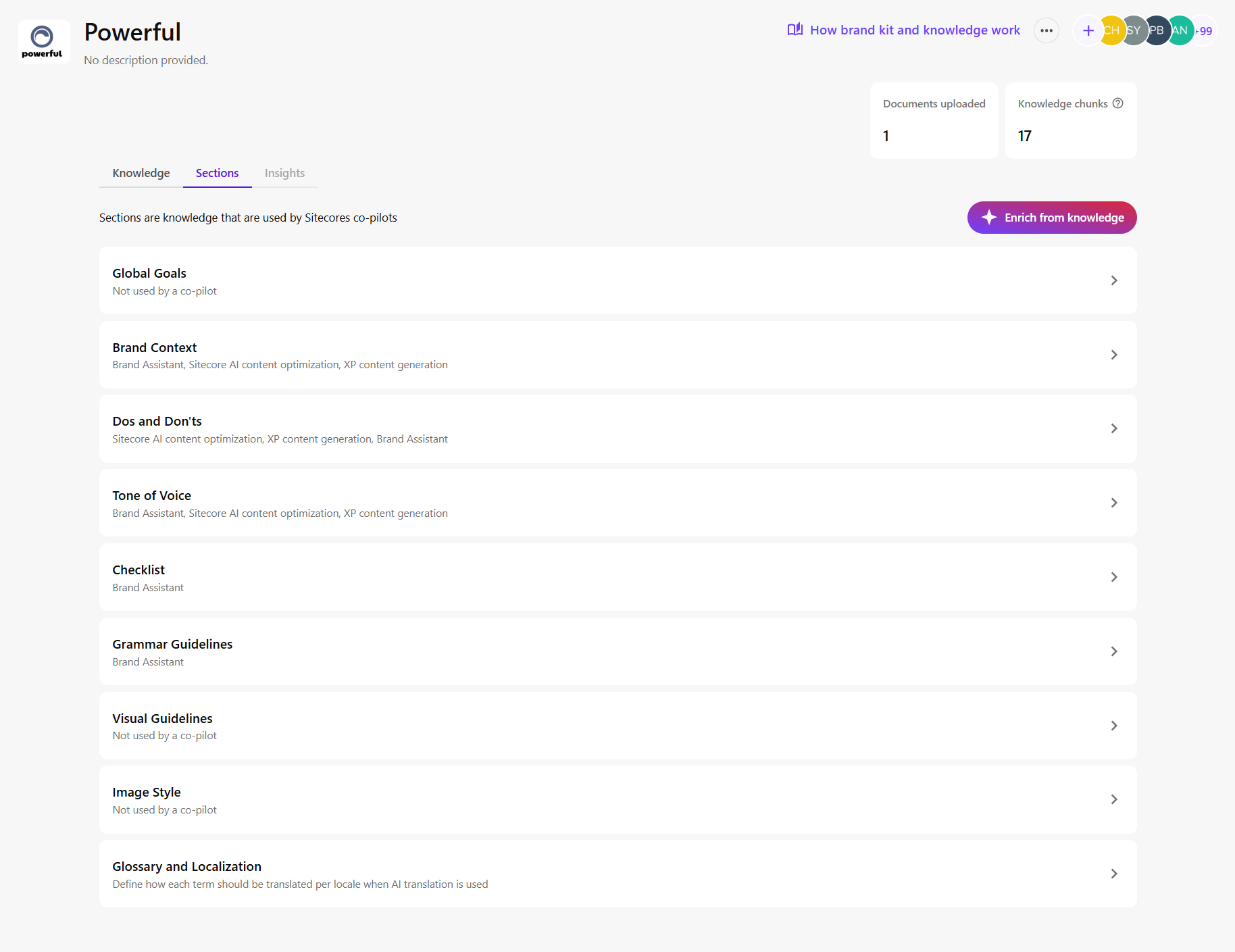
Brand kit sections represent a subset of your brand knowledge. They do not include everything from your uploaded brand documents.
Each section focuses on a specific area of your brand. For example, the Brand Context section defines your brand’s purpose, positioning, and background.
The brand kit includes the following default sections:
- Global Goals - defines your brand’s mission, vision, and core values to guide all content..
- Brand Context - provides background on your brand’s purpose, positioning, and identity for consistent communication.
- Dos and Don'ts - defines guidance that SitecoreAI uses for content generation and translation, especially when no relevant terms are defined in the Glossary and Localization section.
- Tone of Voice - describes the personality traits (for example, friendly, confident) that shape how your brand communicates.
- Checklist - offers a quick reference to verify that content meets brand guidelines.
- Grammar Guidelines - establishes writing rules and stylistic conventions for consistency.
- Visual Guidelines - defines standards for imagery, icons, and layout to maintain a cohesive visual identity.
- Image Style - specifies visual characteristics such as color, mood, and composition that reflect your brand.
- Glossary and Localization - defines how specific terms should be handled across languages during site or page translation. Use this section to ensure key terms are translated consistently or remain unchanged in localized marketing content.
How content is generated for each brand kit section
Each brand kit section is populated automatically based on its intent, a predefined instruction (or prompt) that guides the AI in retrieving the most relevant information from your uploaded brand documents.
The only exception is the Glossary and Localization section, which is entered manually.
For all other sections:
- Each section or subsection has a default intent that defines what kind of content it should contain.
- The AI uses this intent as a guide to determine what information to retrieve.
For example:
- In the Brand Context section, the Brand purpose subsection has the default intent: The core reason for the brand existence.
- To populate this subsection accurately, AI searches your brand knowledge for relevant content (knowledge chunks), selects the most relevant matches, and uses them to generate the content for that subsection.
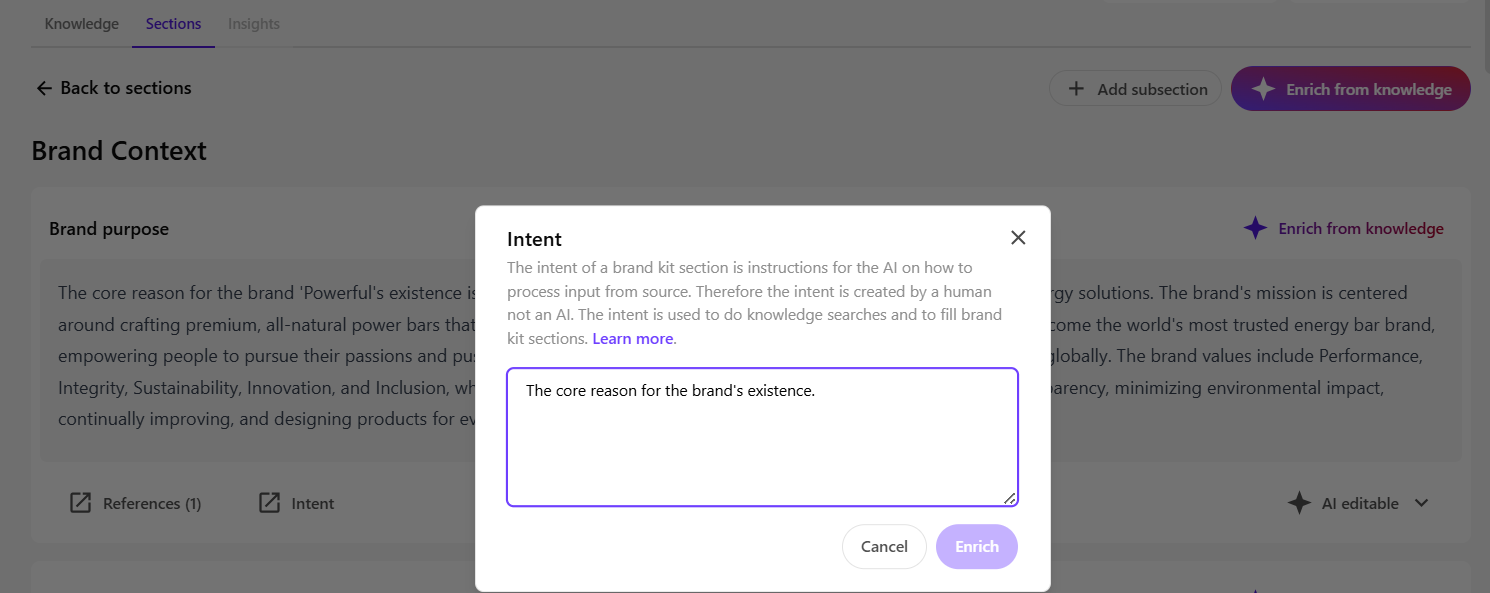
In short, the intent acts as a filter and instruction set, ensuring that each section is filled with content that is accurate, relevant, and aligned with its purpose.
Summary
- Brand kits guide AI tools in generating brand-aligned content.
- You can create multiple brand kits for different brands, campaigns, or products.
- Each brand kit consists of a Knowledge tab (uploaded documents) and a Sections tab (content populated using brand knowledge).
- During brand ingestion, uploaded documents are processed into brand knowledge.
- The content of each brand kit section is generated based on its intent.
- Brand kit sections are subsets of brand knowledge and some are passed to copilots in every prompt.
- Together, brand knowledge and brand kit sections form the brand kit that Sitecore AI tools use to generate consistent, on-brand responses.