Users
CloudPortalLogin
  • Powered byPowered by
Introduction to Sitecore CDP
Data availability
Managing your account
Managing system settings
Managing guests
Batch segmentation
Data browser
Audience export
Dashboards
Developer center
AI in CDP
Glossary
  • Sitecore CDP
  • Managing guests in Sitecore CDP
  • View a guest profile in Sitecore CDP
  • Debug a guest event in Sitecore CDP

Debug a guest event in Sitecore CDP

If you enable the debug feature flag, you use the Event Viewer screen to debug specific events and monitor general platform health. The screen shows a table of events for a selected guest, and details of each event.

Note

The total number of available events depends on your retention policy for live storage.

To use the debug screen:

  1. Search for the guest.

  2. On the Guest Profile screen, click Event Viewer.
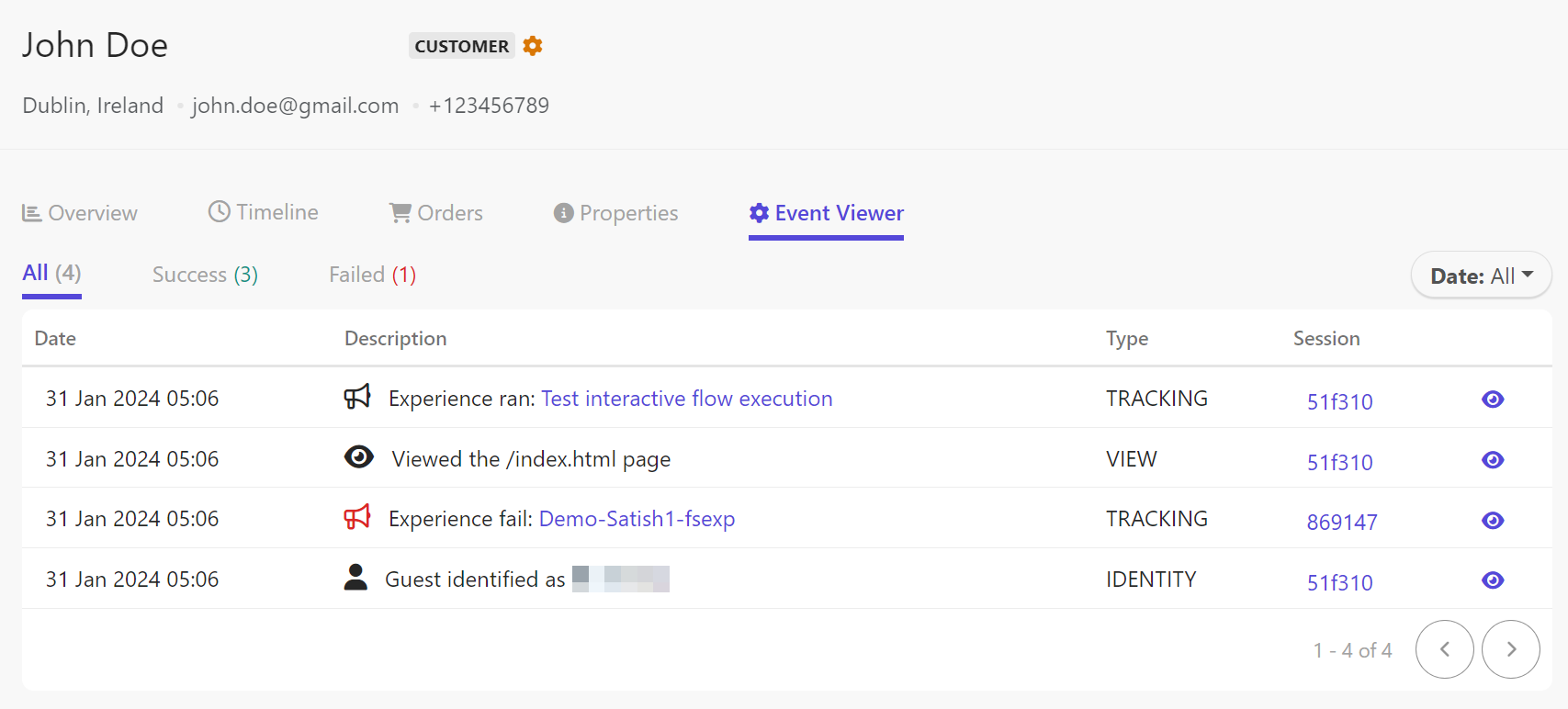
    The Event Viewer screen is used to debug events in Sitecore CDP.
  3. By default, all events are shown. To view only failed events, click Failed. To view only successful events, click Success.

  4. By default, the date filter shows all events. To view a different timeframe, click the Date drop-down menu and click one of the following:

    • Last Hour

    • Last Day

    • Last 7 Days

    • Last 30 Days

    • This Month

    • Previous Month

    • Last 12 Months

    • Last 2 Years

    • A specific date - click the date selector and select the date.

  5. If you are using SmartHub CDP and the event is an experience, you can click the experience name to open it.

  6. To view all events captured for a particular session, click the session name.

  7. To open the event details in a key-value table format, click the eye icon.
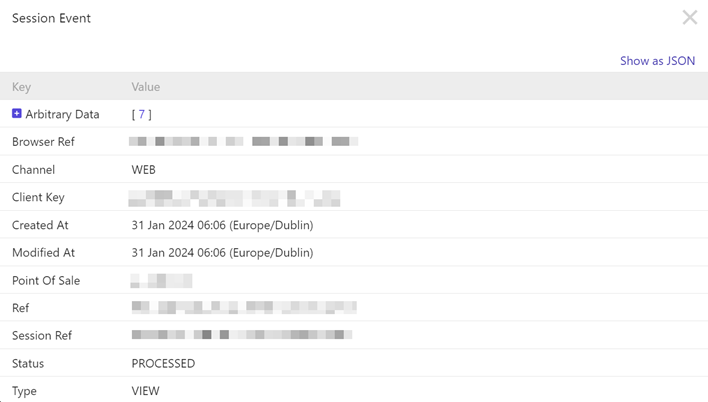
    The Session Event screen shows the key-value details of an event.

    The following details appear for most events:

    Attribute

    Description

    Browser Ref

    An identifier of the browser used in this event.

    Channel

    The channel captured during this event.

    Client Key

    Your organization's client key.

    Created At

    The time at which the event was first ingested into Sitecore CDP.

    Modified At

    The time at which the event was fully processed.

    Point of Sale

    The point of sale (storefront) at which the event occurred.

    Ref

    An identifier of this event.

    Session Ref

    An identifier of the session during which this event occurred.

    Status

    The status of the event processing. For most events, even failed ones, the status is PROCESSED.

    Type

    The event type.

  8. To view the details as a JSON object, click Show as JSON in the event details screen. The following is an example JSON structure of an event:

    RequestResponse
    {
      "ref": "cc123-123-***-***-***",
      "clientKey": "***",
      "createdAt": "2024-01-31T06:15:05.199Z",
      "modifiedAt": "2024-01-31T06:15:05.220Z",
      "type": "TRACKING",
      "status": "PROCESSED",
      "channel": "WEB",
      "pointOfSale": "retailsite.com",
      "browserRef": "***-***-***-***-***",
      "sessionRef": "***-***-***-***-***",
      "flowExecutionRef": "***-***-***-***-***",
      "arbitraryData": {
        "flowExecution": {
          "ref": "***-***-***-***-***",
          "occurredAt": 1648714504380,
          "flowRef": "***-***-***-***-***",
          "flowFriendlyId": "modal_pop_up",
          "flowVariantRef": "***-***-***-***-***",
          "guestRef": "***-***-***-***-***",
          "flowExecutionTimeMs": 2381,
          "status": "SUCCESS",
          "decision": {
            "decisionModelRef": "***-***-***-***-***",
            "decisionModelVariantRef": "***-***-***-***-***",
            "decisionModelExecutionTimeMs": 2306,
            "results": [
              "{\"ruleId\":\"NBO_2\",\"search1\":\"discount\",\"search2\":\"shoes\",\"search3\":\"bag\",\"search4\":\"accessories\"}"
            ]
          }
        },
        "category": "EXECUTED"
      },
      "flowExecution": {}
    }

Do you have some feedback for us?

If you have suggestions for improving this article,

Privacy policySitecore Trust CenterCopyright © 1999-2026 Sitecore