Page designs and page branches
A page design is the presentation definition for a page and consists of partial designs and components. Partial designs contain parts of a layout that a site uses in multiple places.
Page branches are another way to manage reusable content and layout, in particular when working with landing pages, or pages for which you need a flexible layout.
Page designs
You build your website with reusable pieces of content and layout. All these pieces together create the layout for your pages.
A page design is a selection of partial designs that help you to structure your pages. You can, for example, make sure the headers and footers are always in the same place. You can also create a page design to set up a page structure for specific pages, such as a blog page, a landing page, a product page, and so on. Content authors can then place content in these preset layouts.
You can also use rules to select a page design.
You assign a page design to a page (or pages of a specific type) to define the elements and renderings that you want to appear. For example, a blog page might need a header with a navigation component, a main placeholder for the content (post list, categories, archive, tag cloud, recent comments), and a footer with company information.
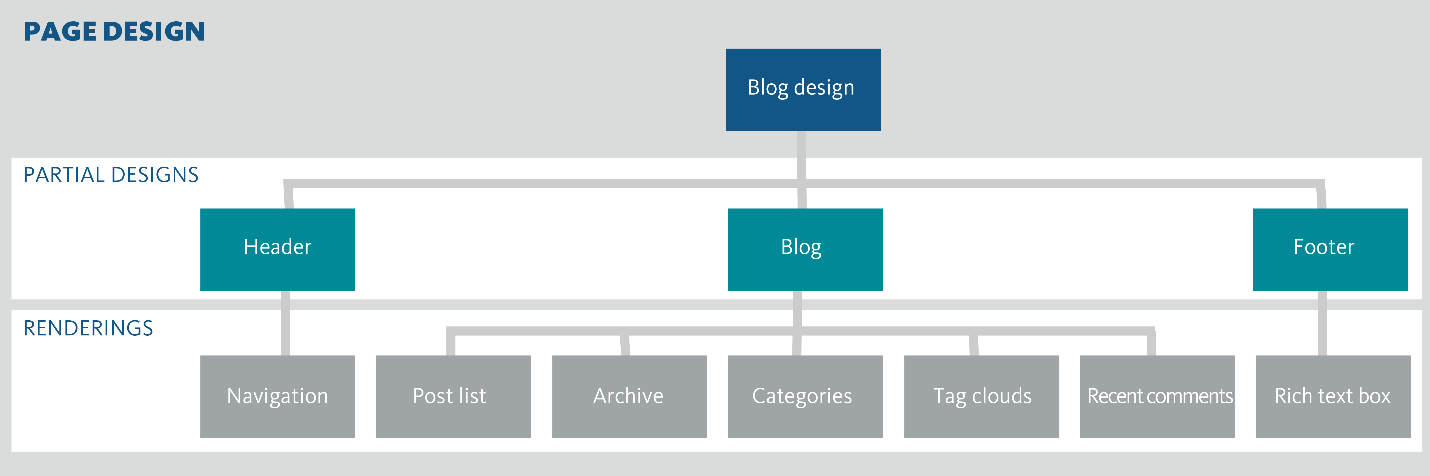
You can link page designs to data templates. In this way, you can link your content types to your page layouts and keep the layout of your site consistent. It is very convenient to assign a page design to the template for web pages that you know you will be using a lot, so that they look consistent.
Page branches
You can use page branches page branches to create modifiable landing pages and other page types for which you want to have a flexible layout. After you have created a page branch, editors can use them as templates to create and modify pages in the Page builder.
With page branches you can:
-
Create multiple page branches based on the same data template.
-
Include local and site-scoped data sources.
-
Control where a page branch is used by using rules.
-
Use the same Sitecore tokens that you use on standard values to automate the creation of titles for your pages.
Page branches complement the functionality of page designs. The components that you have defined in your partial designs remain fixed on the page branches and pages, so you can manage them centrally. You can edit the layout of the page branch in Page builder. Pages created from the page branch contain a copy of all the page branch's renderings and their local data sources.
By default, page branches use the page design that is assigned on the page template that is defined in the presentation configuration for the site.