The Rule Set Editor
The Rule Set Editor is a tool that applies logic-based rules to content management. You can use the Rule Set Editor when you create webhook items in the Content Editor, or when you create custom bucket structures. The Rule Set Editor is used to configure the insert options for page branches.
There are three basic elements in the Rule Set Editor:
-
Conditions
-
Actions
-
Rules
In the Rule Set Editor, you combine conditions with actions to create rules.

Conditions
Conditions consist of logical statements that determine whether the condition is true. For example, the where an item is locked by me condition is true if you have locked an item.
Sitecore has a number of default conditions that you can use, but you can also implement your own conditions.
Actions
Actions are the logical steps that are executed when one or more of the conditions in a rule are true.
Sitecore has a number of default actions available, but you can also implement your own actions.
Rules
Rules associate one or more actions with one or more conditions. You must define your conditions and actions before you can implement a rule. You can also use logical operators such as And and or to create combinations of multiple conditions and actions.
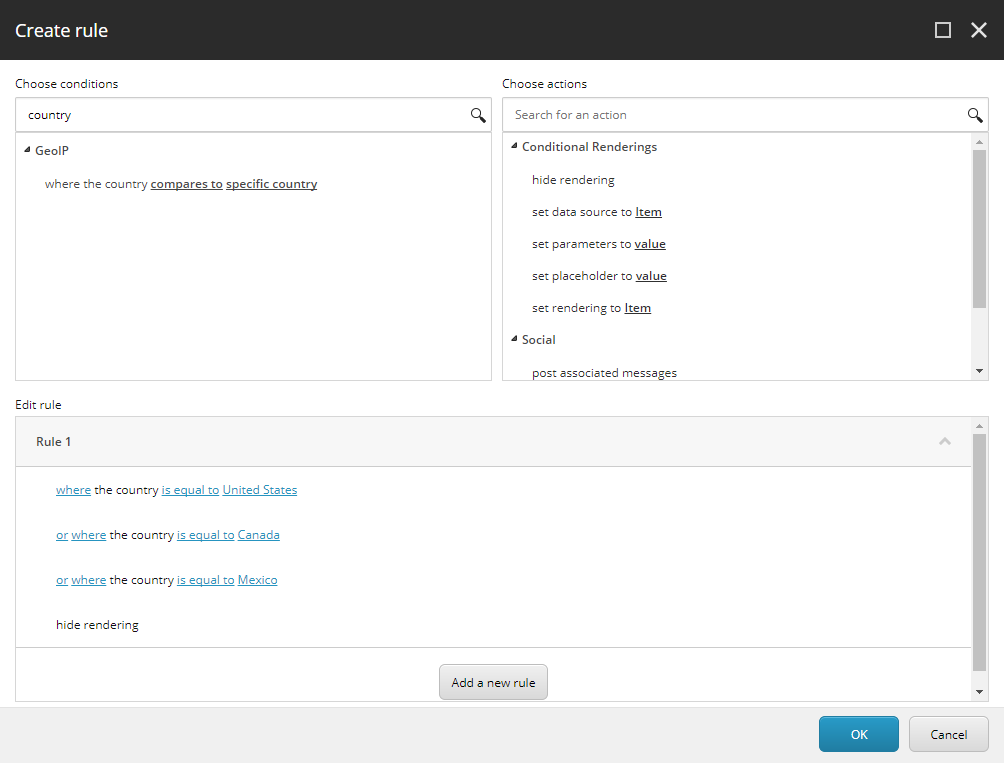
The maximum number of conditions per rule is 128.