AI-assisted media metadata extraction
The metadata extraction feature in Experience Platform uses AI to analyze image items in your Media Library and suggest values for title, alt text, description, and keywords. With this feature, you can quickly enrich images to improve searchability and accessibility, directly in the Content Editor.
The feature only supports image files (.jpg, .jpeg, .png, .webp).
You must have a sitecore\Sitecore AiClient Item Extract Media Metadata role assigned to use this feature. If you are not an administrator, ask one to assign the role for you. See Add or remove AI roles for a user.
To extract metadata from an image item:
-
In the Content Editor, open the Media Library and select an image.
-
On the Media tab, click Extract.

-
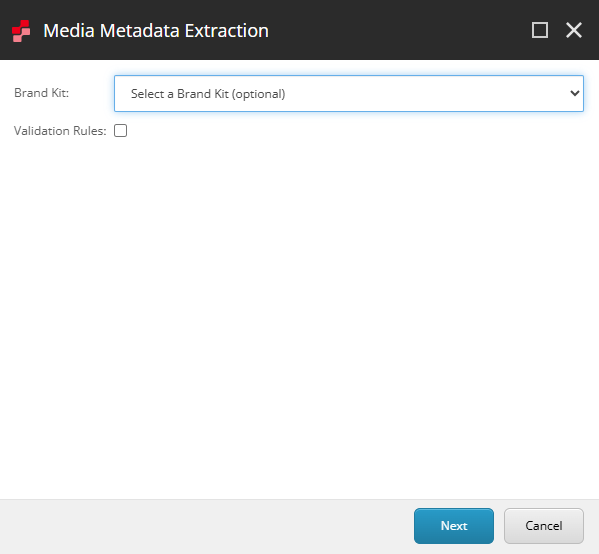
If you're a Sitecore Premium user, in the Media Metadata Extraction dialog, you can optionally select a brand kit.
-
Optionally, select the Validation Rules option to include validation rules in the extracted metadata. The option is disabled when no validation rules are configured for the media metadata fields. See Using validation rules with AI features.
-
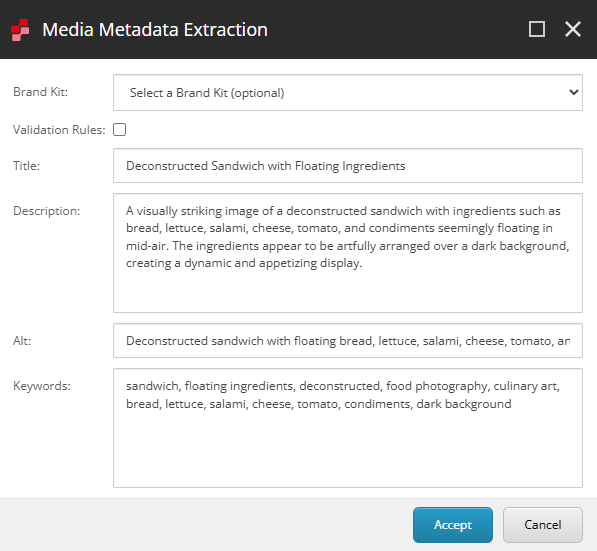
When the extraction process finishes, the Media Metadata Extraction dialog displays the AI-generated suggestions. Review the suggestions for the following fields:
- Title - descriptive title based on image content.
- Description - description of the image.
- Alt - accessibility-friendly alternative text.
- Keywords - relevant keywords for searchability.
 Important
AI-generated metadata can contain mistakes. Always review and correct suggestions before saving.
-
Optionally, you can:
- Select or change the brand kit to restart metadata extraction (only available for Sitecore Stream Premium users).
- Refine metadata fields manually as needed.
-
To save the metadata, click Accept.